ADDITIONAL FUNCTIONS:
If the PAN mode of the gimbal camera is switched to Follow and Follow Pan
Controllable modes, the PAN and TILT angle will be adjusted as the same as the
angle what the gimbal camera is at each waypoint automatically and continuously.
When the PAN mode is switched to the Global Mode, the PAN and TILT angle can
be controlled by aileron and elevator.
NOTICE:
The direct distance between every two waypoint should be more than 5 meters.
If the pilot set 7 waypoints as shown, when the copter arrives at the Waypoint 1
automatically, slowly raise the throttle stick, the copter will fly along the waypoints
from 1 to 7 in order. If the pilot slowly lower the throttle stick, the copter will fly
along the waypoints from 7 to 1 in order (the pilots can set any waypoint number
as they like).
SONAR OBSTACLE AVOIDANCE
With sustainable GPS locked, the sonar can be activated in
Angle (Pilot) Mode by being switched on with Typhoon H
except for the condition that the copter descend vertically at
low speed. When Sonar is activated, the front motor LED will
blink white and the icon on the ST16 screen will be solid
green. If the OBSTACLE AVOID is switched on, but the
function can't be activated, then the icon will be yellow.
Tap the System Settings and choose Other Settings on the ST16 Ground Station,
turn on the Advance Mode, and tap [ ]. After, tap the TASK/CAMERA
icon, the background of 'TASK' will become orange, tap the return button [ ],
then you will enter another interface displaying four functions: CCC (Curve Cable
Cam), Journey, POI (Point of Interest) and ORBIT ME functions.
6
7
1
2
3
4
5
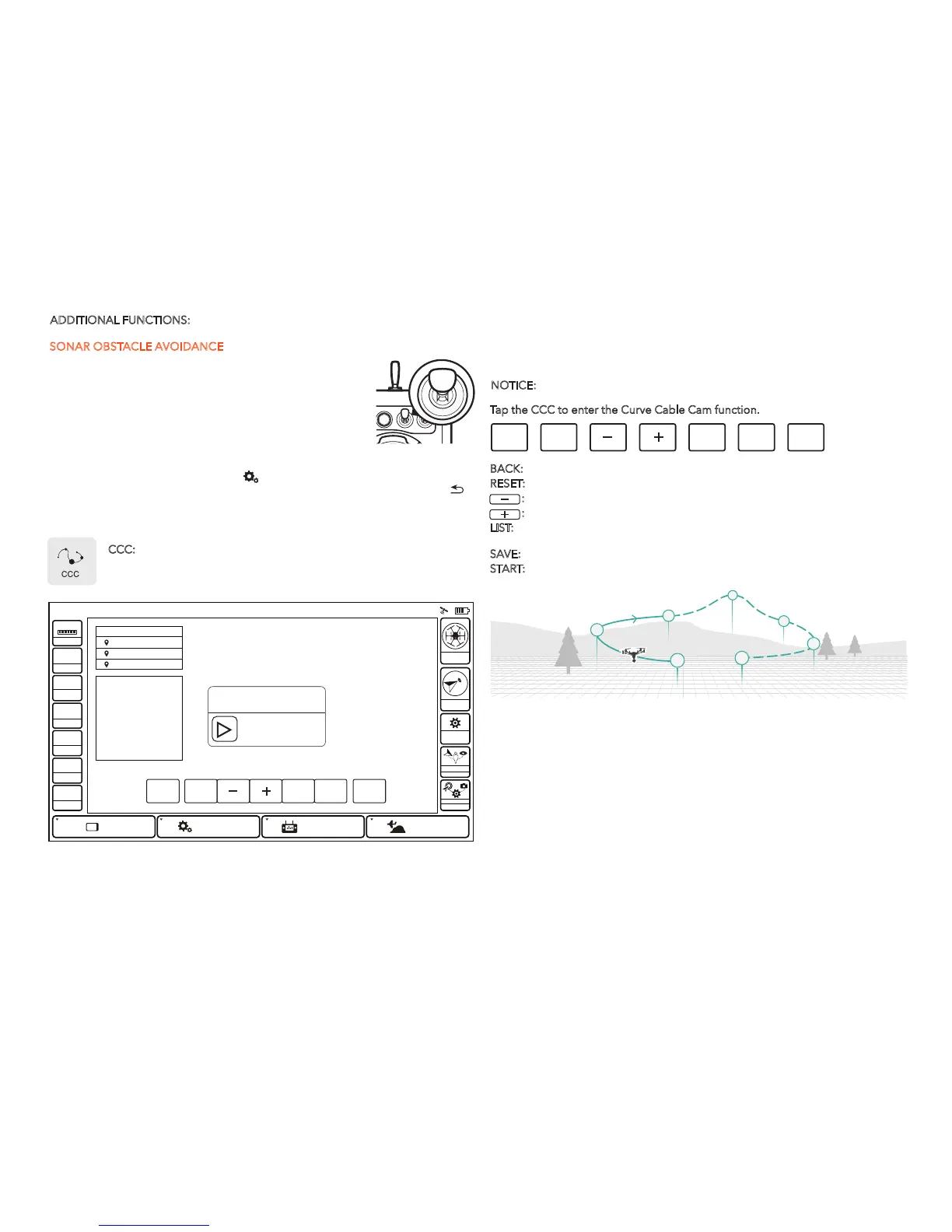
CCC: (Curve Cable Cam) Curve Cable Cam allows you to create an
invisible route for Typhoon H to fly along. Once the pilot sets the point,
Typhoon H will fly the set coordinates while remembering the heading.
Tap the CCC to enter the Curve Cable Cam function.
BACK: Tap BACK and you can return to the previous interface.
RESET:
Tap RESET to delete all the points created during the flight.
:
Tap '-' to delete the last point created during the flight.
:
Tap '+' to create a new point recording the current flying position.
LIST:
Tap LIST and all previous routs will be shown on a list. You can delete any
saved route by sliding the chosen one to the left.
SAVE:
Tap SAVE and the current route will be saved.
START:
Tap START, and slide the icon. Typhoon H will fly along the route newly
created.
System Sengs
Model: Typhoon H welcome,Pilot 12:27 AM 12
VOLTS
GPS
SAT
POS
ALT
G-SPD
DIS
N/A
N/A
N/AE
N/AN
N/AV
N/Am
N/A KPH
N/Am
System SengsPad
Channel Sengs
Model Select
TASK
CAMERA
GPS
CALIBRATION
FOLLOW
WATC H
ANGLE
G
Disabled
OBS
BACK RESET LIST SAVE
START
SLIDE TO START
CANCEL
Make sure the H is clear of all
obstacles before starting mission.
CCC
PONINT 1PONINT 1
PONINT 2
PONINT 3
INSTRUCTION
RESET: Delete all waypoints
+/-: Add/Delete a waypoint
LIST: Load existing waypoint
SAVE: Save waypoint
START: Start waypoint mission
BACK RESET LIST SAVE
START
10



 To Next Page