5
ASSEMBLY
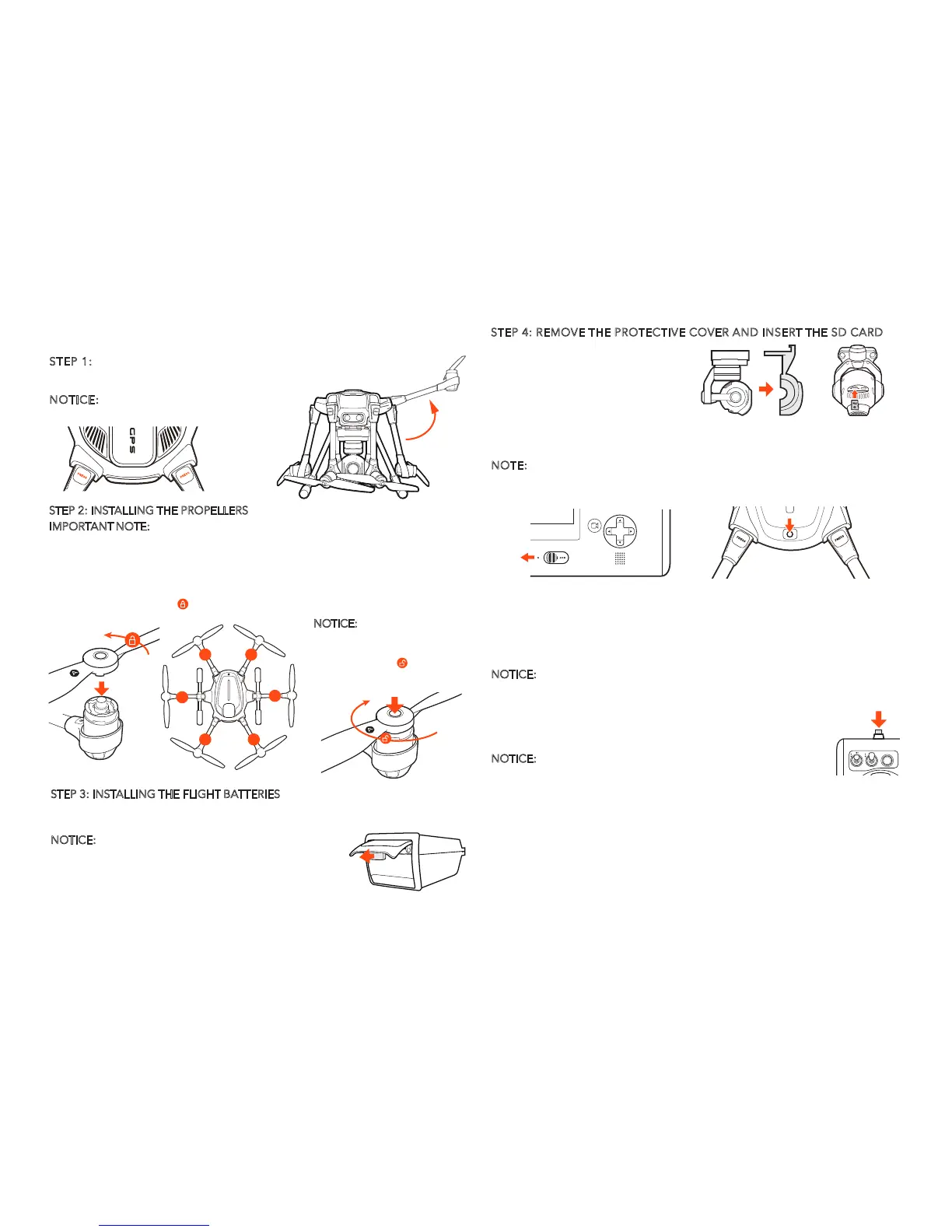
STEP 1: ASSEMBLING THE ARMS
Unfold the motor arms and secure them until hearing a 'click'.
STEP 2: INSTALLING THE PROPELLERS
IMPORTANT NOTE: Always ensure propellers are installed properly. The motors are
extremely powerful, meaning that if the device is misused there is a risk of material
damage, serious injury and even fatal injury.
Mount the propellers on the motors and note the 'A' and 'B' given on the motor
arms. This distinction between 'A' and 'B' refers to propeller 'A' and 'B'. Mount
propeller 'A' on motor 'A' and propeller 'B' on motor 'B',press and rotate propel-
lers in the direction the [ ] points to, and the propellers will be locked.
STEP 3: INSTALLING THE FLIGHT BATTERIES
Push the battery into the battery compartment with the Yuneec logo facing upwards
until hearing a 'click', which means the battery is installed successfully.
STEP 4: REMOVE THE PROTECTIVE COVER AND INSERT THE SD CARD
Carefully remove the protective
cover from the camera lens.
Insert the included 16GB card or
any Class 10 microSD card from
16GB to 128GB.
NOTICE:
Gently open the battery cap to the maximum
degree (to a position where is almost horizontal with
the GPS cover), then you can pull the battery out.
NOTICE:
Press the 'PRESS' button
to fold the motor arms.
A
A
B
A
B
B
NOTICE: Press and hold the
center button on the propeller
and rotate the propeller in the
direction the [ ] points to,
then you can disassemble the
propellers.
POWERING ON / OFF
NOTE: ALWAYS turn on the ST16 Ground Station and allow it to boot up
BEFORE turning Typhoon H on (and ALWAYS turn Typhoon H off BEFORE
turning off the ST16 Ground Station).
STARTING/STOPPING THE MOTORS
NOTICE:Only with sustainable GPS or GPS being turned off, the motors
can be started or stopped by pressing the START/STOP button.
Step back approximately 26 feet (8 meters) behind Typhoon H. Press and hold the
START/STOP button for about 3 seconds to start, and about 2 seconds to stop the motors.
Place Typhoon H on a level and stable surface then power on the ST16 Ground
Station. Press and hold power button on Typhoon H. Release the button when the
aircraft emits a rising tune. DO NOT TOUCH OR MOVE THE Typhoon H UNTIL THE
INITIALIZATION PROCESS IS COMPLETE. The gimbal camera will spin to the front
position, the main aircraft LED will blink red, green and blue rapidly during the
process of initialization.
NOTICE:
If the main LED blinks red slowly, the initialization has failed. The aircraft
needs to be powered on again. To power off the aircraft, press and hold the power
button until the aircraft emits a falling tune.
Step back approximately 26 feet (8 meters) behind Typhoon H, make sure the ST16
Ground Station is in the Angle mode or Smart mode. When there is suitable GPS
signal for both the ST16 Ground Station and Typhoon H, you can start the motors.
To begin, tap the TASK/CAMERA icon on the ST16 screen, and tap the TAKE OFF
icon. Slide it on the screen, then the aircraft will climb to the height of 2 meters and
automatically hold its position (make sure both sticks are in the center position).



 To Next Page