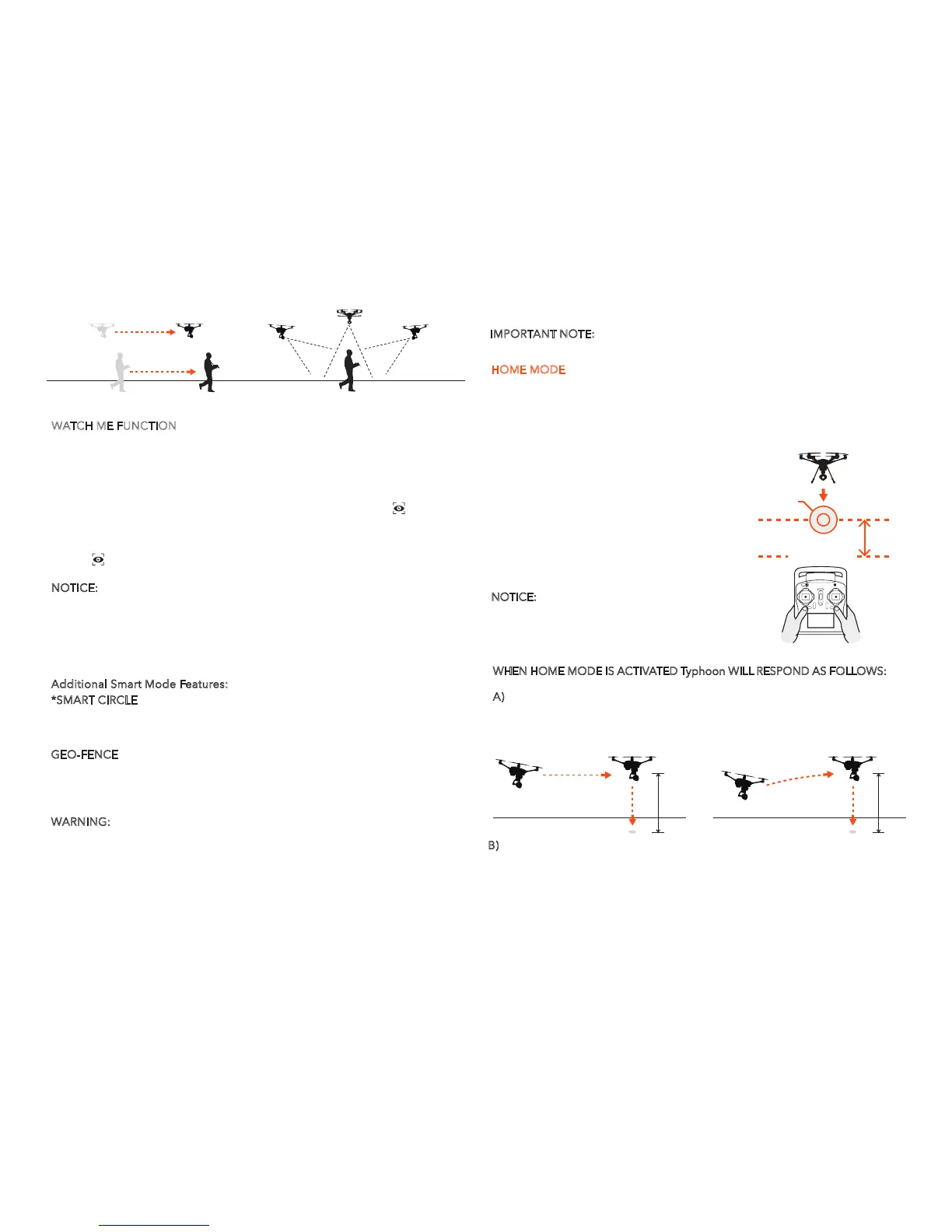
WATCH ME FUNCTION
Watch Me enables the camera to keep tracking the remote controller no matter
where and how it moves as the camera can automatically tilt its angle according
to the controller.
Usually, the default function under Smart Mode is Follow Me. Watch Me
function can be switched on by following these steps:
Watch Me/Follow Me Button: When in Smart Mode, press [ ] to switch
Typhoon H between Watch Me and Follow me function. Follow Me function is
the default setting, and the button is ORANGE. If it is GREY, it means ST12 GPS
isn't ready yet. Please wait.
Press [ ] , and the button will change from ORANGE to GREEN. A green
symbol indicates that you are in Watch Me.
NOTICE:
Once Typhoon H is above 2m and out of Smart Circle during flying,
Typhoon H yaw direction will take the control itself. The camera lens will always
point to you as long as the Typhoon H is in Watch Me function. Please put the
CGO3+ Pitch Angle/Position Control Slider in the middle position. If you want
to trim the camera angle up, then just move the Pitch Angle/Position Control
Slider a bit up. If you want to trim
the camera angle down, just move the slider down.
Additional Smart Mode Features:
*SMART CIRCLE
In most cases the Smart Circle will keep Typhoon H from coming within approxi-
mately 26 feet (8 meters) of you as long as you position yourself at least 26
feet/8 meters behind Typhoon H.
GEO-FENCE
The geo-fence is a virtual ‘barrier’ that will keep Typhoon H from traveling
further than 300 feet (91 meters). Although this limit can be adjusted using the
USB interface/programmer and software we strongly recommend using the
default limit at all times.
WARNING:
Smart Mode only works when Typhoon H has a suitable GPS
signal/lock. If you take off in Smart Mode and Typhoon H loses GPS signal/lock
it will switch to Angle (Pilot) Mode automatically. This is why we strongly recom-
mend learning to fly in Angle (Pilot) Mode as soon as possible. Otherwise, if you
lose GPS signal/lock and are not able to properly control Typhoon H in Angle
FOLLOW ME FUNCTION WATCH ME FUNCTION
15
(Pilot) Mode the aircraft may crash or even ‘fly away’.
IMPORTANT NOTE
: Crash damage and 'fly aways' are NOT covered under warranty.
WHEN HOME MODE IS ACTIVATED Typhoon WILL RESPOND AS FOLLOWS:
A) When flying higher than 33 feet (10 meters) Typhoon H will maintain the
current altitude, fly back to the home point, or active home point if the ST16
Ground Station has enough satellites for Follow Me, then descend vertically
until it lands.
B)
When flying lower than 33 feet (10 meters) Typhoon H will climb to 33 feet
(10 meters) while flying back to the home point, or active home position, then
will descend vertically until it lands.
HOME MODE
When the Flight Mode selection switch is in the bottom position Typhoon H will
be in Home Mode, also known as Return to Home Mode.
In Home Mode the GPS connectivity will fly Typhoon H back in a straight line in the
10 m
A
10 m
B
PILOT LOCATION
13-26
(4-8m)
LANDING
LOCATION
direction of the pilots’ current location, and
automatically land within 13-26 ft (4-8m) of the
pilot. This can be very helpful for beginning
pilots who aren’t quite ready to land Typhoon H
themselves. It can also be helpful for pilots that
lose orientation during flight. Simply activate
Home Mode until Typhoon H automatically
moves toward the home position, and once you’ve
confirmed orientation switch back to Angle (Pilot)
Mode. If Typhoon H ever loses the link with the
ST12 Ground Station it will automatically enter
Home Mode.
NOTICE:
If the signal of remote control is lost,
Typhoon H will automatically return to home
point and hold its position (with a suitable GPS
signal/lock) over the home position except for
low battery.



 To Next Page