7.5
Click the " Gen "
amplitude is 2.5V, the maximum frequency of the sine wave is
waves are 1M.
Click the " Stop"
Click the "Single
Click the "s" and "
wave, triangle wave, etc.
Click "Ok" or "Gen"
Square wave
can adjust the duty cycle, other waveforms do not work.
Note:
When the set frequency is greater than 1MHz, the square wave signal may
show small horizontal jitter
7.6
Shift” +"CH1CH2
cannot be turned off. When you do not need to use two channels at the same time,
please turn off CH2
to obtain a higher sampling rate and reduce power consumption.
When using dual channel mode, click the "CH1CH2" button to
CH1 and CH2.
If CH1 has a high priority, the waveform of CH1 is moved by the up
and down buttons.
7.7 Cursor
Press the “Shift” +
"s" key to turn the horizontal cursor on/off.
Press the “Shift” +"n
s"key to turn the vertical cursor on/off
Press the left and right arrow keys directly to move the horizontal cursor 1. After
pressing the Shift key, press the horizontal arrow key again to move the horizontal
cursor 2. The same goes for vertical cursors.
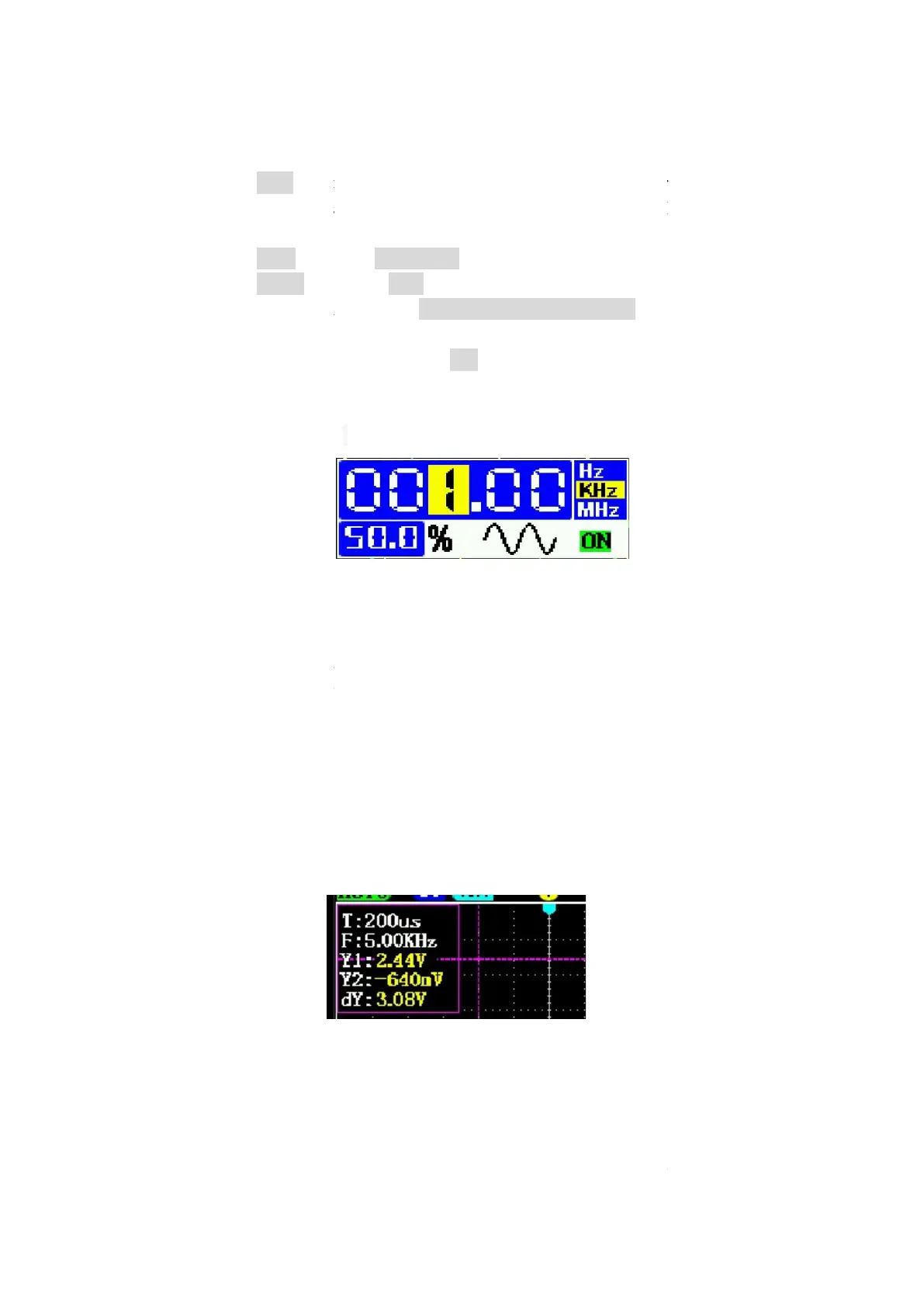
For vertical cursors, Y1: The voltage a
the dashed line below. dY=Y1
12
to call up the window
amplitude is 2.5V, the maximum frequency of the sine wave is
5
turn on/off the signal generator output.
reset the number to: 1.00Khz, 50%
" keys to switch the output waveform
to confirm and exit.
can adjust the duty cycle, other waveforms do not work.
When the set frequency is greater than 1MHz, the square wave signal may
show small horizontal jitter
.
CH2. CH
1 can only be turned on and
cannot be turned off. When you do not need to use two channels at the same time,
to obtain a higher sampling rate and reduce power consumption.
When using dual channel mode, click the "CH1CH2" button to
If CH1 has a high priority, the waveform of CH1 is moved by the up
"s" key to turn the horizontal cursor on/off.
s"key to turn the vertical cursor on/off
.
Press the left and right arrow keys directly to move the horizontal cursor 1. After
pressing the Shift key, press the horizontal arrow key again to move the horizontal
cursor 2. The same goes for vertical cursors.
For vertical cursors, Y1: The voltage a
t the dashed line above. Y2: The voltage at
the dashed line below. dY=Y1
-
Y2, which is the voltage difference between the two
The signal
can adjust the duty cycle, other waveforms do not work.
When the set frequency is greater than 1MHz, the square wave signal may
1 can only be turned on and
cannot be turned off. When you do not need to use two channels at the same time,
to obtain a higher sampling rate and reduce power consumption.
If CH1 has a high priority, the waveform of CH1 is moved by the up
Press the left and right arrow keys directly to move the horizontal cursor 1. After
pressing the Shift key, press the horizontal arrow key again to move the horizontal
t the dashed line above. Y2: The voltage at
Y2, which is the voltage difference between the two


 To Next Page
 Loading...