12
EN
the bottom
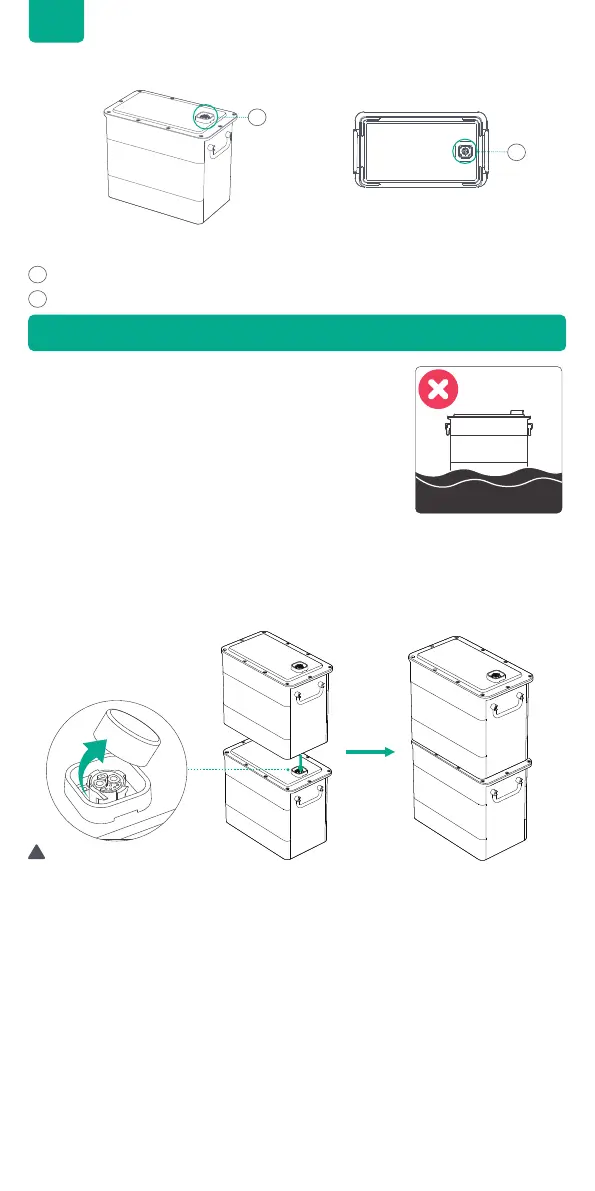
AB2000S Battery Port
Connect with PVHub Hub or AB2000S Battery
Connect with AB2000S Battery
5.2 Product Overview
1
2
1
2
• Keep the AB2000S on a level surface, at against
the wall.
• Choose a location without direct sunlight.
• Remove the plastic protective covers on the connection port, then please align
the left side rst.
• Carefully align the AB2000S Battery Ports and slowly put it into place.
Vertically stacked AB2000S Batteries do not need a Battery Cable to establish
a connection.
6.1 Choosing an Appropriate Location
6.2 Connecting Your AB2000S
6. Getting Started
• AB2000S should be turned off before connection.
• Do not connect the batteries while they are being charged or discharged.
• Do not touch the metal pins of the ports with your hands or other objects.
Gently clean them with a dry cloth when necessary.
• The Battery Mounting Brackets can be used to secure the AB2000S units in
place.
Tips:
!



 To Next Page