EasyManua.ls Logo

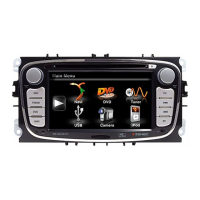
ZENEC Z-N528 - User Manual

ZENEC Z-N528
38 pages
Print Icon
To Next Page IconTo Next Page
Loading...
Z-N528Z-N528
INFOTAINER
USER MANUAL
EN
Question and Answer IconNeed help?

Do you have a question about the ZENEC Z-N528 and is the answer not in the manual?

Summary

Safety Instructions and Basic Operation

Turn Device On and Off

Instructions for powering the device on and off.

Anti-Theft Protection

Details on the device's anti-theft feature and password management.

Device Controls Overview

Multifunction Steering Wheel Controls

Explanation of steering wheel control functions.

Z-N528 Front Panel Controls

Description of the device's front panel controls.

Radio Functions

UKW (FM) Radio Operation

Operation and control of the FM radio.

FM Radio Features

FM Bar Graph Mode

Setup modes for FM station frequency arrows.

Manual FM Station Search

Direct station frequency input methods.

Radio Setup Options

UKW Setup (FM)

FM RDS settings like AF and REG.

DAB+ Radio Setup

Configuration and adjustments for DAB+ tuner.

DAB+ Radio Features

DAB+ Ensemble and Station List

Display of DAB+ ensembles and stations.

DAB+ Setup

Important functions for the DAB+ tuner.

Audio Media Control

Audio Media Control and Operation Bar

Controls for audio playback and media management.

Source Selection

Camera Operation

Operation of the camera source.

Vehicle Integration

Using Android Auto

Connecting and using Android Auto.

Smartphone Integration

Android Auto Operation

Interface and operation of Android Auto.

Apple CarPlay Overview

Using iPhone features via CarPlay.

CarPlay and Bluetooth

Apple CarPlay Operation

Navigating and using CarPlay features.

Bluetooth Hands-Free System

Detailed guide to Bluetooth hands-free system.

Bluetooth Connectivity

Pairing Devices

Steps for connecting a smartphone via Bluetooth.

Call Handling and Bluetooth Menu

Contacts and Call Logs

Audio Volume Adjustments

Advanced Audio Settings

Audio Setup: Expert Mode

Advanced sound configurations like Equalizer, Crossover.

Sound Tuning

Speaker and Subwoofer Configuration

Summary

Safety Instructions and Basic Operation

Turn Device On and Off

Instructions for powering the device on and off.

Anti-Theft Protection

Details on the device's anti-theft feature and password management.

Device Controls Overview

Multifunction Steering Wheel Controls

Explanation of steering wheel control functions.

Z-N528 Front Panel Controls

Description of the device's front panel controls.

Radio Functions

UKW (FM) Radio Operation

Operation and control of the FM radio.

FM Radio Features

FM Bar Graph Mode

Setup modes for FM station frequency arrows.

Manual FM Station Search

Direct station frequency input methods.

Radio Setup Options

UKW Setup (FM)

FM RDS settings like AF and REG.

DAB+ Radio Setup

Configuration and adjustments for DAB+ tuner.

DAB+ Radio Features

DAB+ Ensemble and Station List

Display of DAB+ ensembles and stations.

DAB+ Setup

Important functions for the DAB+ tuner.

Audio Media Control

Audio Media Control and Operation Bar

Controls for audio playback and media management.

Source Selection

Camera Operation

Operation of the camera source.

Vehicle Integration

Using Android Auto

Connecting and using Android Auto.

Smartphone Integration

Android Auto Operation

Interface and operation of Android Auto.

Apple CarPlay Overview

Using iPhone features via CarPlay.

CarPlay and Bluetooth

Apple CarPlay Operation

Navigating and using CarPlay features.

Bluetooth Hands-Free System

Detailed guide to Bluetooth hands-free system.

Bluetooth Connectivity

Pairing Devices

Steps for connecting a smartphone via Bluetooth.

Call Handling and Bluetooth Menu

Contacts and Call Logs

Audio Volume Adjustments

Advanced Audio Settings

Audio Setup: Expert Mode

Advanced sound configurations like Equalizer, Crossover.

Sound Tuning

Speaker and Subwoofer Configuration

ZENEC Z-N528 Specifications

General IconGeneral
BrandZENEC
ModelZ-N528
CategoryCar Video System
LanguageEnglish

Related product manuals