5
Tips for Using the ITSV-2 Keys
1. Make sure the unit is properly powered up, in idle screen mode and connected
to the network.
2. Select Settings > > . Tap on one of the Accounts
to congure , SIP server (ICX-AlphaCom or IC-EDGE), SIP
ser ID (Extension Number), (if required) and SIP
(if required).
Note: For changes to take immediate eect, it may be necessary to temporarily disable
the account. Do this by setting to OFF and tapping OK. Then re-
enable your account by setting to ON and tapping OK.
3. Follow the LCD menu options to congure other settings on the unit. For
example, to congure static IP on the ITSV-2, set up static IP address via menu
Settings > > Ethernet settings.
4. If you want to see your accounts on your home screen, press the button.
Press the Menu button, and select Widgets. Several account display widgets
will appear. Select and drag the widget to the home screen.
ITSV-2 Conguration
• For further information on the conguration for
ICX-AlphaCom, SIP, and IC-EDGE, please see
Zenitel Wiki
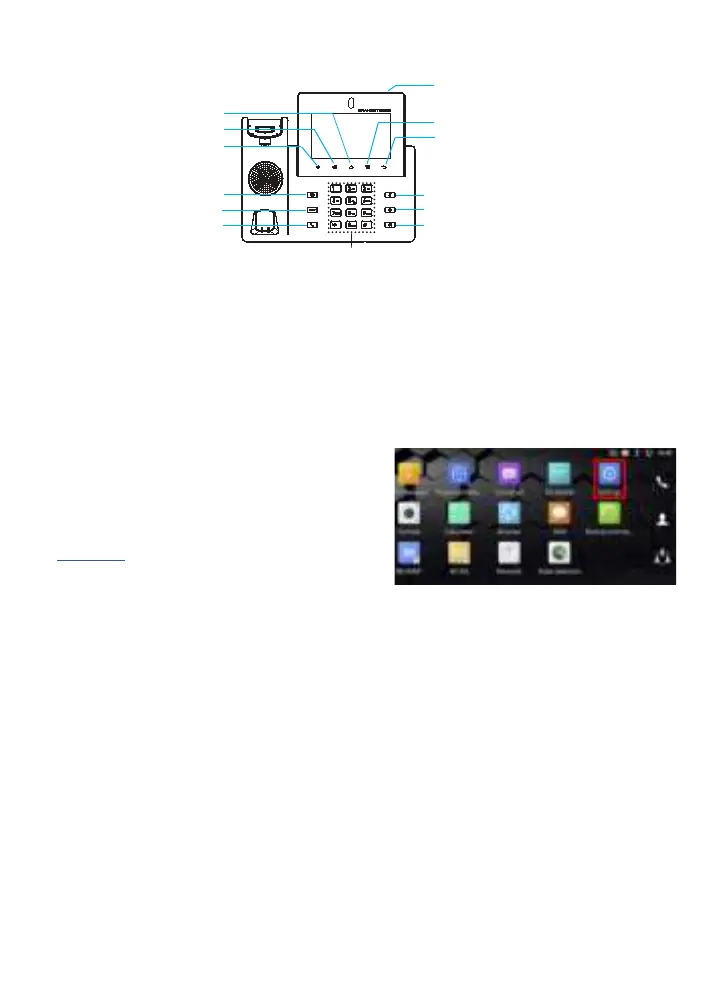
VOLUME DOWN
VOLUME UP
HOME
MENU
BACK
Conference
Transfer
Send
Standard Keypad
Speaker
Headset
Mute
Message Waiting Indicator
● VOLUME: Press the UP or DOWN keys to adjust the volume on the ITSV-2.
● HOME: Press the HOME key to return to the default idle screen. Press and
hold the HOME key for 2 seconds to take a screenshot.
● MENU: Press the MENU key to access the unit’s display settings, edit widgets
and thread manager. Press and hold the MENU key for 2 seconds to enter the
managing application interface directly.
● BACK: Press the BACK key to go back to the previous menu.




 To Next Page