DVD+VCR Connections Panel (Continued)
12
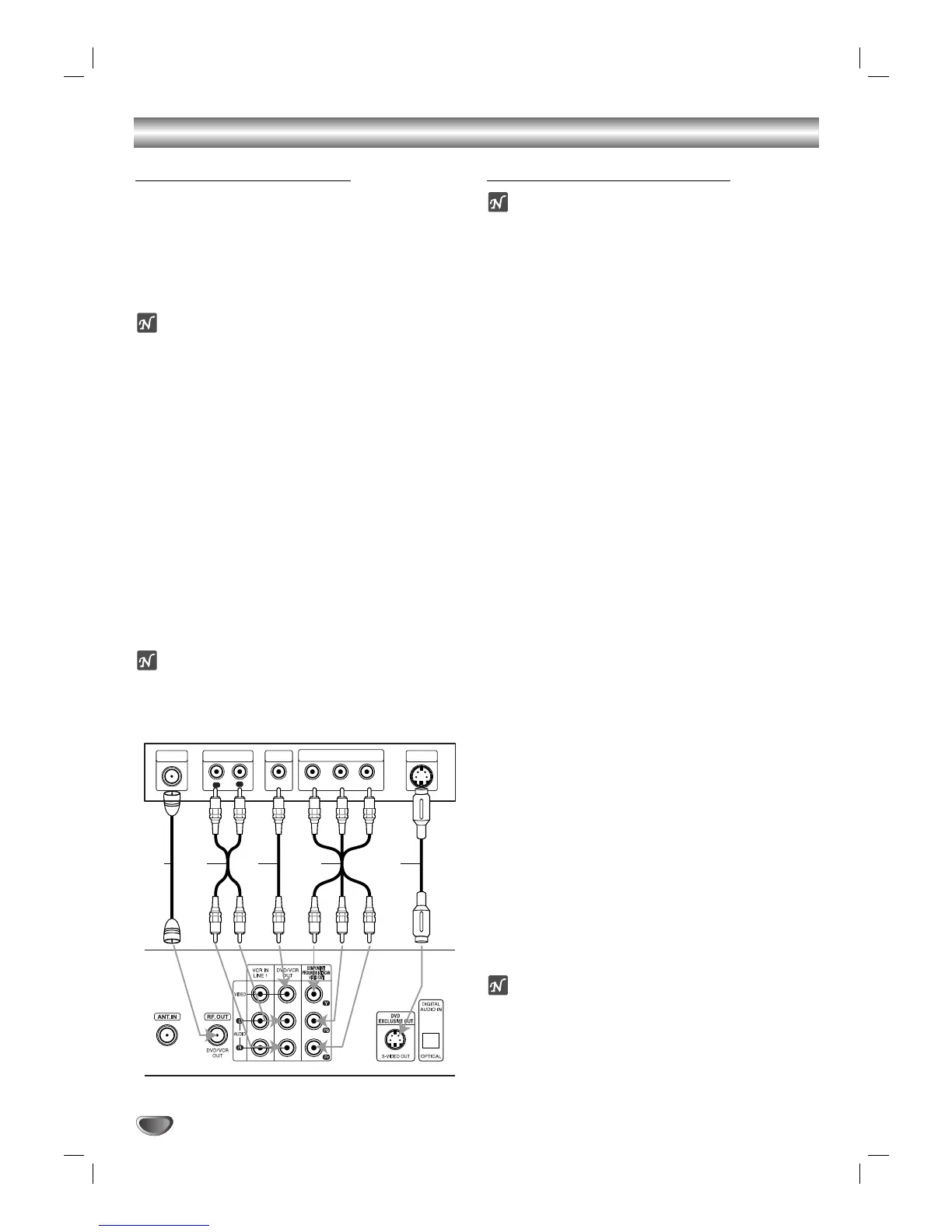
Basic TV Connections
Make one of the following connections, depending on
the capabilities of your TV.
RF coaxial connection
Connect the RF.OUT jack on the DVD+VCR to the
antenna in jack on the TV using the 75-ohm Coaxial
Cable supplied (R).
ote
If you use this connection, tune the TV to the
DVD+VCR’s RF output channel (CH 3 or 4).
How to set the DVD+VCR’s RF output channel
When the DVD+VCR is turned off,
press and hold
CH/PRESET (v/V) on the front panel for about five
seconds to change the RF output channel (CH 03 or
CH 04). “RF 03” or “RF 04” appears in the display win-
dow.
Audio/Video connection
11
Connect the DVD/VCR VIDEO OUT jack on the
DVD+VCR to the video in jack on the TV using the
supplied video cable (V).
22
Connect the Left and Right DVD/VCR AUDIO OUT
jacks on the DVD+VCR to the audio left/right in
jacks on the TV (A) using the supplied audio
cables.
ote
If you use this connection, set the TV’s source selector
to VIDEO.
Optional TV Connections
otes
DVD playback can ONLY be done using the S-VIDEO
OUT and COMPONENT/PROGRESSIVE SCAN
VIDEO OUT connection options below.
The tuner and
VCR will still output through the RF.OUT (R) or
DVD/VCR OUT (A, V) jack. (See left)
When using the COMPONENT/PROGRESSIVE
SCAN VIDEO OUT jacks, set the VIDEO OUTPUT
switch to COMPONENT/PROGRESSIVE SCAN.
When using the S-VIDEO OUT jack, set the VIDEO
OUTPUT switch to S-VIDEO.
S-Video Connection
11
Connect the S-VIDEO OUT jack on the DVD+VCR
to the S-Video in jack on the TV using the supplied
S-Video cable (S).
22
Connect the Left and Right AUDIO OUT jacks on
the DVD+VCR to the audio left/right in jacks on the
TV using the supplied audio cables (A).
Component Video (Color Stream
®
) connection
11
Connect the COMPONENT/PROGRESSIVE SCAN
VIDEO OUT jacks on the DVD+VCR to the corre-
sponding in jacks on the TV using user-supplied Y
Pb Pr cables (C).
22
Connect the Left and Right AUDIO OUT jacks of
the DVD+VCR to the audio left/right in jacks on the
TV (A) using the supplied audio cables.
Progressive Scan (ColorStream
®
pro) connection
If your television is a high-definition or “digital ready”
television, you may take advantage of the
DVD+VCR’s progressive scan output for the highest
video resolution possible.
If your TV does not accept the Progressive Scan for-
mat, the picture will appear scrambled if you try
Progressive Scan on the DVD+VCR.
11
Connect the COMPONENT/PROGRESSIVE SCAN
VIDEO OUT jacks on the DVD+VCR to the corre-
sponding in jacks on the TV using an optional Y Pb
Pr cable (C).
22
Connect the Left and Right AUDIO OUT jacks of
the DVD+VCR to the audio left/right in jacks on the
TV (A) using the supplied audio cables.
otes
– Set the Progressive Scan to “On” on the DVD setup
menu for progressive signal, see page 23.
– Progressive scan does not work with the analog video
connections (yellow VIDEO OUT jack).


 To Next Page