PREPARATION
19
On-Screen Display (OSD)
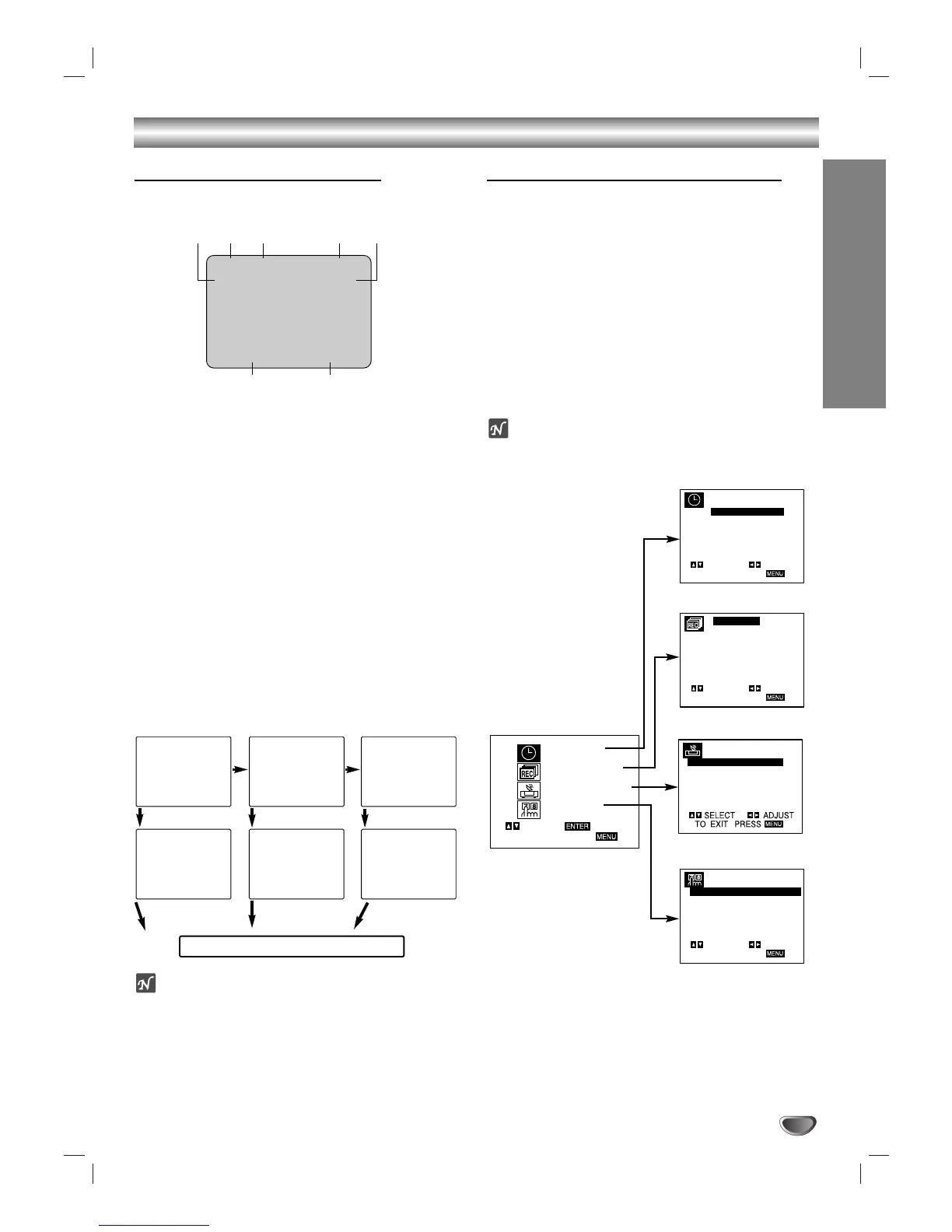
Some of these functions appear during VCR operation.
❶❷❸ ❹ ❺
❻❼
❶ TAPE SPEED DISPLAY
Shows the current tape speed.
❷ FUNCTION DISPLAY
Indicates the function in progress.
❸ HI-FI DISPLAY
Indicates the unit is playing back tape recorded in Hi-Fi.
❹ CHANNEL DISPLAY
I
ndicates the selected channel (or LINE1, LINE2).
❺ STEREO/SAP DISPLAY (MONO is not displayed)
Shows the type of audio signal received by the VCR tuner.
❻ DATE DISPLAY
Shows the current date. (Month/Date/Day of the week
format)
❼ CLOCK/COUNT/REMAIN DISPLAY
Shows the current time, the tape counter and remaining time
on the tape.
Each press of the SELECT/ENTER changes the TV
screen in the following sequence.
otes
The function displays can be seen displayed on the TV
screen for 3 seconds.
The clock (or tape counter, tape remaining) mode will contin-
ue until you press SELECT/ENTER.
The tape counter and the remaining tape length indicator
appear only when a cassette is inserted. Also, the remaining
tape length indicator appears after any tape operation.
Setting the On-Screen Display
The SETUP, clock setting, and timer recordings are
accessed conveniently with On-Screen Menu Displays
that lead you through each step. The following pages
describe the On-screen selections to be set.
Menu Selection
VCR functions are available using the remote control.
11
Press MENU and the MAIN menu will appear.
22
Select the desired menu with v/V button and
then press SELECT/ENTER.
ote
Menus remain on-screen for 3 minutes.
VCR Operation Setup
SET CLOCK (page 21)
TIMER RECORD (page 26)
CHANNEL SETUP (page 20)
VCR SETUP (page 20)
PLAY HI-FI CH 4
SP STEREO
JUL 5 , FRI 2:15 PM
MAIN MENU


 To Next Page