7
INTRODUCTION
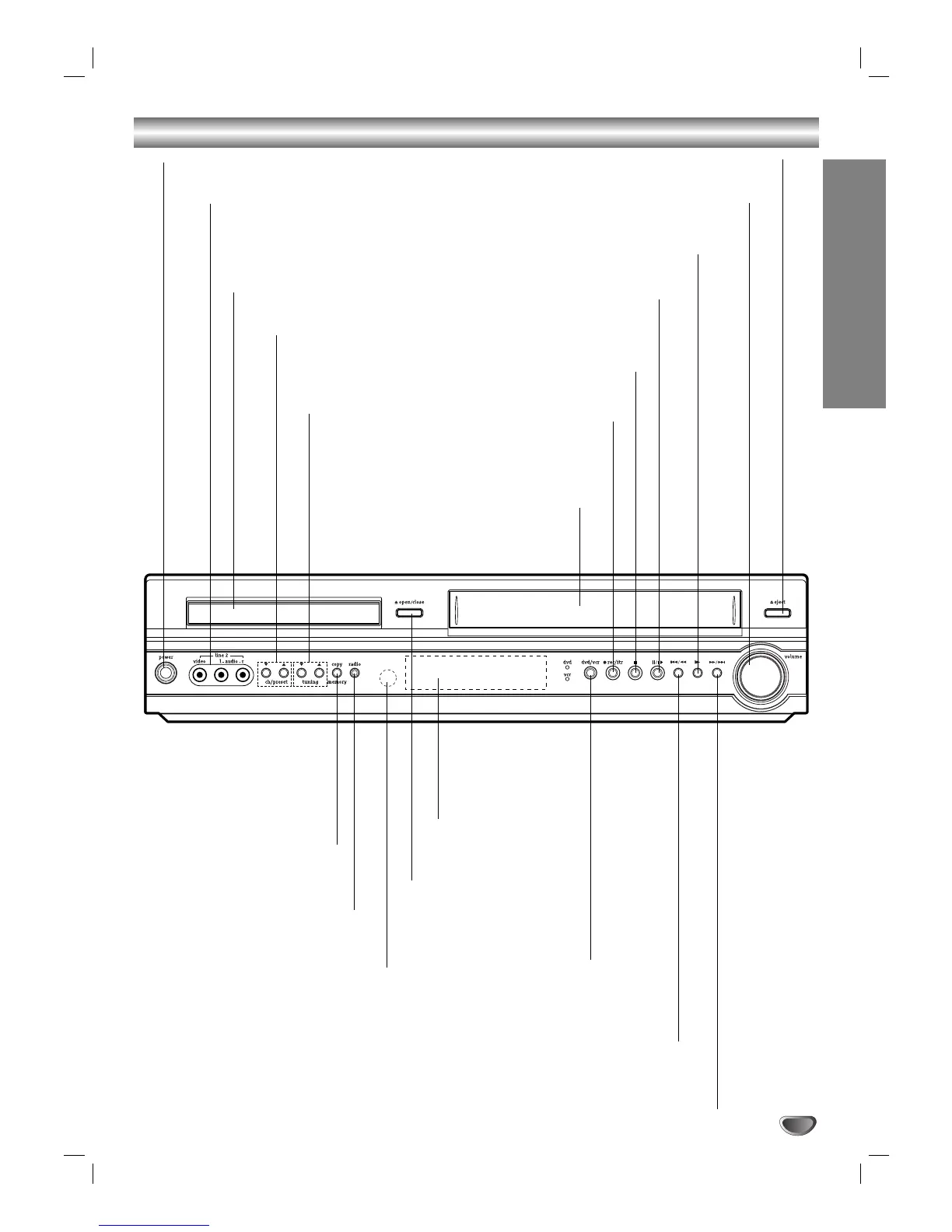
Front Panel
FORWARD (>/M)
DVD: Go to NEXT chapter/track. Press and hold for two seconds for a fast forward search.
VCR: Advances the tape
from
STOP mode or for fast forward picture search.
PAUSE/STEP (X/C)
Pause playback or recording
temporarily/press repeatedly for
frame-by-frame playback.
OPEN/CLOSE
Opens or closes
the disc tray.
Remote Sensor
Point the DVD+VCR remote control
here.
Display window
Shows the current
status of the
DVD+VCR.
Disc Tray (DVD deck)
Insert a disc here.
POWER
Switches the DVD+VCR ON and OFF.
COPY/MEMORY
Press to copy a DVD in the
DVD deck to a VCR tape in
the VCR deck.
Memorizes currently tuned
Radio frequency (station).
TUNING (v/V)
Scans available
channels in the
area.
BACKWARD (./m)
DVD: Go to beginning of current chapter/track or to previous chapter/track.
Press and hold for a fast reverse search.
VCR: Rewinds the tape from STOP mode or for fast reverse picture search.
PLAY (N)
To play back a recorded tape.
STOP (x)
Stops playback or recording.
REC/ITR (z)
To record normally or
to activate Instant
Timer Recording.
CH/PRESET (v/V)
Scans up or down through
memorized channels or radio
frequencies (stations).
RADIO (AM/FM)
Selects Radio operation
mode.
LINE2 (VIDEO IN/AUDIO IN (Left/Right))
Connect the audio/video output of an
external source (Audio system, TV/ Monitor,
another VCR).
Cassette Compartment
(VCR deck)
Insert a video cassette here.
EJECT
Ejects the tape in the VCR deck.
VOLUME
Adjusts sound level of speakers.
DVD/VCR
Toggles control
between the DVD deck
and the VCR deck.


 To Next Page