8
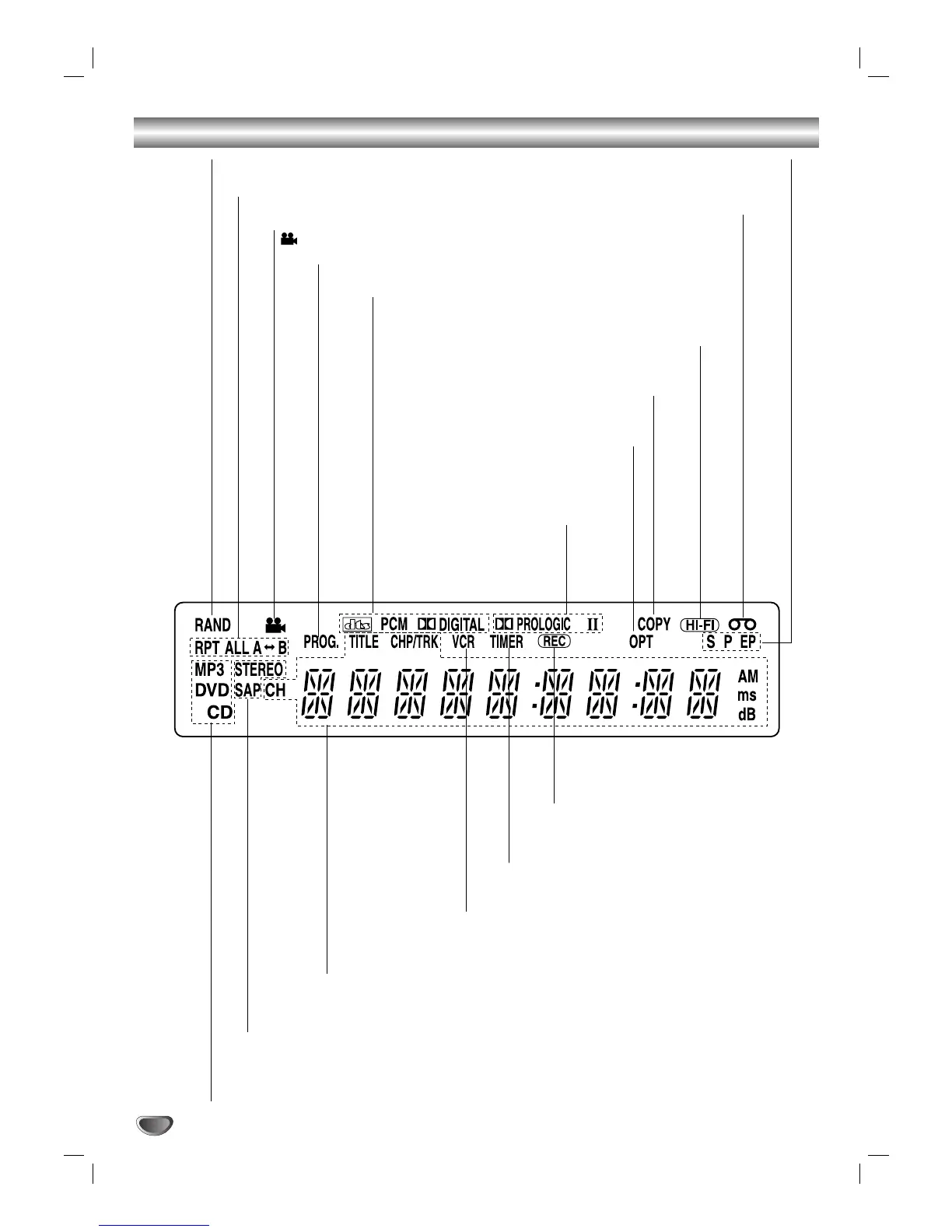
Display Window Overview
STEREO Indicates a stereo broadcast is being received.
SAP Indicates when a SAP BILINGUAL broadcast is being received.
DVD DVD inserted.
CD Audio CD inserted.
MP3 MP3 disc inserted.
Indicates repeat mode.
ANGLE active.
RAND RANDOM playback active.
A cassette is in the VCR deck.
SP EP Displays the recording
and playback speed.
HI-FI Indicates the unit is playing back
a tape recorded in Hi-Fi.
OPT Indicates source of DVD+VCR is
DIGITAL AUDIO IN.
Indicates clock, total playing time, elapsed time, remaining time, title number,
chapter/track number, channel, radio frequency, level, volume, channel or cur-
rent deck status (Playback, Pause, etc).
VCR DVD+VCR functions are available and
channels are selected at DVD+VCR.
TIMER DVD+VCR is in timer recording or a timer
recording is programmed.
REC DVD+VCR is Recording.
PROG. Programmed playback active.
Indicates encoding format of the current disc.
COPY DVD to VCR copy is in progress.
Indicates sound mode is
PROLOGIC II.


 To Next Page