10
www.zephyronline.com
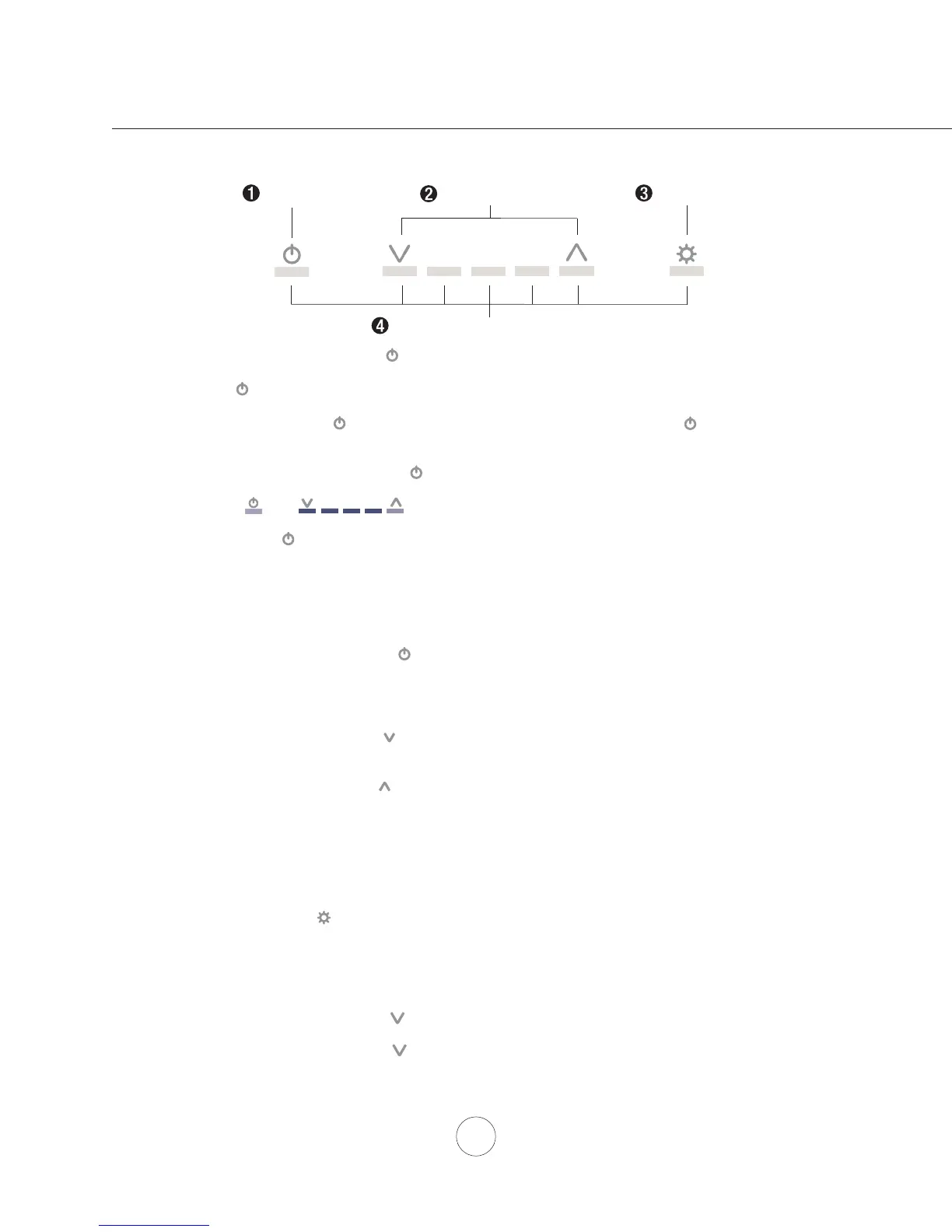
Lights On/Dim/Off
Display (speed level, delay off, filter clean/change)
Adjust 5 Speed Levels
Power / Delay Off
1 POWER / DELAY OFF BUTTON
Power Button Function
- Button will turn power on and off for entire hood (fan and lights).
- Hood will remember the last speed and light level it was turned off at.
(Example: Press Button to turn off hood when on fan speed 4 and high lights. Press Button
again and the hood will turn back on at speed 4 and high lights level.)
Delay Off Button Function
- With the fan on press and hold the Button for two seconds. The fan will change to speed 1 and the
5 minute delay off timer will start.
+ LEDs will illuminate and slowly blink in accordance with the time
remaining until the fan and lights automatically turn off.
- Pressing Button while Delay Off Function is enabled will turn the hood off and cancel the Delay Off
Function.
ACT Verification
- Airflow Control Technology (ACT) allows the installer to set the maximum fan CFM to align with local
codes and regulations.
- To verify the maximum fan CFM:
- With hood off, hold the Button for two seconds. If all five fan speed indicators illuminate =
default maximum CFM. If three fan speed indicators illuminate = 590 maximum CFM. If 2
fan speed indicators illuminate = 390 maximum CFM.
2 SPEED SELECTION BUTTON
Fan Speed Decrease Button
- Press this button to decrease fan speed. 5, 4, 3, 2, 1.
- If fan is On Speed 1 and this button is pressed, fan will power Off.
Fan Speed Increase Button
- Press this button to increase fan speed. Fan On, 1, 2, 3, 4, 5.
- If hood is Off and this button is pressed, fan will turn On Speed 1.
Act Enabled Speed Selections
- When ACT is enabled, the number of fan speeds will be reduced as follows:
- 590 CFM = Maximum 3 speeds
- 390 CFM = Maximum 2 speeds
3 LIGHTS BUTTON
- Lights are two levels, High and Low.
- From off, press one time for High. Press again for Low. Press again to power lights off.
4 DISPLAY INDICATORS
Baffle Filter Clean Reminder (always enabled)
- After 30 hours of fan usage, the button indicator will begin to slowly blink indicating it is time to
clean the baffle filters.
- To reset: With hood off: hold the button for three seconds. All LED indicators will blink two times
confirming the 30 hour timer has been reset.
Features & Controls - ICON Touch Controls


 To Next Page
 Loading...