EasyManua.ls Logo

zeptive ZVD2200 - Wired Devices

Default Icon
12 pages
Print Icon
To Next Page IconTo Next Page
To Previous Page IconTo Previous Page
Loading...
4
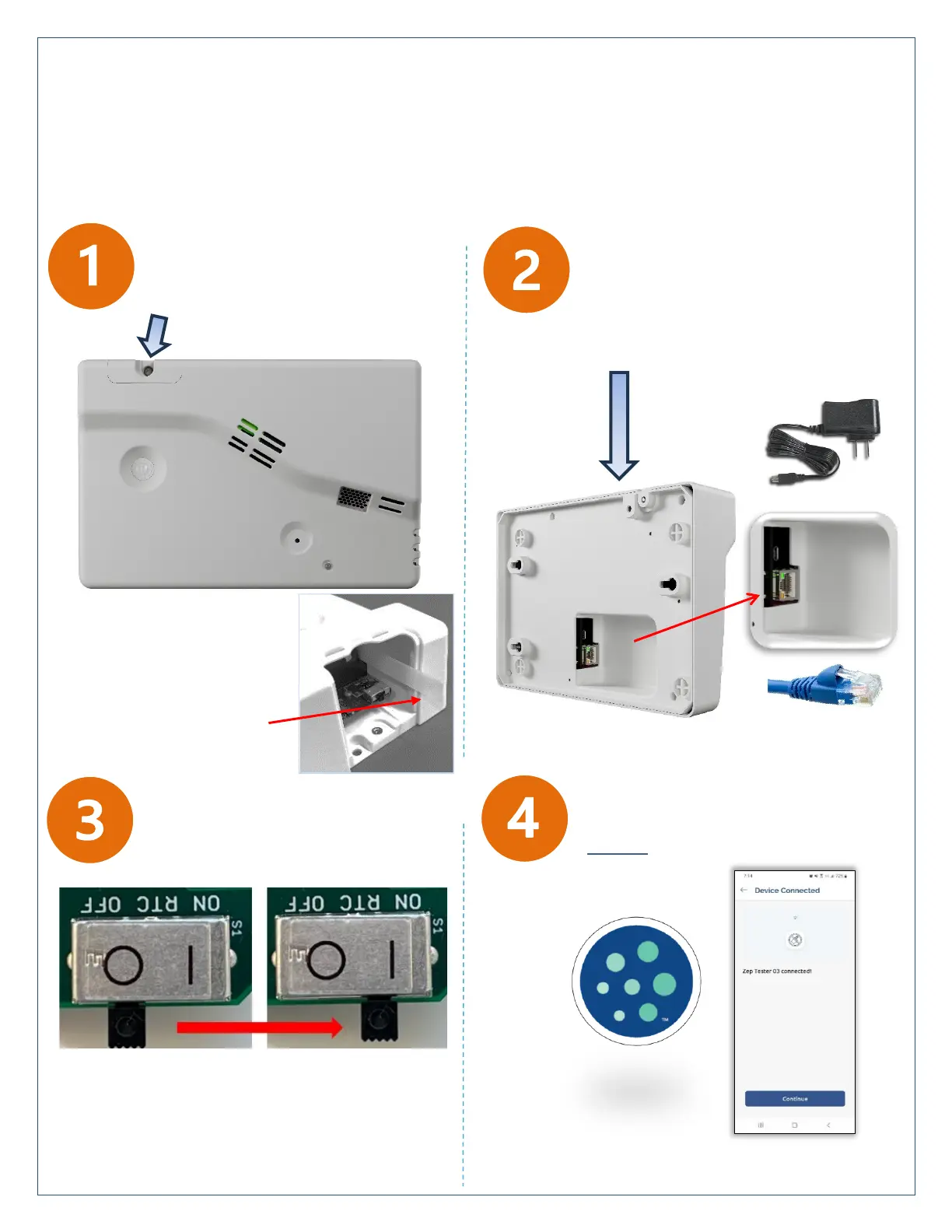
Sign in to the Zeptive App and test
the unit’s WiFi or PoE connection
before installation
Wired ZVD2200 Model
Remove screw to access
power switch and backup
battery pull tab
Access the DC power jack
and/or the Ethernet RJ45 jack
on the underside of the case
to power the unit
Remove battery
tab and discard
Slide internal power switch
to the ON position
The ZVD2200 operates either WiFi or Ethernet, with PoE or mains power. It is good practice to test connectivity with
one or more devices before mounting to the ceiling or wall in their final operating area.
IMPORTANT: Allow 24 hours for the device to acclimate to its environment prior to testing vape/smoke
IMPORTANT: Allow 24 hours for the device to
acclimate to its environment prior to testing
vape/smoke