8
Wi-Fi Credentials
Add Credentials via the Zeptive Phone App
Configure or reconfigure a device:
The phone app can be downloaded from the Apple Store (IOS) or from Google Play (Android)
https://apps.apple.com/us/app/zeptive/id1495817590
https://play.google.com/store/apps/details?id=cc.blynk.appexport.zeptosense&hl=en_US&gl=US
Follow the steps below to reconfigure a device’s credentials. Devices should be reconfigured one at a time to simplify
pairing.
1. Enable Bluetooth on your phone
2. Power on the device
3. Open the Zeptive app on your phone
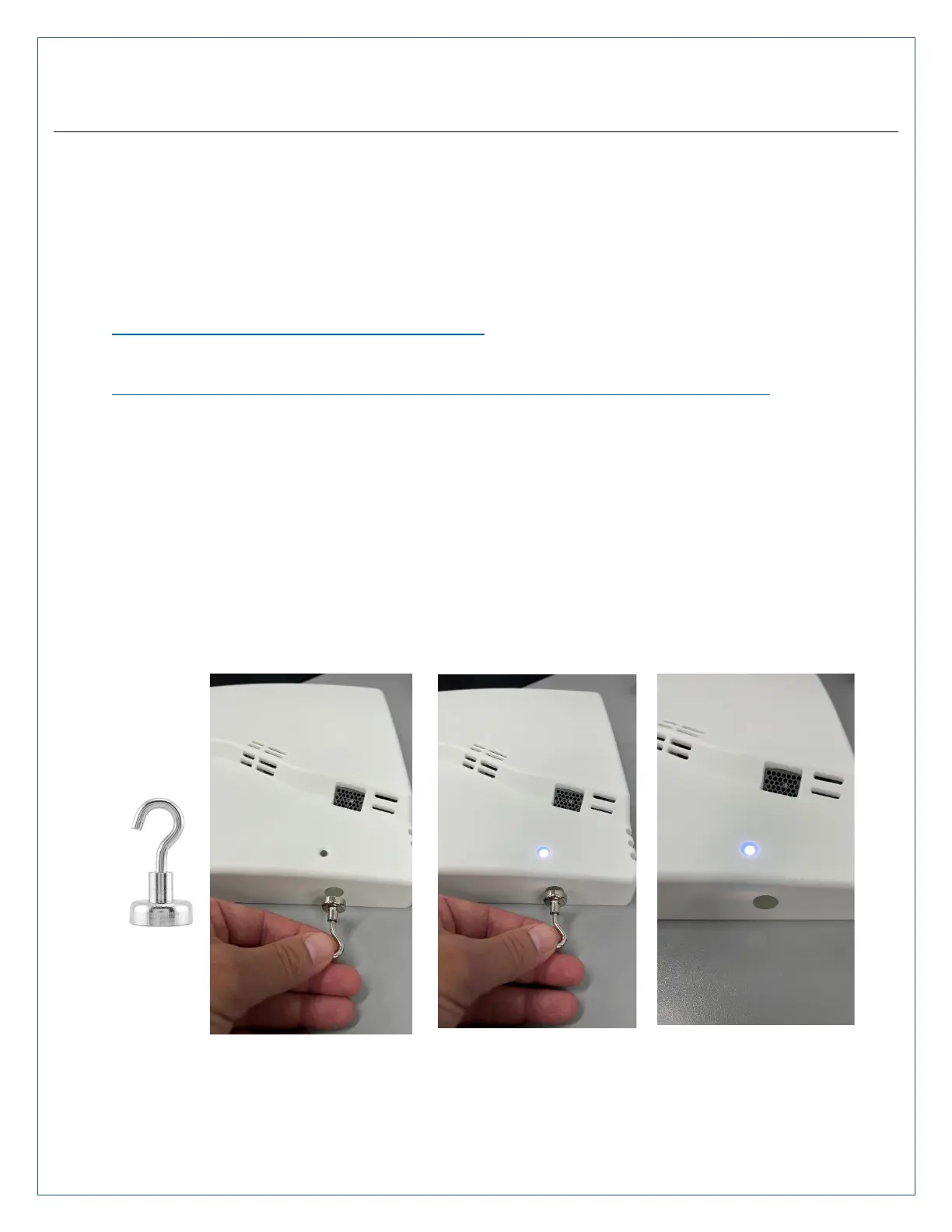
4. Place the magnet on the holographic sticker located on the side of the device and watch for the alternating blue
and white LED just above the sticker. This will put the device in the reconfigure mode for 10 minutes to allow
time to set the credentials. If the 10 minutes expires before the reconfigure is complete, the process can be
started again with the magnet.
5. From the phone app; select the device to reconfigure, tap the ellipsis in the upper right, tap the ellipsis again,
select reconfigure, tap star.



 To Next Page