4
77
T
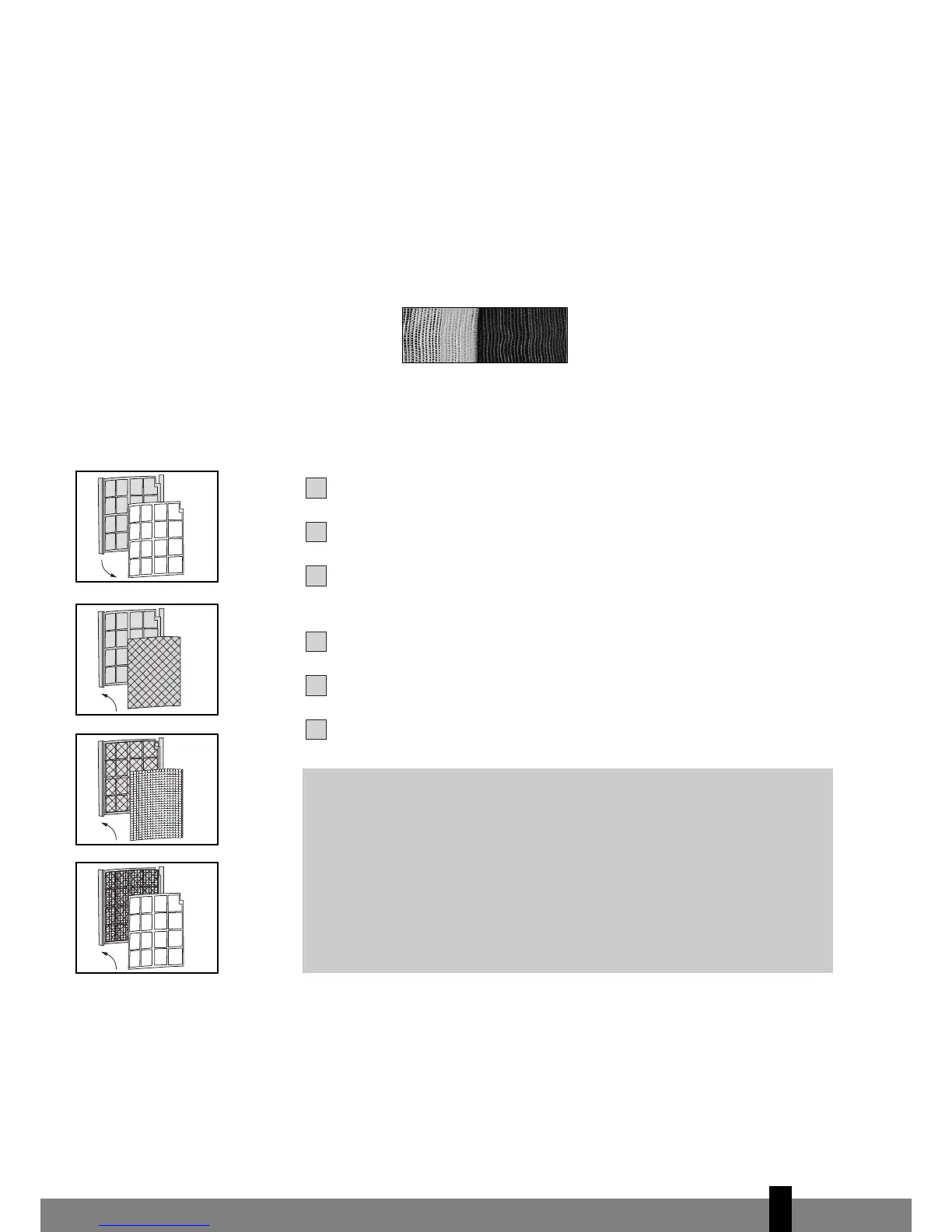
he filter frame on the backside of the unit can be opened. The active carbon
filter and 3M™ Filtrete™ filter can be installed or removed. The screen filter is
part of the filter frame (see illustration).
a. The screen filter has to be cleaned regularly with a vacuum cleaner to avoid
b
locking of the air flow.
b. The positive/negative electrostatically charged 3M™ Filtrete™ filter is recom-
mended to be changed every 3 months. Unusual dirt, construction work, pets,
the presence of smoke and running the air-conditioning unit continuously
can shorten the life time of the 3M™ Filtrete™ filter.
New filter Recommended change of filter
c. The active carbon filter can be cleaned with a vacuum cleaner when dusty but
has to be changed at the same time as the 3M™ Filtrete™ filter.
Filter installation:
Slide out the filter frame from the unit.
Separate the filter fixer from the filter frame (see fig. 1).
Remove the active carbon filter and the 3M™ Filtrete™ filter from its plastic
bag.
Insert the active carbon filter into the filter frame (see fig. 2).
Insert the 3M™ Filtrete™ filter into the filter frame (see fig. 3).
Fix the filter by reassembling the fixer into the filter frame (see fig. 4).
G
NOTE!
• Remove the 3M™ Filtrete™ filter and active carbon filter before
seasonal storage and install new filters at the beginning of the new
season. The old filters can be disposed in the ‘Non-biological garbage
container’.
• Replacement filter packages are available at your dealer.
•
T
o run the unit without active carbon filter and/or 3M™ Filtrete™
filter does not bring any harm to the air conditioner. In that case
odours and unhealthy dust are not removed from the circulated air.


 To Next Page