MS - SOUND decoders MS440 to MS990 and MN - NON-SOUND decoders MN170 to MN340 Page 25
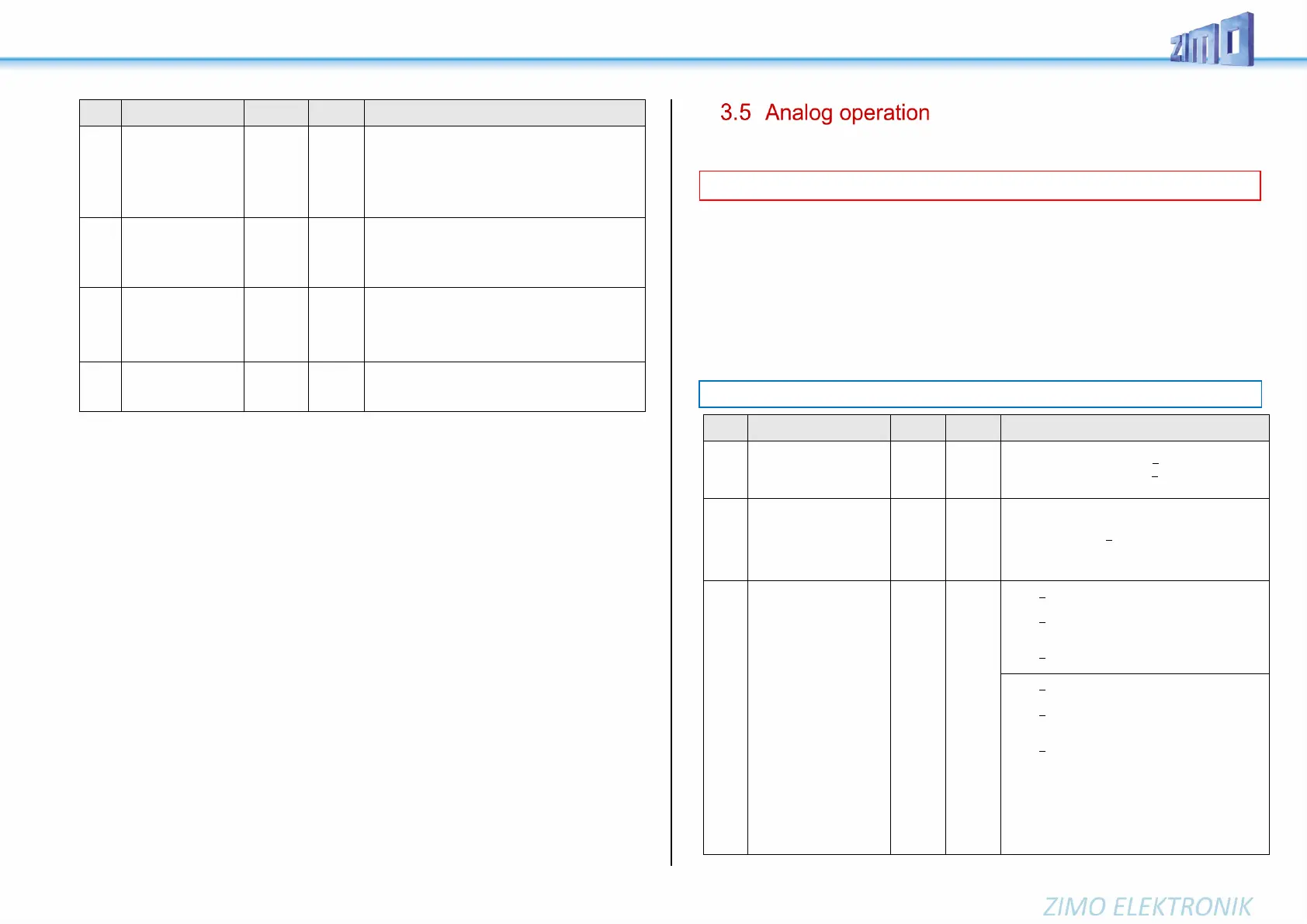
Bit 5 = 0: F12 (forw.) controlled by individual address
= 1: …. by consist address
Bit 7 = 1: F13 – F27 (all!) ….by consist address
Bit 6 = 1: Auto-Consist: The system changes automati-
cally between individual and consist address, if one of
the two addresses = speed 0 and the other =speed >0.
Change between
individual address or
consist per function key
SW version 4.210 and
higher
Using this key (only on the main address), you can
switch between the main address of the decoder (on
CV #1 or CVs #17, #18) or the consist address. But for
this CV #21 and CV #22 must be set to CV value 0 and
it replaces the command CV #22, Bit 6=1.
Reducing the motor
regulation in consist
op.
SW version 4.210 and
higher
The tens digit reduces the motor compensation to 10 –
90 % according to the value in CV #58.
Automatic unilateral
light suppression
Bit 7 = 0, 1
Bit 7 = 0, 1
If CV #109, bit 7=1 and CV #110, bit 7=1, the light sup-
pression on the driver’s cab side in consist operation is
activated automatically.
All ZIMO decoders can operate on conventional layouts with DC power packs, including PWM throttles, in
analog DC as well as in analog AC (Märklin transformers with high voltage pulse for direction change).
To allow analog operation,
CV #29, bit 2 = 1 must be set. and CV #12, bits 0 and/or 4 = 1
This is usually the case by default (CV #29 = 14, which includes bit 2 = 1 and CV #12 = 117), but analog
operation may be turned off in many sound projects (sound decoders).
The actual behavior during analog operation, however, is strongly influenced by the locomotive controller
(power pack). Especially when using a too weak transformer, the driving voltage can easily collapse
when the decoder consumes current; which in particularly unfavorable cases leads to oscillation between
operation and non-operation.
In analog operation, it is possible to adjust the acceleration momentum (CV #14, bit 6) and function
outputs (CV #13 & #14) individually.
Possible operating modes
All bits of CV #12 are de-
scribed in chapter “3.1
Basic Configuration”
Bit 0 - DC analog 0 = disabled 1 = enabled
Bit 4 - AC analog 0 = disabled 1 = enabled
Bit 5 … (see chapter “3.1 Basic Configuration“)
Basic Configuration
all bits of CV #29 are de-
scribed in chapter “3.1
Basic Configuration”
14 =
0000 1110
therefore
Bit 2 = 1
(Analog
operation)
Bit 1 … (see chapter „3.1 Basic Configuration“)
Bit 2 - automatic change to analog operation
0 = disabled 1 = enabled
Bit 3 ….
Bit 4 ….
etc. … (see chapter „3.1 Basic Configuration“)
Functions
F1 - F8
Functions
F0 (forw. rev.)
F9 - F12
in analog operation
(= observation mode)
and
Acceleration/
Deceleration, control
in analog operation
(CV #13)
0 - 255
(CV #14)
0 - 255
(CV #13)
0
(CV #14)
64
therefore
Bit 6 = 1:
Bit 0 = 0: F1 is OFF in analog mode
= 1: …ON in analog mode
Bit 1 = 0: F2 is OFF in analog mode
= 1: …. on
………. F3, F4, F5, F6, F7
Bit 7 = 0: F8 is OFF in analog mode
= 1: …. on
Bit 0 = 0: F0 (forw) OFF in analog mode
= 1: …ON in analog mode
Bit 1 = 0: F0 (rev) is OFF in analog mode
= 1: …ON in analog mode
………. F9, F10, F11
Bit 5 = 0: F12 is OFF in analog mode
= 1: …ON in analog mode
Bit 6 = 0: Analog operation with acceleration and de-
celeration according to CVs #3 and #4; use-
ful for sound
=1: Analog operation without effect,
I.e. without acceleration and deceleration
according to CV #3 and #4.
Similar to a classical analog operation.
ATTENTION: DC analog will be implemented with SW version 4.50
NOTE: Actual decoder settings may differ from the default values if a sound project is loaded.



 To Next Page