MS - SOUND decoders MS440 to MS990 and MN - NON-SOUND decoders MN170 to MN340 Page 71
Servo 3
Servo 4
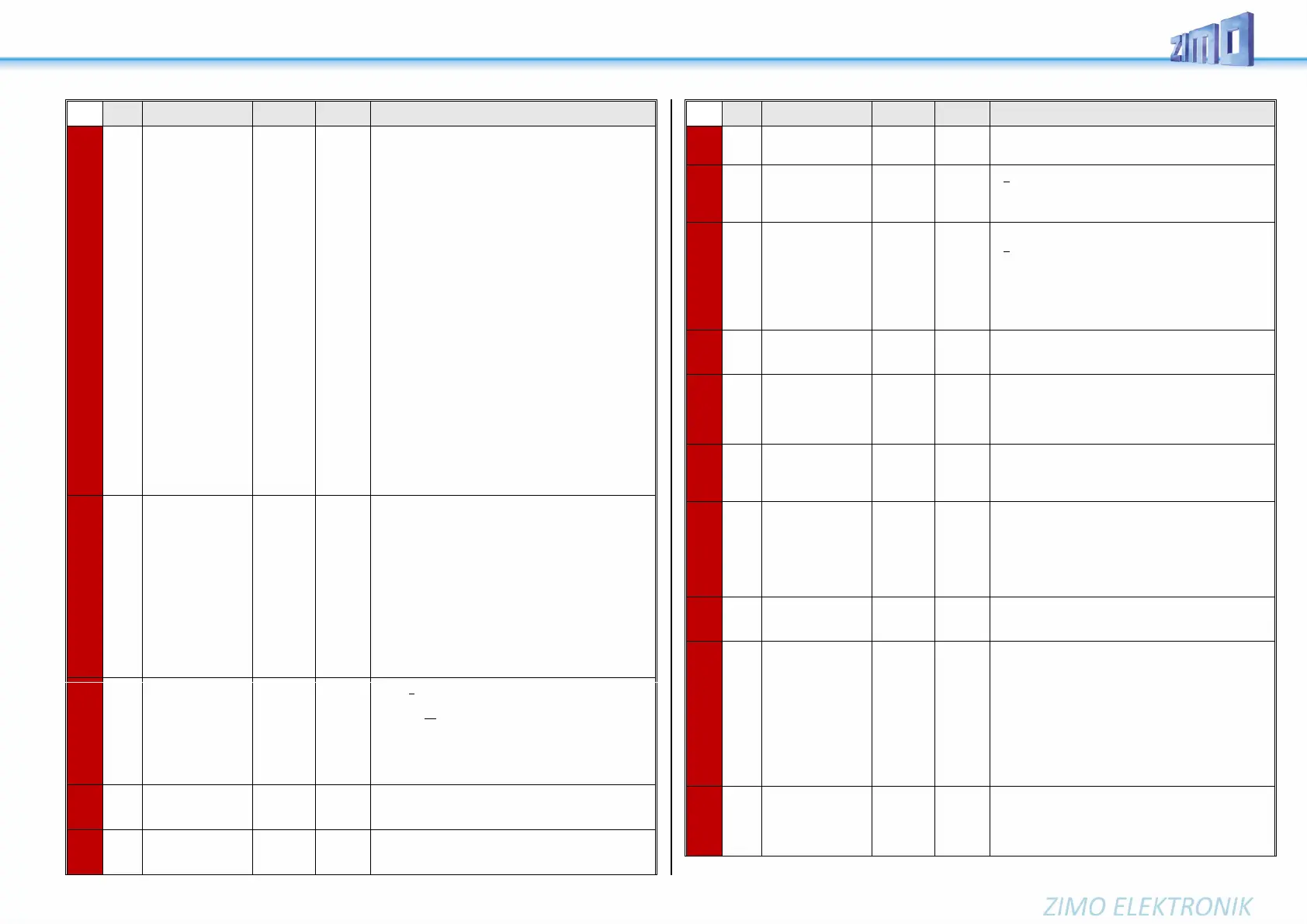
Function assignment
NOTE:
If a servo control line
shares its connec-
tion with another
function (e.g. SUSI
or input) for optional
use, a value >0 in
CV #181, #182, ...
means switching to
servo control line.
This concerns with
"small" decoders
(track N ... H0) the
"official" SUSI pins,
which are switched
to servo with CVs
#181, #182 (SUSI
no longer present),
with MS950, MS955
servos 3 + 4, with
MS990 7 + 8.
90 - 97
101-114
201 -.208
= 1: Single-key operation with F1
= 2: Single-key operation with F2
and so on..
= 28: Single-key operation with F28
= 90: Servo dependent on loco direction
forward = servo left; reverse = servo right
= 91: Servo dependent on loco direction and standstill
i.e. Servo on the right at standstill and direction
forward, otherwise servo on the left
= 92: Servo dependent on loco direction and standstill
i.e. Servo on the right at standstill and direction
backwards, otherwise servo on the left
= 93: Servo dependent on standstill or cruising
i.e. Servo on the right at standstill, servo on the left
at cruising; direction without effect.
= 94: refers to function "Panto1" which is
configured in CV #186.
= 95: …"Panto2" configured in CV #187
= 96: …"Panto3" configured in CV #188
= 97: …"Panto4" configured in CV #189
= 101: Two-key operation F1 + F2
= 102: Two-key operation F2 + F3
and so on..
= 111: Two-key operation F11 + F12
= 112: Two-key operation F3 + F6
= 113: Two-key operation F4 + F7
= 114: Two-key operation F5 + F8
(Two-key mode as defined with CV #161, Bit 2)
= 201 - 208: Events 1 - 8 from scripts or sound
Special assignment
for live steam en-
gines
= 1: Steam loco with one servo in operation;
Speed and direction of travel by slider, center
position means stop.
= 2: Servo 1 proportional on speed regulator
Servo 2 for direction.
= 3: like 2, however: Direction-servo is automatically in
“neutral” if speed is 0 and F1 = ON;
At speed step > 0:
If direction-servo is engaged.
NOTE to CV #185 = 2 or 3:
Servo 1 is adjustable with CV #162, #163 (end-
positions), by using the corresponding values, it is
also possible to change the direction.
Servo 2 is adjustable with CV #166, #167.
"Panto1"
"Panto2"
"Panto3"
"Panto4"
Bit 7 = 0: Not sound-dependent
= 1: Sound-dependent
Bit 6 - 5 = 00: direction independent,
= 01: only if loco drives forward
= 10: only if loco drives backwards
= 11: only if F-key is turned off
Bit 4 - 0: to Activate
00001 = F1 00010 = F2 00011 = F3, …
Brighting-up time
for effects 88, 89
and 90
The range 0 -100 corresponds to 0 - 1 sec (10ms/value)
101 – 200 1 – 100s (1s/value)
201 – 255 100 – 320s (4s/value)
Dimming time
for effects 88, 89
and 90
The range 0 - 100 corresponds to 0 - 1 sec (10ms/value)
101 – 200 1 – 100s (1s/value)
201 – 255 100 – 320s (4s/value)
Value for effect dim-
ming
Code 011010xx in CV #125ff: Decreases the brightness of the
(light) function output by the set value (in percent). (e.g. value 127
= 50 %)
ABC - commuting
with stopping times
in reverse loops
= 0: no commuting on ABC basis
= 1 - 255: Stopping period (in sec) in the ABC stopping
(=turnaround) sections at the end of the commuting
distance.
ABC - commuting
with additional
pit stops
Only as commuting if CV #193 = 1 - 255
= 0: Commuting without pit stops (see above)
= 1 - 254: Commuting with pit stops
(terminal loops by ABC slow-speed sections,
pit stops defined by ABC stopping sections)
Stopping period (in sec) in the pit stops
= 255: as above but permanent stop in pit stops
(until stop is cancelled).
Effects on
FA9, FA10,
FA11, FA12, FA13
like CV #125 #195 → FO9 #196 → FO10
#197 → FO11 #198 → FO12
#199 → FO13
Alternative (clearer,
preferred for new
projects) "SUSI" us-
age
= 11: SUSI pins as logic level outputs (see above)
= 22: SUSI pins as reed inputs
= 33: SUSI pins as servo control lines
= 44: SUSI pins as "SUSI pins" (same as 0)
= 55: SUSI pins as I2C bus.
If decoder (large
scale decoder) has
two "SUSI" connec-
tions
As above (CV #201), but for second SUSI connection;
there, however, CV #202 is the only setting option, not
just the alternative).
Use of the
inputs IN1 & IN2,
or IN3 & IN4
= 11: both "IN"s as logic level outputs (see above)
= 22: both "IN"s as logic level ("reed") inputs
= 44: both "IN"s as input for axis detector
CV #203 ones digit: IN1, tens digit: IN2
CV #204 ones digit: IN3, tens digit: IN4
If the axis detector is used but neither CV #203 nor #204
is configured, then IN3 is taken as default.
Bootloader
version and subver-
sion
Reading out these CVs provides the version and subver-
sion of the bootloader currently on the decoder (bootloader
= program to load the actual software).
Decoder-ID,, thereof
CV #250 and
CV #251 (Bits 7- 4)
= Decoder-Type
(See chapter 2
Technical Data,
schematics, opera-
tion with mfx…) CV
#251 (Bits 3 - 0) and
CV #252 + #253 =
serial no.
The decoder ID (serial number) is automatically entered
during production: The first byte and half of the second
byte denotes the decoder type; the rest contain a serial
number.
The decoder ID is primarily used for automatic address as-
signment when an engine is placed on the layout track as
well as in combination with the “load code” for “coded”
sound projects (see CVs #260 - #263).
“Load code”
for
“coded” sound pro-
jects
New ZIMO sound decoders can be ordered for an addi-
tional small fee with a “load code” pre-installed, which en-
titles the user to install “coded” sound projects of a se-
lected sound bundle. The load code can also be pur-
chased and installed by the user later: see www.zimo.at.


 To Next Page
 Loading...