Page 70 MS - SOUND decoders MS440 to MS990 and MN - NON-SOUND decoders MN170 to MN340
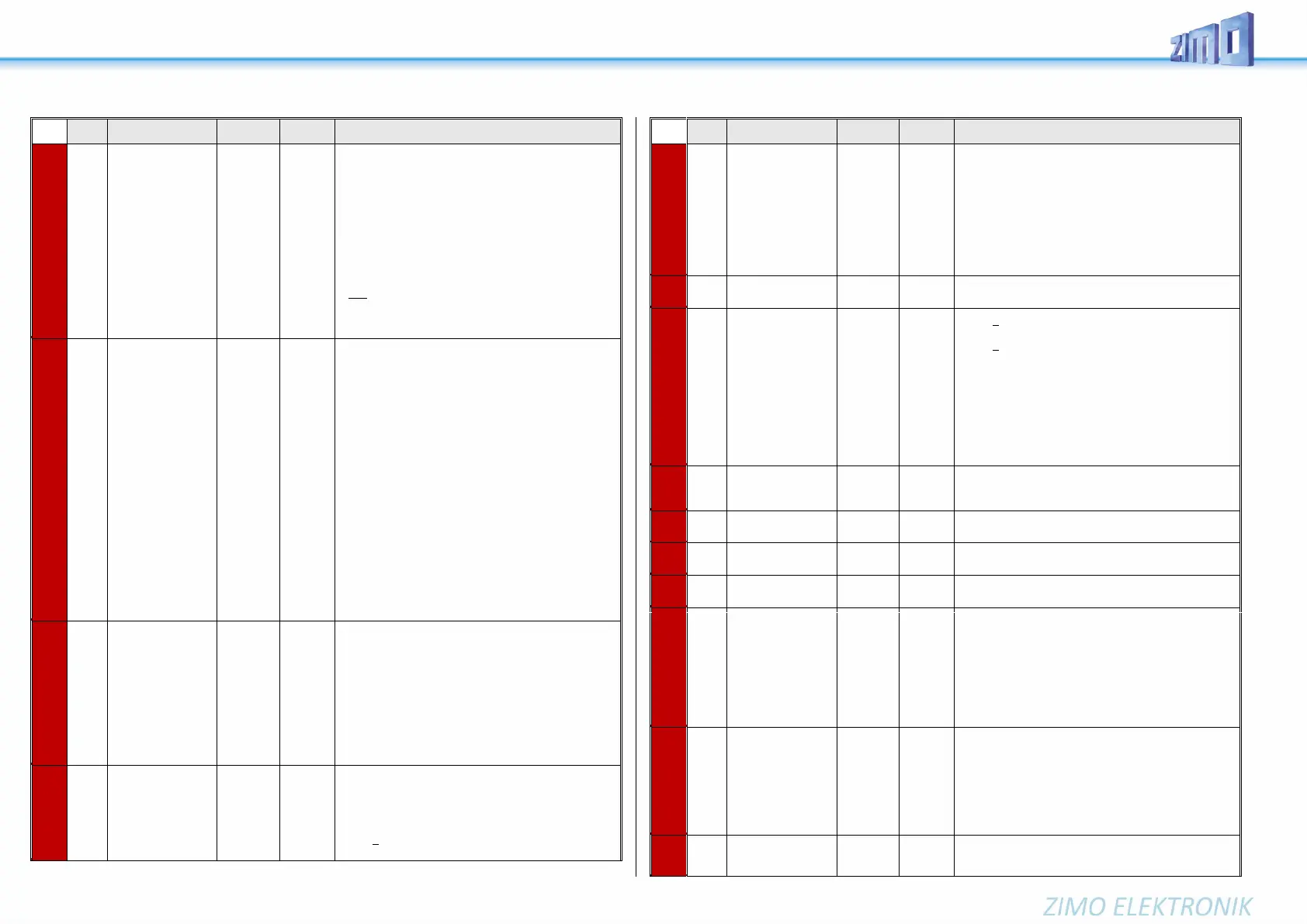
alternative to CV
#124:
Selecting a function
key for half
speed
30
and
bits 7, 6, 5
for
Setting
Half-
speed.
CV #155: Determination of the function key, with which the
half speed (= highest speed step results in half speed) can
be switched on.
If CV #155 > 0 (i.e. a key is set), a possible assignment in
CV #124 is ineffective.
If CV #155 =
= 0: CV #155 is not active, so CV #124 is valid.
= 1 - 28: Function key F1 - F28
= 29: Function key F0
= 30: MAN key
Bits 7, 6, 5: Modification of the "half" speed".
= 000: Speed according to speed step, multiplied by
0.625
= 001 ... 100: ... speed step, multiplied by 0.125 ...0.5
= 100 ... 111: ... speed step, multiplied by 0.5 ...0.875
to be preferred for
new projects
alternative to CV
#124:
Selecting
a function key for
deactivating momen-
tum
0,
1 - 28,
29,
30,
129 - 156,
157,
158
This CV overwrites the setting of the F keys in CV #124
(bit 2&6) in case it is not satisfactory. The set range (bit
0&1) of the acceleration behavior does not change.
If CV #156 > 0 (i.e. a key is set), any assignment in
CV #124 is ineffective.
If CV #155 =
= 0 means CV #155 is not active, so CV #124 is valid.
= 1 - 28: Function key F1 - F28
= 29: Function key F0
= 30: MAN key
Bit 7 = 1: Suppression of switching the light when revers-
ing direction.
The settings of CV #124 about the type of deactivation or
reduction still apply, thus:
CV #124, Bit 1, 0 =
= 00: no influence on acceleration times
= 10: reduces acceleration/deceleration time
to ¼ of the values according to CVs #3, #4.
= 11: deactivates acceleration/deceleration time
completely.
Typically, CV #124 = 3 is set to achieve full deactivation
(unless other bits in CV #124 are also set).
Selection of a
Function key for the
MAN-function
Only for non-ZIMO
controllers that don’t
have a dedicated
MN key.
The MAN function (or MAN key on ZIMO controllers) was
originally designed for ZIMO applications only, in order to
cancel stop and speed limit commands applied by the
“signal-controlled speed influence” system (HLU).
This function was expanded in later software versions to
include “asymmetrical DCC signal stops” (Lenz ABC).
If ZIMO decoders are used with non-ZIMO systems
which do not have this key (rarely with HLU, usually with
ABC), a function key can now be assigned with CV #157
to cancel a signal-controlled speed limit or stop com-
mand.
Various special bits
Bits 1, 3, 5, 6, 7
(only Diesel & Electro)
Bit 1 = 1: Diesel mechanical: RPM is not raised
when braking (see CV #364).
Bit 2 = 0: RailCom speed feedback (km/h)
feedback in “old” format (for
MX31ZL, RailCom ID 4)
= 1: RailCom speed feedback (km/h)
Normal feedback (RailCom ID 7)
Bit 3 = 1: (DIESEL) Sample for standstill is
faded out when driving-off “early”.
Bit 4 = 1: Steam chuff frequency increases slower
at high speed (non-proportional)
Bit 5 = 1: (DIESEL) Braking (even by one speed
step) causes the motor and turbo
sounds to decrease by on sound step.
Bit 6 = 1: (ELECTRIC) Thyristor sound may be louder
when braking.
Bit 7 = 1: (ELECTRIC) Switchgear sparks on FO7.
like CV #125 #159 → FO7 #160 → FO8
Servo outputs:
Protocol
and alternate
Use of
Servo outputs:
3 & 4
as SUSI pins
0 - 3
NOTE:
For Smart
Servo RC-
1
set
CV #161 =
2!
Bit 0 = 0: Servo protocol with positive pulses.
= 1: Servo protocol with negative pulses.
Bit 1 = 0: Control wire only active during movement
=1: ... always active (draws current,
judders sometimes but holds the position
also at mechanical load);
Bit 2 = 0: For two-key operation (as per CV #181, ...) with
center position, if none of the two keys is
activated.
= 1: For two-key operation (as per
CV #181, ...), where the servo runs only as
long as function keys are active.
Defines the servo’s left stop position.
“Left” may become the right stop, depending on values
used.
Defines the servo’s left stop position.
Defines a center position, if three positions are used.
Rotating speed; time between defined end stops in tenths
of a second (total range of 25 sec, default 3 sec.).
#166
-
#169
#170
-
#173
#174
-
#177
Same as input map-
ping above for other
functions:
servo 2
servo 3
servo 4
Valid for each servo, which is "Panto..." under CVs #181 -
#184 (function assignments) = 94 - 97),
After reaching the final position (i.e. after "Panto lift") the
Panto should move slightly up and down a few more
times. CV #178 sets the amplitude of this oscillation
(more precisely the first one)
= 0: no oscillation
= 50: sensible initial setting, vary from there.
= 0: Servo not in operation


 To Next Page
 Loading...