Page 14 of 24 804545 03.17 1.00
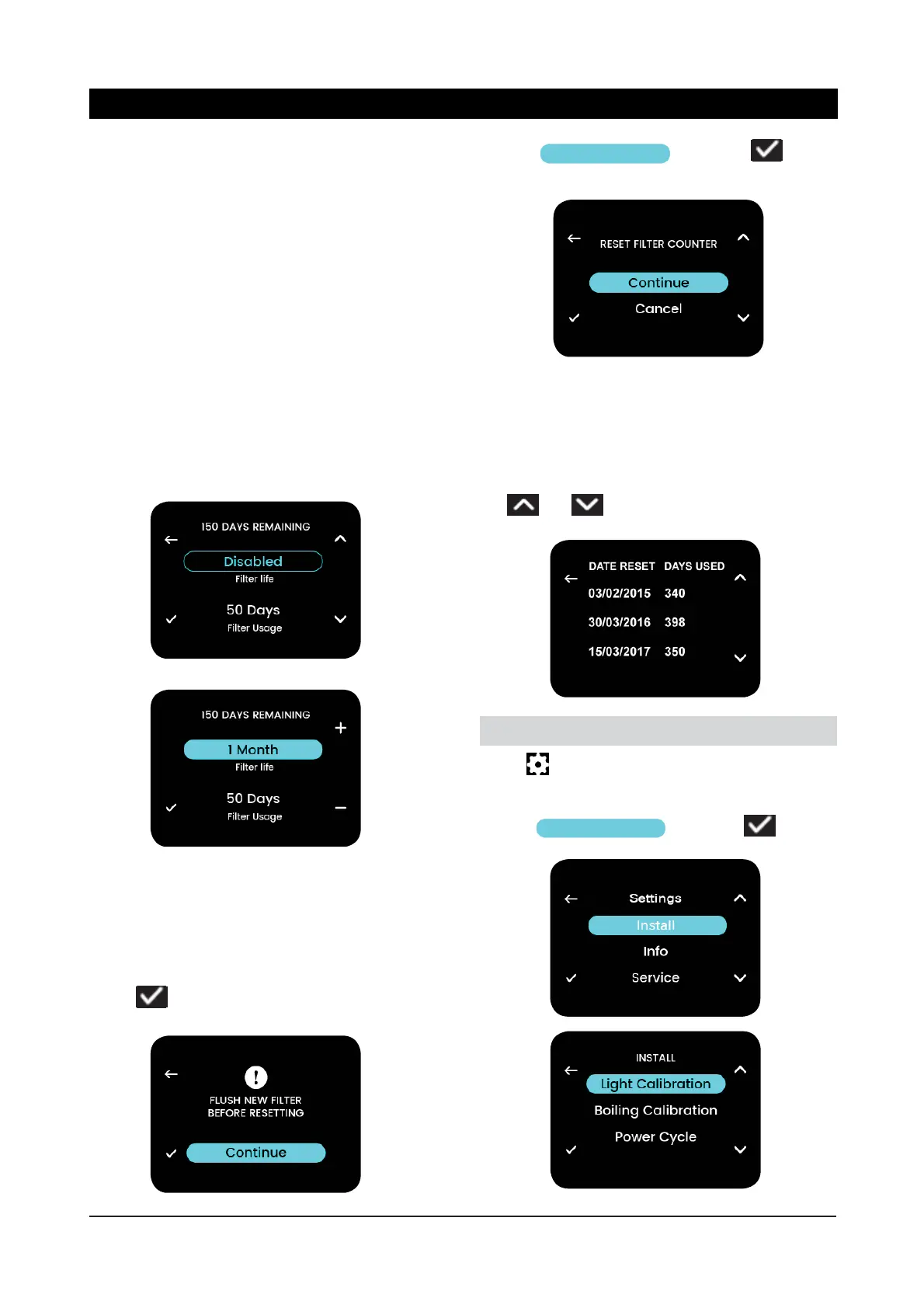
This allows modifi cation of fi lter life and usage
parameters.
Filter Life – Options are:
► Disabled (no fi lter replacement reminder will be
shown on home screen)
► 1-14 months (Default 12 months)
Filter Usage – Automatically increments daily. This
is reset to “0 Days” when a fi lter reset is performed.
Can be adjusted if a partially used fi lter is inserted.
The days remaining of the fi lter shown on this
menu and on the home screen are based on these
2 parameters.
This action will reset the fi lter usage counter. A re-
minder is shown to fl ush the new fi lter before doing
this (see page 21 - Filter Replacement).
Select
to continue after fl ushing.
Choose
Continue
and select to
reset the fi lter usage counter.
The log shows the dates that the fi lter usage counter
was reset and the “days used” before the reset was
performed.
Use
and to scroll through the log history.
3.4.2 Filter Life / Usage
3.4.3 Replace Filter
3.4.2 Filter Log
Select on the home screen to navigate to the
main menu.
Choose
Install
and select
4. Install Menu
Menu Operation



 To Next Page