H0412500.A - EN - 2013-02
8
EN
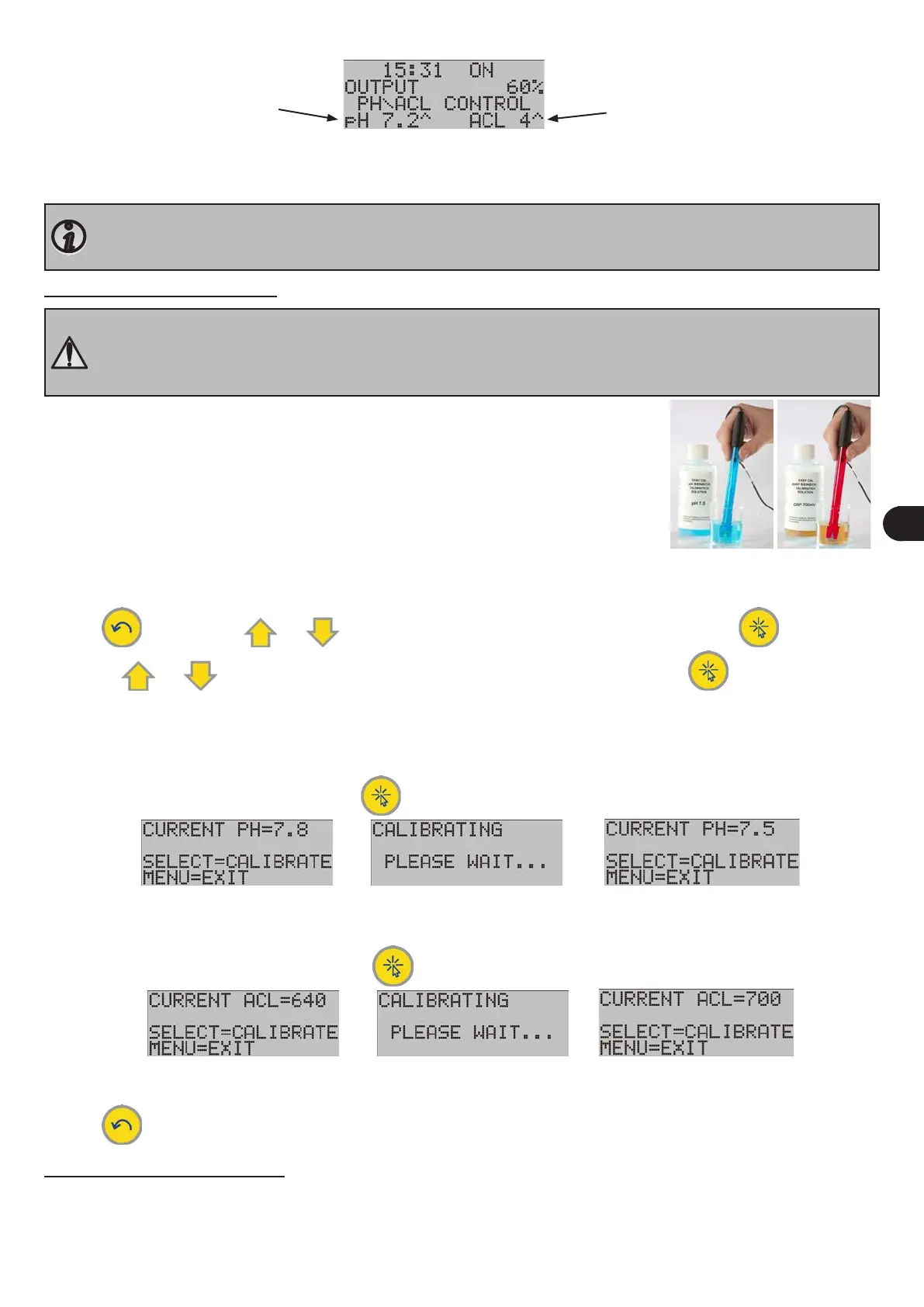
- TRi PRO module:
pH set point
ACL set point
A '^' symbol appears to the right of the set point if the value measured by the equipment needs to be corrected automa-
cally (pH of water in the pool higher than the set point and/or insucient chlorine level). Then pH minus is injected and/
or chlorine produced automacally according to the dened cycles.
By default, pH regulaon (peristalc pump in the TRi pH or TRi PRO module) is disabled and the LCD screen will
display 'pH ---'. It is enabled automacally about 8 hours aer being turned on. To enable pH regulaon immedi-
ately and so display the set point on the LCD screen, see § 3.6.2.
3.3 Calibrang the sensor(s)
• To operate accurately and reliably, the sensors must be calibrated before using the TRi chlorinator with the TRi
pH or TRi PRO module. To maintain maximum eciency of the unit, we recommend calibrang at least once
every 2 months during the period the swimming pool is being used.
• Ensure the sensors are cleaned before calibraon (see § 4.1).
• Conrm that the TRi power pack is plugged in,
• Stop the pool pump and isolate the sensors by closing any valves, so as to be able to re-
move the sensors safely.
• Remove the sensors from their sensor holder on the POD (unscrew the locking ring by
hand).
• Rinse the end of the sensors with clean water and shake them to remove excess water.
Do not touch or wipe the glass bulb at the end of the sensors.
• Put the pH sensor into a sample of the pH7.5 buer soluon supplied.
• Put the ACL sensor into a sample of the 700 mV buer soluon supplied.
• Leave the sensors immersed for about 1 minute to obtain a reliable measurement.
• Press , then use the or keys to display 'CALIB. PH' or 'CALIB. PH/ACL', then press .
• Use the or keys to display 'PH CALIBRATION' or 'ACL CALIBRATION', then press .
Note the measured value:
• pH = 'X.X'
- If the value is greater than 8.2 or less than 6.4: the sensor is dirty or has been damaged during transport. Clean the pH
sensor (see § 4.1) then repeat the above steps. If the problem persists, contact your reseller.
- If the value is between 6.4 and 8.2, press to begin calibraon. The procedure takes about 15 seconds.
- When calibraon is nished, check that the value displayed equals 7.5, otherwise repeat the calibraon.
• ACL = 'XXX'
- Start the calibraon procedure by pressing ; the procedure lasts about 15 seconds,
- If the value is 700: calibraon is correct
- If the value is not 700: repeat the calibraon steps. If the problem persists, contact your reseller.
• Press or wait 30 seconds to exit.
3.4 Adjusng the set point(s)
The set point is displayed connuously on the LCD home screen.
The default seng for the pH set point is pH7.2 (TRi pH and TRi PRO modules).
The default seng for the ACL set point is 4 (TRi PRO module).
This value provides the ideal compromise to achieve opmum eciency in terms of water disinfecon.


 To Next Page