H0360600.A2.EN Ver.05/2011 5
2.4.2.Startup
x Whenthecleanerispoweredon,thecontrolboxremainsinstandby.
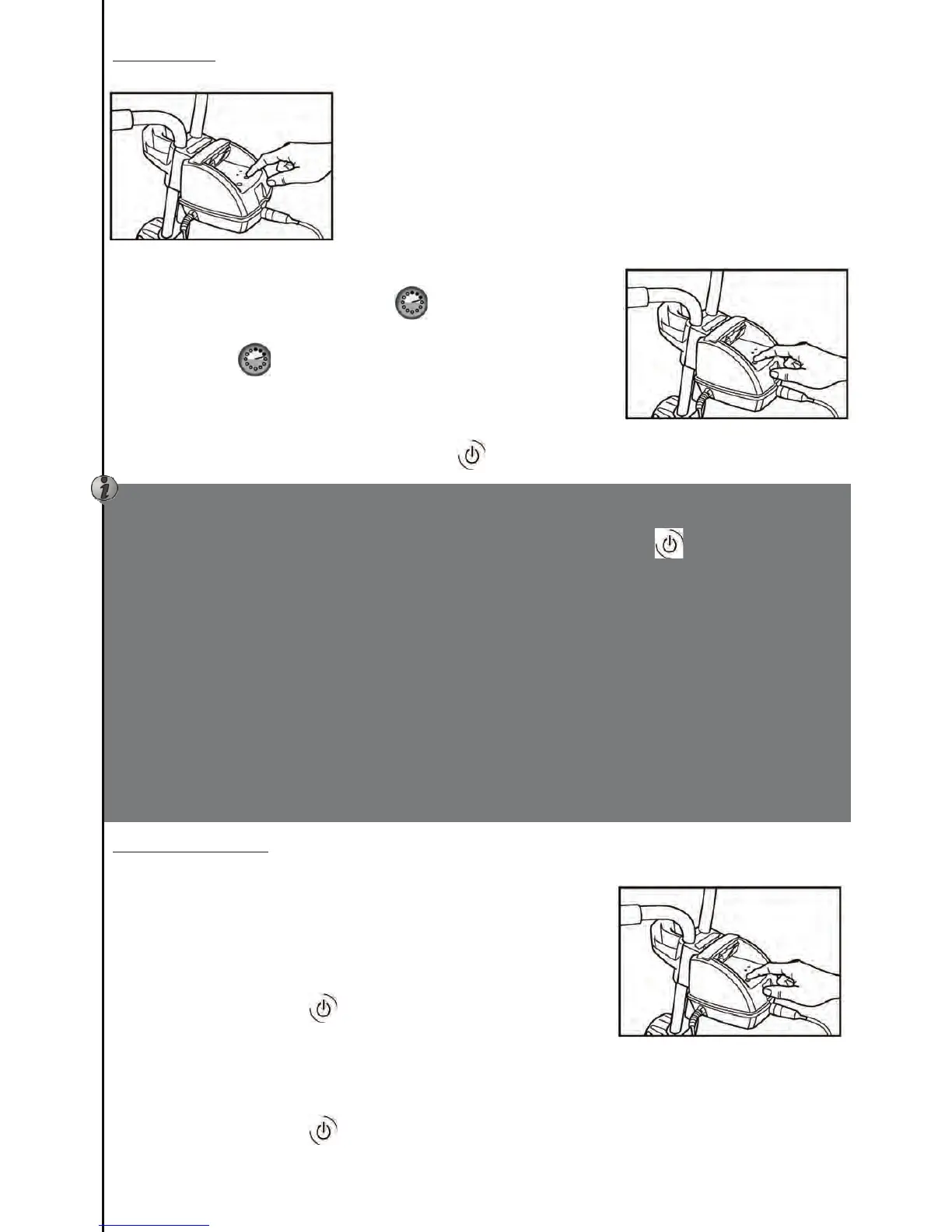
x Thecleanerisstartedbypressingthekeycorrespondingtooneofthe2
cleaning programmes (Diagram 10). The indicator located above the
selected programme will light up. The cleaner starts after a few
secondsandcalculatesitsowntrajectory.
x Youcanchangetheselectedcleaningprogrammeatanytimewhenthe
cleaner is operating. Just press the key corresponding to the other
programme(IorII).Acompletenewcleaningcyclewillstart.
APPLIESFORVORTEX™4ONLY:
x Dependingonhowclean/dirtythepoolis,youmaywishtomodifythe
lengthofthecleaningcyclebypressing
.Youcanincreasethistime
by one hour or reduce it by 30 minutes by pressing the key a second
time. Pressing
a third time will reset to the initial predefined
cleaningtimes(1hr30or2hrs30).
Uponstartingupthenexttime,therobotwillrecalltheparametersthat
wereusedforthepreviousoperation.
x Tostopthecleanerduringaprogrammepresson
.Diagram11.
2.4.3.Endofprogram
VORTEX™3,VORTEX™34WD
x Therobotstopsandtheindicatorcorrespondingtotheprogramislit.
At the end of the cycle the robot must cool down for 15 minutes in
order to avoid potential damage to the seals. After 15 minutes the
indicatorwillblinkmeaningthatthecleanercanberemovedfromthe
water.
x Pressonthepowerbutton
.Diagram12.
VORTEX™4
x Therobotstopsandthe4ledindicatorsflashsuccessivelyinaloop.Wait15minutesbeforeremovingthe
robotfromthepool.Thiscorrespondstothecoolingtimerequiredinordertoavoidpotentialdamagetothe
seals.
x Pressonthepowerbutton
.Diagram12.
Remarks:
Ifyoupressthekeyforthecurrentprogrammeitwillhavenoeffect.
Attheendofthe programmethecleanerstopsbut remainsinstandby.Press
toshutoff thecleaner
powersupply.
Due to the vast range in the shape and size of different pool steps, it is possible that the cleaner may
encounterdifficultiesincleaningtheseareasofapool.Whentherobotisdescendingalongthepoolwall,it
mayalsocomeawayfromthewall.
Thecleanerlowersitssuctionpowerwhenreversing.Somedebrismaynotbesuctionedduringthisreverse
action.
Ifthecleanersucksinairatthewaterlineasafetymechanismistriggeredanditwillsinkbacktothebottom
afterafewmoments.
Thecleanertendstotipoverandfloatforafewseconds,thisisnotamalfunction,itwillreturntoitsnormal
position.
Ifyourpoolhasanalarmitisstronglyrecommendedthatthepooliswellfilledsothattherobotdoesnot
touchthealarmrepeatedlyanddamageit.
Itisalsostronglyrecommendedtokeepthepoolcover openwhenusingthecleanerin"bottomandsides"
Diagram10
Diagram11
Dia




 To Next Page