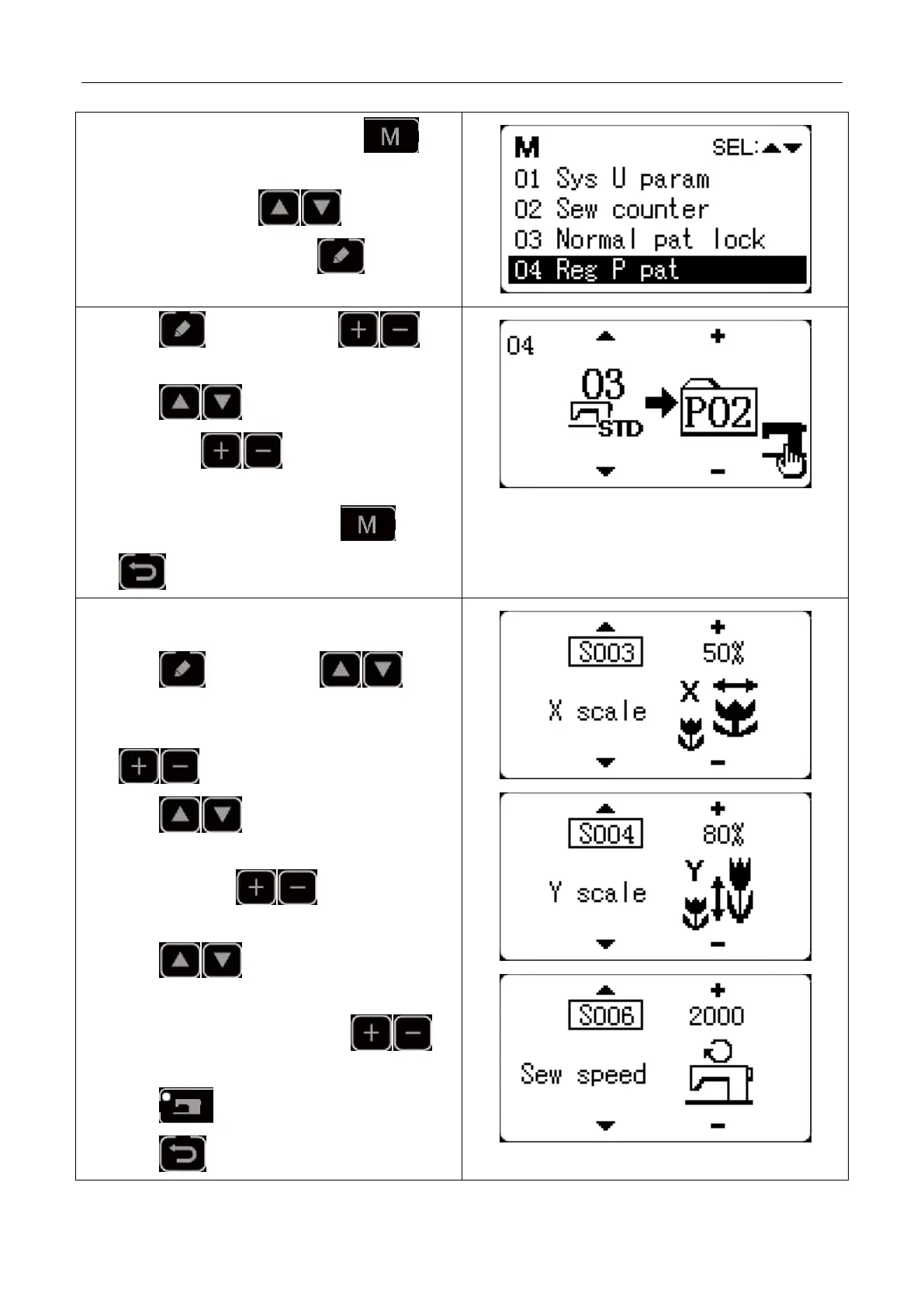
1) Turn on the power and then press key.
(Sewing LED is off.) Enter mode setting (memory
switch setting). Press key to select “04
register P pattern” and press key to enter
pattern register mode.
2) Press key and then press key
to edit item data.
3) Press key to set the standard pattern as
No.3. Press to set P-No. as 2. Press
READY key to register P2 and the mode interface
will be displayed. Then press key or
key.
4) Set separately the X scale rate as 50%, Y scale rate as
80%, sewing speed as 2000 sti/min.
5) Press key , then press key
and X scale rate will be displayed as 100%. the
increment of X scale rate can be set as 1%. Press
key to change the data into 50%.
6) Press key and Y scale rate will be
displayed as100%. The increment of Y scale rate can
be set as 1%. Press key to change the
data into 80%.
7) Press key and sewing speed will be
displayed as the current value. The increment of
sewing speed can be set as 100. Press
key to change the data into 2000 sti/min.
8) Press key to complete setting.
9) Press key to complete pattern registering



 To Next Page