20 ZOLL AED PLUS Administrator’s Guide
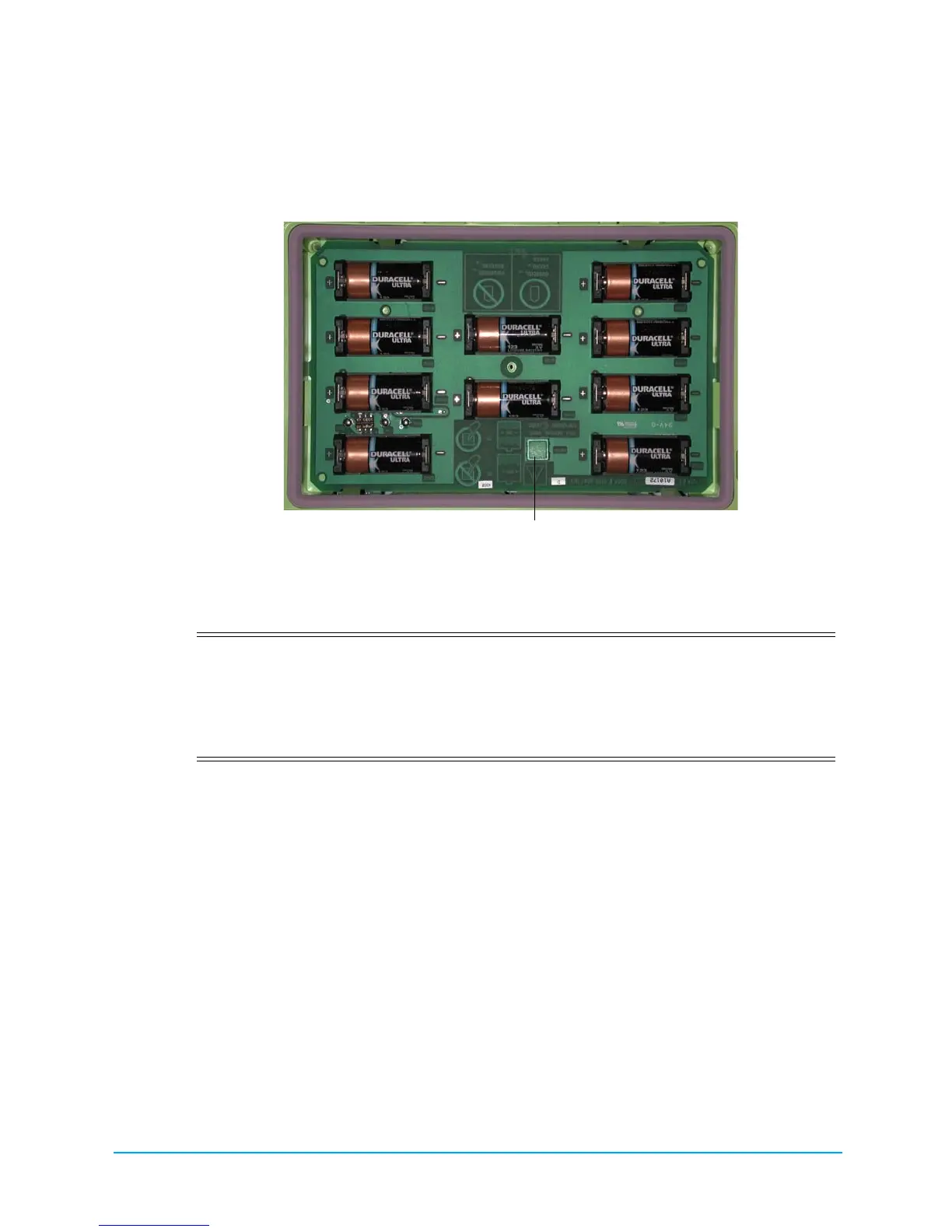
2. Remove all batteries at once and dispose of batteries properly. Place new batteries into the battery
bank, observing battery polarity markings and making sure that all batteries are securely seated and
properly oriented. After placing the first 5 to 9 batteries in the battery well, the
INSTALL BATTERIES audio prompt reminds you to install the remaining batteries in the battery
compartment.
Figure 8: Battery Compartment
3. After installing new batteries, press the Battery Reset Button inside the battery compartment when
prompted (see Figure 8). Pressing the button resets the battery usage indicator to full charge.
NOTE If you do not press the Battery Reset Button in the battery well within 15 seconds after installing all
batteries, the AED Plus assumes that the batteries installed in the device were temporarily removed, and
are not fully charged.
NOTE Because Lithium Manganese Dioxide battery cells do not contain toxic materials, they may be disposed of
in general trash after discharge or when properly protected against shorting between terminals.
Identifying Battery Condition
Battery capacity depletes during standby operation of the unit, while the unit is operating, and as a result
of each defibrillation. Battery capacity also gradually diminishes over a shelf life of years without use.
The AED Plus monitors energy remaining in the installed batteries. When battery capacity is low or
depleted, the AED Plus will not function to specification. When a low battery condition occurs, the
AED Plus:
• emits an audible alarm or “beep” once every minute, if the AED Plus is off
• issues the CHANGE BATTERIES audio prompt, if the AED Plus is on
CAUTION! You MUST replace all 10 batteries at once. Do not replace individual batteries. The AED
Plus cannot detect whether all batteries or only a few batteries have been replaced. Do
not place used batteries into the AED Plus. Using less than fully charged batteries
can affect the unit when performing a rescue. DO NOT press the Battery Reset
Button if all the batteries are not new. The AED Plus then assumes that they are the same
batteries that were just removed.





 To Next Page