EasyManua.ls Logo

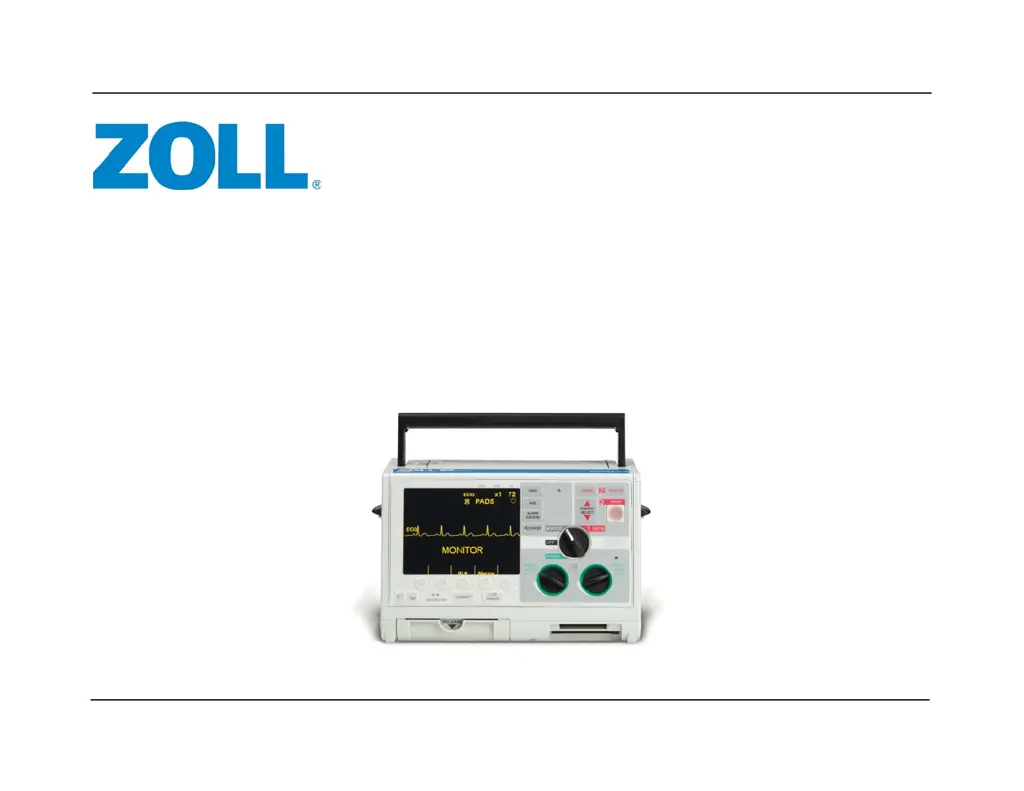
ZOLL M Series - Service Manual

ZOLL M Series
186 pages
Print Icon
To Next Page IconTo Next Page
Loading...
9650-0450-01 Rev.U
Service Manual
M Series
®

Table of Contents

Other manuals for ZOLL M Series

Questions and Answers

  • B
    brianbrownSep 8, 2025
    What to do if ZOLL Blood Pressure Monitor can't detect blood pressure due to motion or vibration?
    • R
      Ryan HallSep 9, 2025
      If the ZOLL Blood Pressure Monitor is unable to detect systolic, diastolic, or mean blood pressure due to excessive motion or vibration, take a single blood pressure measurement. Keep the patient as still as possible and insulate the patient and cuff from outside vibrations as much as possible.
  • A
    arnoldryanAug 26, 2025
    What to do if the displayed HR is not accurate with artifact present on ZOLL Medical Equipment?
    • T
      Tyler BrooksAug 26, 2025
      If the displayed heart rate (HR) is not accurate and there is artifact present, try the following: * Reduce or eliminate ECG artifact caused by electrode or patient cable movement by routing cables so they don’t pull on electrodes or swing excessively. * Ensure the patient is motionless. * Check for possible excessive radio frequency interference. * Verify a good connection of electrodes to the patient. Prepare the patient’s skin before electrode attachment. * Move patient cables away from other electrical equipment, especially any RFI source. * Ensure the ECG cable fits snugly in the unit. You may also try changing the ECG cable or replacing/repositioning the ECG electrodes.
  • T
    tiffanykelleyAug 27, 2025
    What causes electronic interference in ZOLL M Series Medical Equipment?
    • K
      Katherine RichardsonAug 27, 2025
      Electronic interference can be caused by excessive radio frequency interference. To resolve this, check for potential sources of RFI and move patient cables away from other electrical equipment. Try turning off sources of excessive RFI or moving the M Series unit away from the RFI source.
  • R
    ronalddudleySep 18, 2025
    What to do if ZOLL Medical Equipment shows false low reading?
    • T
      tmillerSep 18, 2025
      If your ZOLL Medical Equipment shows a false low reading, select a smaller cuff and lower the patient’s limb to heart level.
  • K
    Keith ShepherdNov 24, 2025
    How to fix ECG LEAD OFF message on ZOLL M Series Medical Equipment?
    • M
      Marcus WrightNov 24, 2025
      If you see an ECG LEAD OFF message, here's what you can do: * Ensure the ECG electrode site is properly prepared by cleaning the site, lightly abrading the patient’s skin, and/or clipping the patient’s hair at the electrode site. * If electrode gels are dry, replace the electrodes with new ones from a freshly opened package. * Check that all leads are attached. * Set the monitor to another lead. * Verify that the electrodes have not exceeded their expiration date. You can also try to reproduce the problem using a simulator. Inspect the ECG cables for corrosion or broken connector pins and check for intermittent connections by flexing the cable at the yoke and snap connectors. Verify the cable connection to the defibrillator, inspect the ECG input connector and its pins, and rep...
  • G
    Gloria BowmanSep 13, 2025
    What to do if ZOLL Medical Equipment shows catheter whip?
    • K
      katelynwilsonSep 13, 2025
      If you are experiencing catheter whip, overdamped system, or underdamped system, follow your institution's procedures to address the catheter whip. Check for blood clots and remove them if present. Also, check for any blood remaining in the catheter following blood sampling, and eliminate it if found. Remove all air bubbles, including pinpoint air bubbles, from the fluid circuit.
  • D
    Dustin HenrySep 4, 2025
    What does 'CO2 OUT OF RANGE' mean on ZOLL M Series Medical Equipment?
    • R
      Ronald WillisSep 4, 2025
      If your ZOLL Medical Equipment displays 'CO2 OUT OF RANGE (dashed lines for CO )', it means the calculated CO value is greater than 100 mmHg. If this error continues, perform an adapter or module zero.
  • W
    whiteheadjenniferSep 4, 2025
    Why does my ZOLL Medical Equipment say 'CO2 IN ADAPTER: WAIT'?
    • S
      Stephen KellerSep 4, 2025
      If the ZOLL Medical Equipment displays 'CO2 IN ADAPTER: WAIT', it means there was CO in the adapter when you tried to zero it, or you tried zeroing within 20 seconds of the previous zero. Remove the adapter from any CO source, including exhaled breaths and ventilator exhaust valves. Wait up to 20 seconds before trying the adapter zero again.
  • H
    hchavezNov 23, 2025
    What to do if CHECK PADS/POOR PAD CONTACT message displays on ZOLL M Series?
    • J
      Jessica SimpsonNov 23, 2025
      If you see a CHECK PADS/POOR PAD CONTACT message, try the following: * Remove and reinsert the PADS connector into the universal cable. * Check for damaged defibrillator pads, wires, or the connector. * Make sure the defibrillator pads aren't dried out or expired. * Clip the patient’s hair (do not shave) and dry the pad contact area. * Connect the cable to the test plug. If the DEFIB PAD SHORT message appears, the cable is functioning properly. In this case, check the connections of the pads to the patient and to the defibrillator cable. If the DEFIB PAD SHORT message doesn't appear, remove the defibrillator from service. Alternatively, connect the universal cable to the shorting plug. The DEFIB PAD SHORT message should appear when you SELECT PADS. If it doesn't, try another un...
  • B
    Brian WilsonAug 30, 2025
    What does 'REPLACE CO2 MODULE' mean on ZOLL Medical Equipment?
    • W
      Wanda MillerAug 30, 2025
      If your ZOLL Medical Equipment displays 'REPLACE CO2 MODULE', it means that the module is defective, incompatible, under temperature, or the temperature has been unstable for more than 5 minutes. You should replace the module.

Summary

Chapter 1 Maintenance Tests

Equipment Requirements for Maintenance Tests

Lists all necessary equipment for performing the M Series maintenance tests.

Physical Inspection of the Unit

Details steps for physically inspecting the unit for damage or wear.

Front Panel Button Test

Tests the functionality of all buttons and controls on the front panel.

Defibrillator Self Test

Performs an internal self-test of the defibrillator's functions.

Shock Test

Tests the energy delivery and accuracy during shock delivery.

SpO2 Monitor Test

Tests the pulse oximetry functionality and readings.

EtCO2 Monitor Test

Tests the end-tidal carbon dioxide monitoring functionality.

NIBP Monitor Test

Verifies the repeatability of NIBP measurements and pulse rate calculation.

Chapter 2 Troubleshooting

ECG LEAD OFF Message Displays

Troubleshooting steps for ECG lead off errors.

CHECK PADS;POOR PAD CONTACT Message

Troubleshooting for pad connection errors.

ZOLL M Series Error Messages

Lists and explains error messages and their technical actions.

Chapter 3 Replacement Parts

Replacement Parts List

Lists available replacement parts for the ZOLL M Series devices.

Chapter 4 Functional Description

Main System Board Functions

Explains the primary functions performed by the M Series Main System Board.

High Voltage Module

Explains the HV module's function in pacing and defibrillation.

Defibrillator Charging and Discharging

Describes how the defibrillator charges and discharges energy.

Discharging Process

Explains the process of delivering energy to the patient or internally.

12 Lead Option

Explains the functionality and usage of the 12 lead ECG option.

Pulse Oximetry (SpO2)

Describes the SpO2 monitoring option and its operation.

End Tidal Carbon Dioxide (EtCO2)

Details the EtCO2 monitoring option and its functionality.

Biphasic Waveform

Explains the Rectilinear Biphasic waveform and its generation.

Chapter 5 Disassembly Procedures

Safety Precautions

Outlines critical safety measures before performing disassembly.

Front Panel Removal

Step-by-step guide to remove the front panel assembly.

CCT Front Panel Removal

Specific instructions for removing the front panel of CCT units.

System Board Assembly Removal

Guide to safely remove the system board assembly.

Biphasic High Voltage Module Removal

Steps to remove the biphasic high voltage module.

Monophasic: High Voltage Assembly Removal

Instructions for removing the monophasic high voltage assembly.

Monophasic: High Voltage Capacitor Disassembly

Steps for disassembling the monophasic high voltage capacitor.

Appendix A Overview

ZOLL M Series Maintenance Test Checklist

A checklist for recording results of maintenance tests.

ZOLL M Series Specifications

General IconGeneral
Pacer Rate30 - 180 ppm
Display TypeLCD
Defibrillator TypeManual and AED
Monitor DisplayHigh-resolution LCD
ECG Monitoring3-lead
PacingDemand
Battery TypeLithium-ion
DisplayHigh-resolution LCD
WaveformBiphasic Truncated Exponential (BTE)
Monitoring ParametersECG, SpO2, EtCO2, NIBP, temperature
ConnectivityData port for data transfer
Pacer TypeTranscutaneous
Pacer Output0 - 140 mA
PrinterIntegrated thermal
Energy Selection2, 3, 5, 7, 10, 15, 20, 30, 50, 70, 100, 120, 150, 200 Joules

Related product manuals