26
ZOOM G1u
Effect Types and Parameters
27
ZOOM G1u
Checking the G1u Version
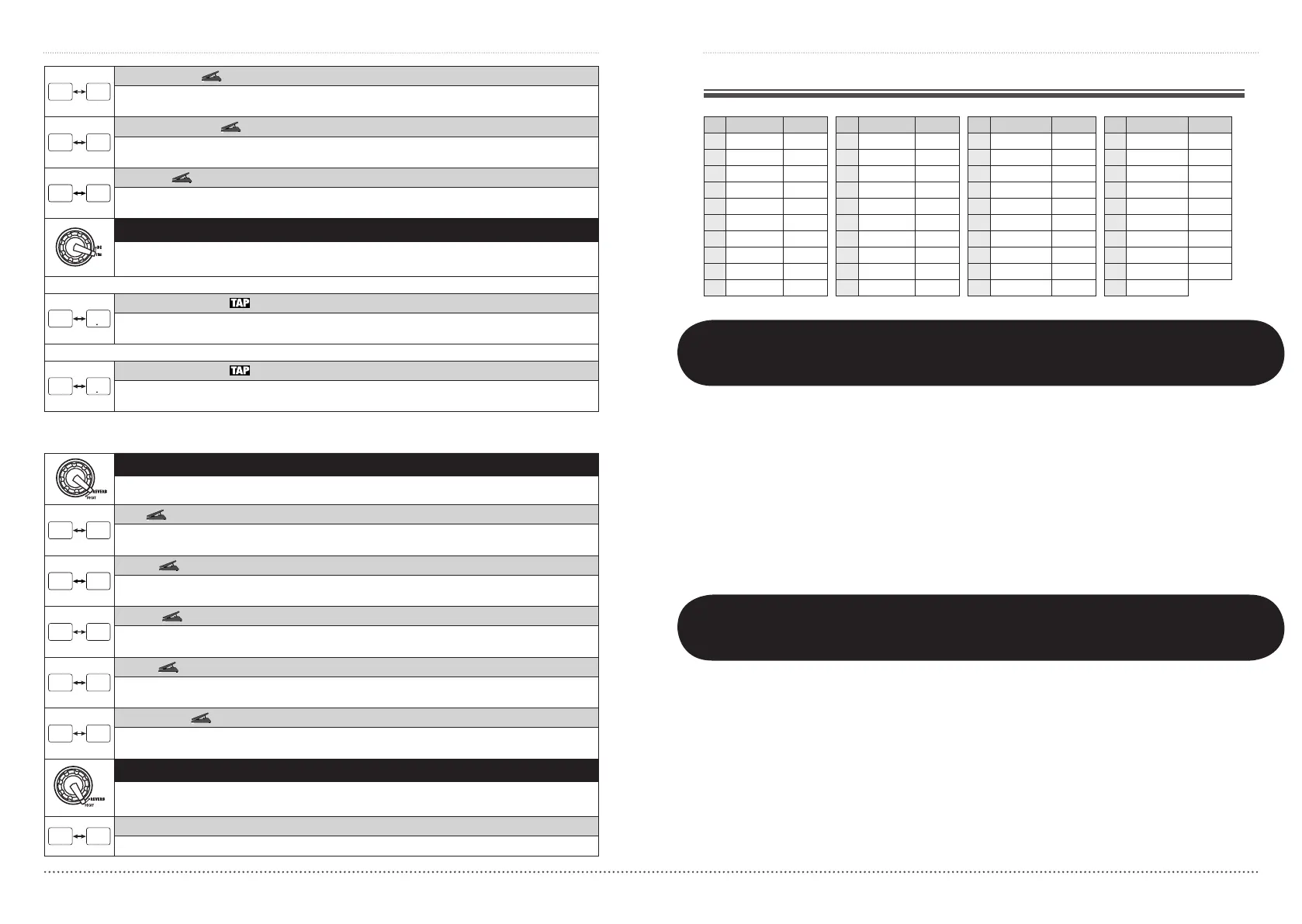
Analog Delay
This effect simulates an analog delay with a long delay time of up to 5000 msec. The right-digit setting
values control the mixing ratio of the effect sound and the feedback amount.
Ping Pong Delay
This is a ping-pong type delay where the delay sound alternates between left and right. The right-digit setting
values control the mixing ratio of the effect sound and the feedback amount.
Reverse
This is a special delay where the effect sounds as if playing in reverse. Maximum delay time is 2500 msec.
Highersettingsresultinstrongereffectsound.
TIME (Prm2)
Controls parameter 2 of the DELAY module. The setting range is different for the
Reverse effect type and other effect types.
When Delay – Ping Pong Delay is selected
Time(DelayTime)
Setsthedelaytime.Inthe10–1000millisecondrange,theadjustmentisperformedin10-msecsteps
(1–99,1.0).Above1second,theadjustmentisperformedin100-msecsteps(1.1–5.0).
When Reverse is selected
Time(DelayTime)
Setsthedelaytime.Inthe10–1000millisecondrange,theadjustmentisperformedin10-msecsteps
(10–99,1.0).Above1second,theadjustmentisperformedin100-msecsteps(1.1–2.5).
nREVERB module
REVERB (Type&Prm1)
Selects the REVERB module effect type and controls parameter 1 at the same time.
Hall
Thisreverbeffectsimulatestheacousticsofaconcerthall.Higherright-digitsettingsincreasethemixing
ratio of the effect sound.
Room
Thisreverbeffectsimulatestheacousticsofaroom.Higherright-digitsettingsincreasethemixingratioof
the effect sound.
Spring
Thiseffectsimulatesaspring-typereverb.Higherright-digitsettingsincreasethemixingratiooftheeffect
sound.
Arena
Thisreverbeffectsimulatestheacousticsofalargevenuesuchasasportsarena.Higherright-digitsettings
increase the mixing ratio of the effect sound.
Tiled Room
Thisreverbeffectsimulatestheacousticsofatiledroom.Higherright-digitsettingsincreasethemixingratio
of the effect sound.
DECAY (Prm2)
Controls parameter 2 of the REVERB module. This parameter is common to all effect
types.
Decay
Adjuststhedecayduration.
Troubleshooting
• Nopower
Referto"Turnpoweron"onpage6.
• Reverbeffectdoesnotoperate
While a rhythm pattern is playing, the reverb
effect is not available. Stop the rhythm pattern
first (
g
p. 10).
• Delayeffectdoesnotoperate
While the looping function is being used, the
delay effect is not available. Stop the looping
function first (
g
p. 12).
• Patchswitchingdoesnotchangethe
sound
Is the patch selection method of the G1u set to
"pre-select" (
g
p.18)?Turnpoweroffandthen
on again to return to normal operation.
• Highlevelofnoise
IsZOOMACadapterbeingused?Besuretouse
onlyanadapterfor9VDC,300mAwithcenter
minus plug (ZOOM AD-0006).
• Batterylifeisshort
Aremanganesebatteriesbeingused?Continuous
operation time is about 10 hours with alkaline
batteries.
Rhythm Function Preset Patterns
# Name TimSig # Name TimSig # Name TimSig # Name TimSig
1 8beat 1 4/4 11 METAL 2 4/4 21 POP 3 4/4 31 BALLAD 1 4/4
2 8beat 2 4/4 12 THRASH 4/4 22 DANCE 1 4/4 32 BALLAD 2 3/4
3 8beat 3 4/4 13 PUNK 4/4 23 DANCE 2 4/4 33 BLUES 1 4/4
4 8shuffle 4/4 14 DnB 4/4 24 DANCE 3 4/4 34 BLUES 2 3/4
5 16beat 1 4/4 15 FUNK 1 4/4 25 DANCE 4 4/4 35 JAZZ 1 4/4
6 16beat 2 4/4 16 FUNK 2 4/4 26 3per4 3/4 36 JAZZ 2 3/4
7 16shuffle 4/4 17 HIPHOP 4/4 27 6per8 3/4 37 METRO 3 3/4
8 ROCK 4/4 18 R'nR 4/4 28 5per4 1 5/4 38 METRO 4 4/4
9 HARD 4/4 19 POP 1 4/4 29 5per4 2 5/4 39 METRO 5 5/4
10 METAL 1 4/4 20 POP 2 4/4 30 LATIN 4/4 40 METRO
Checking the G1u Version
Checking the G1u Software Version, perform the following steps.
1.TurnpowertotheG1uonwhile
holdingdownthe[BANKUP·TAP]key
and the [
Q
] foot switch.
The higher two digits of the current version are
shown on the display.
2.Pressthe[
Q
] foot switch.
The l
ower two digits of the current version are
shown on the display.
3. Pressing either of the [
W
]/[
Q
] foot
switches causes the version display
togooff,andtheG1urestarts.
Detailed information about the latest software
version can be found on the ZOOM web site:
http://www.zoom.co.jp/


 To Next Page