10
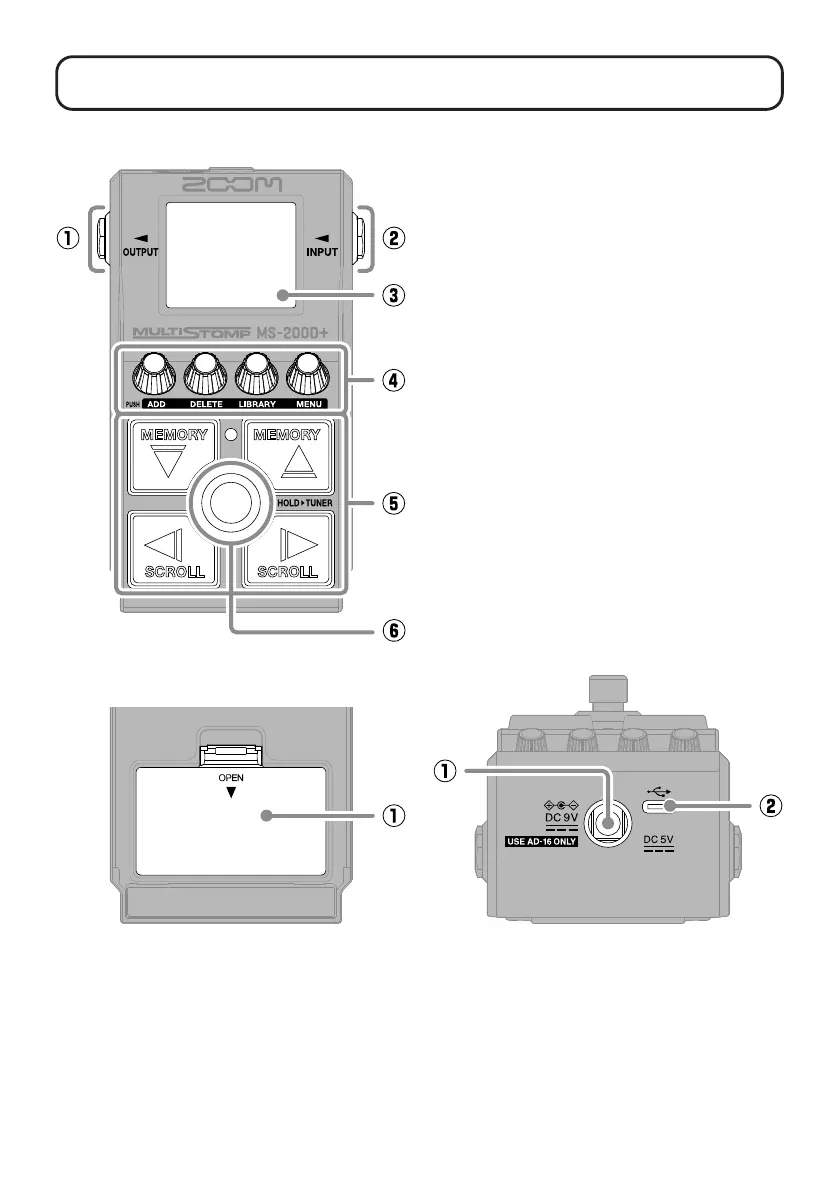
Functions of parts
①
Output jacks
Connect a guitar amp or another effect
here.
②
Input jack
Connect a guitar here.
③
Display
This shows the selected patch memory
and its effects, along with their parameter
setting values, and other information.
④
Parameter knobs
Use these to adjust effect parameters
and make various settings.
⑤
Direction buttons
Use these to select patch memories and
effects, for example.
They can be operated by foot.
⑥
Footswitch
This turns the effect on/off.
Press and hold this to switch to the
tuner.
■
Bottom
①
Battery cover
Open this when installing or removing
AA batteries.
■
Top
■
Back
①
DC 9V AC adapter connector
Connect the dedicated AC adapter
(ZOOM AD-16) here.
②
USB (Type-C) port
Use this to connect to a computer or an
iOS/iPadOS device.
This supports opera-
tion on USB bus power.



 To Next Page