
 Need help?
Do you have a question about the Zoom UAC-2 and is the answer not in the manual?
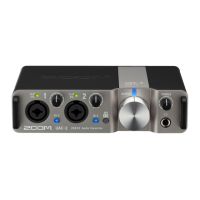
Describes the UAC-2 as a USB3.0 audio interface compatible with Windows, Mac, and iPad.
Highlights the asynchronous transfer system for faithful audio reproduction and high-quality sound.
Details the high-performance mic preamps, Hi-Z connections, and phantom power capabilities.
Information on the dedicated mixer application for internal mixer and effect settings.
Explains the meaning of warning, caution, and other symbols used in the manual.
Covers safe handling, operating environment, connection procedures, and volume usage.
Details precautions regarding electrical interference, cleaning, and temperature.
Instructions on what to do if the UAC-2 malfunctions or operates abnormally.
Information on trademarks, software copyrights, and usage restrictions.
Identifies and labels all controls and connectors on the top panel of the UAC-2.
Identifies and labels all ports and switches on the rear panel of the UAC-2.
Step-by-step guide to downloading and installing the necessary driver for computer connection.
Instructions on connecting the UAC-2 via USB and turning on the power.
Instructions on enabling the CLASS COMPLIANT MODE switch for iPad connectivity.
Details on using adapters and final steps to connect the UAC-2 to an iPad.
Guide on connecting guitars, basses, and keyboards using TRS/mono phone cables.
Explanation of when to use the Hi-Z switch for passive guitars or other instruments.
Instructions for connecting dynamic and condenser microphones using XLR cables.
Details on how to enable phantom power (+48V) for condenser microphones.
Guidance on setting input gain using level indicators to prevent clipping.
How to connect audio output devices and adjust volume for headphones and speakers.
Setting up direct monitoring for zero-latency audio monitoring of inputs.
Guide for connecting MIDI keyboards, controllers, and sound modules to the UAC-2.
Step-by-step instructions to initialize settings and restore the UAC-2 to its factory defaults.
Solutions for when the computer cannot select or detect the UAC-2 device.
Troubleshooting steps for no sound or quiet playback from speakers or headphones.
Addressing issues with recorded audio being too loud, too quiet, or silent.
Fixes for distorted sound coming from the input jacks.
Solutions for audio skipping during playback or recording sessions.
Troubleshooting for inability to play or record audio correctly.
Resolving issues encountered when connecting the UAC-2 to an iPad.
Detailed specs for input/output connectors, gain, impedance, and phantom power.
Technical data including frequency response, input conversion noise, and dynamic range.
Information on interface, power source, dimensions, and weight of the unit.
Lists the items that should be included with the UAC-2 audio converter.
 General
| Digital audio optical in | 0 |
|---|---|
| On/off switch | Yes |
| Product color | Black |
| Operating voltage | 5 V |
| Power consumption (typical) | 5 W |
 Weight and Dimensions
| Depth | 113.9 mm |
|---|---|
| Width | 176 mm |
| Height | 46.2 mm |
| Weight | 750 g |

 To Next Page









