Please include the Power Switch to your network BEFORE connecting it to the appliance you wish to control.
Auto Z-Wave Inclusion
1. Put your Z-Wave controller into inclusion mode
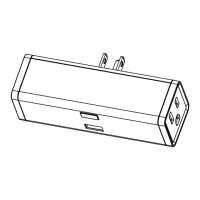
2. Plug the Power Switch into a grounded receptacle located within direct range from your Z-Wave gateway
controller
3. The LED indicator will start flashing blue, then turn blue (on) or pink (off) once included
4. A new on / off device will be recognized by your Z-Wave controller
Manual Z-Wave Inclusion
1. Plug the Power Switch into a grounded receptacle located within direct range from your Z-Wave gateway
controller
2. Put your Z-Wave controller into inclusion mode
3. Press and release the Z-Wave button 3 TIMES QUICKLY
4. The LED indicator will start flashing blue, then turn blue (on) or pink (off) once included
5. A new on / off device will be recognized by your Z-Wave controller
Secure Z-Wave Inclusion
1. Plug the Power Switch into a grounded receptacle located within direct range from your Z-Wave gateway
controller
2. Put your Z-Wave controller in secure inclusion mode
3. Press and HOLD the Z-Wave button for at least 3 seconds
4. The LED indicator will start flashing green, then turn blue (on) or pink (off) once included
5. A new secure on / off device will be recognized by your Z-Wave controller
TROUBLESHOOTING TIPS:
If you are unable to include the Z-Wave Power Switch to your controller, please try one of the following:
Bring the Power Switch closer to your Z-Wave controller
Once you put the controller into inclusion mode, press and release the Z-Wave button quickly more than 3 times
to ensure the command has gone through
Put your controller into EXCLUSION mode. Press and release the Z-Wave button quickly 3 times, and then try
adding it to your network again
If you are trying to include the Power Switch as a secure device, please make sure your controller supports
AES signal encryption
Z-WAVE EXCLUSION
1. Plug the Power Switch into a grounded receptacle located within direct range of your Z-Wave gateway controller
2. Put your Z-Wave controller into exclusion mode
3. Press and release the Z-Wave button 3 TIMES QUICKLY
4. The LED indicator will start flashing orange, then turn blue (on) or pink (off) once excluded
5. The Power Switch will disappear from your controller’s device list. The LED indicator will remain solid orange



 To Next Page
 Loading...