EasyManua.ls Logo

Zte avid plus - User Manual

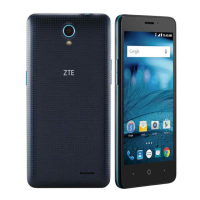
Zte avid plus
101 pages
Print Icon
To Next Page IconTo Next Page
Loading...
1
User Manual and
Safety Information

Table of Contents

Questions and Answers

  • A
    Andrew SalazarAug 14, 2025
    What to do if my Zte avid plus Cell Phone cannot be turned on?
    • J
      Julia GarciaAug 15, 2025
      If your Zte Cell Phone won't turn on, the battery may be depleted. Recharge the phone's battery and press the power button for about 12 seconds to reboot the device. Also, if the device is in 'Download Mode' with a constant red LED, recharge the phone’s battery and press the power button for approximately 12 seconds to reboot the device.
  • L
    lindabaileyAug 18, 2025
    Why is my Zte avid plus reception so poor?
    • L
      Lauren LewisAug 18, 2025
      Poor reception on your Zte Cell Phone can occur if the network signal is weak at your location, such as in a basement or near a tall building. Wireless transmissions may not effectively reach these areas. Try moving to a location where the network signal can be properly received. Also, the network might be busy, especially during peak hours. Avoid using the phone at these times, or try again after a short wait. If you are far from a base station, request a service area map from your provider.
  • J
    Joshua MillerAug 21, 2025
    What to do if my Zte Cell Phone battery is not charging?
    • K
      Kathryn SuttonAug 21, 2025
      If your Zte Cell Phone battery isn't charging, several factors could be responsible. The battery or charger might be damaged, in which case you should contact the dealer. Extreme temperatures can also prevent charging; ensure the phone's temperature is between 0°C and 45°C. Finally, check the connections between the battery and charger to ensure they are properly made.
  • Q
    qrushAug 25, 2025
    How to fix Zte avid plus unable to connect to the network?
    • J
      Jason WoodsAug 26, 2025
      If your Zte Cell Phone can't connect to the network, the micro-SIM card might be invalid, so you should contact your service provider. You might be outside the network's service area, in which case you should check the service area with your provider. Poor signal strength can also be a factor; try moving to an open space or closer to a window.
  • C
    Chad RoseAug 28, 2025
    Why does my Zte Cell Phone have shortened standby time?
    • P
      Paul JohnsonAug 28, 2025
      Shortened standby time on your Zte Cell Phone can be due to several reasons. The standby time depends on your service provider's system configuration. If you are in an area with a weak signal, temporarily power off the phone. A depleted battery or high temperatures can also shorten battery life, so try using a new battery. If the phone cannot connect to the network, it will continue searching for a base station, which drains the battery. Change your location or temporarily turn off the phone.
  • D
    Dr. Carlos Robinson PhDAug 31, 2025
    Why does my Zte Cell Phone crash, reboot, or freeze?
    • R
      Rhonda WheelerAug 31, 2025
      Your Zte Cell Phone might crash, reboot, or freeze due to incompatible third-party software. Try resetting the phone to factory status. Also, uninstall the software that may be causing the problem and upgrade the phone software.
  • T
    Taylor NavarroSep 3, 2025
    How to fix micro-SIM card error on Zte Cell Phone?
    • W
      Wesley RoweSep 3, 2025
      A micro-SIM card error on your Zte Cell Phone could be due to several reasons. The card may be malfunctioning or damaged, so take it to your service provider for testing. Ensure the micro-SIM card is inserted properly. Also, check for debris on the micro-SIM card contacts and clean them with a soft, dry cloth.
  • A
    Alejandro Fernandez MDSep 7, 2025
    What to do if PIN code is blocked on Zte avid plus?
    • J
      Jennifer SpencerSep 7, 2025
      If the PIN code on your Zte Cell Phone is blocked, it's likely because you've entered an incorrect PIN code three times consecutively. Contact your service provider. If they provide the micro-SIM card’s PUK code, use it to unlock the micro-SIM card.
  • J
    Jason GarciaSep 10, 2025
    Why am I unable to select certain features on my Zte avid plus?
    • M
      msimmonsSep 10, 2025
      Your service provider may not support these features, or you may not have applied for services that provide these features. Contact your service provider.

Zte avid plus Specifications

General IconGeneral
Display5.0 inches
Expandable StoragemicroSD, up to 32 GB
Rear Camera5 MP
Front Camera2 MP
ColorsBlack
NetworkGSM / HSPA / LTE
Bluetooth4.0
GPSYes, with A-GPS
USBmicroUSB 2.0
SIMMicro-SIM
Display TypeTFT

Videos

How To Reset ZTE Avid Plus Z828 - Hard Reset and Soft Reset

How to install SD and SIM card into ZTE Avid Plus Z828

How to get ZTE Avid Plus Z828 IN & OUT of safe mode

Related product manuals