Need help?
Do you have a question about the Zte h560n and is the answer not in the manual?
Enables quick and safe WLAN configuration with other devices.
Resets the device to factory default settings.
Steps to configure IP settings for Windows 7 and Vista systems.
Steps to configure IP settings for Windows XP and 2000 systems.
Instructions for connecting to a wireless network from a Windows 7 computer.
Instructions for connecting to a wireless network from a Windows XP computer.
Equipment compliance with FCC rules for Class B digital devices and interference.
Compliance with FCC RF radiation exposure limits and conditions for operation.
 General
| Wi-Fi Standards | 802.11b/g/n |
|---|---|
| Frequency Band | 2.4 GHz |
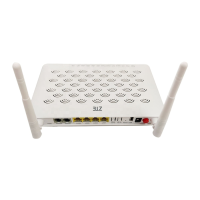
| Antenna | 2 x External Antennas |
| Antenna Type | External |
| Model | H560N |
| Ethernet Ports | 4 x 10/100 Mbps |
| Security | WPA/WPA2 |
| Device Type | 4G LTE Router |


 To Next Page