54 55
You can use your phone to take photos and record videos. Photos and videos are stored
on the phone’s microSDHC card or in the phone’s internal storage.
Capturing a Photo
1. Touch the Home Key > >
Camera.
2. Aim the camera at the subject and make any necessary adjustments.
3. Touch the area where you want the camera to focus, or leave the camera to autofocus
on the center of the image.
4. Lightly touch
.
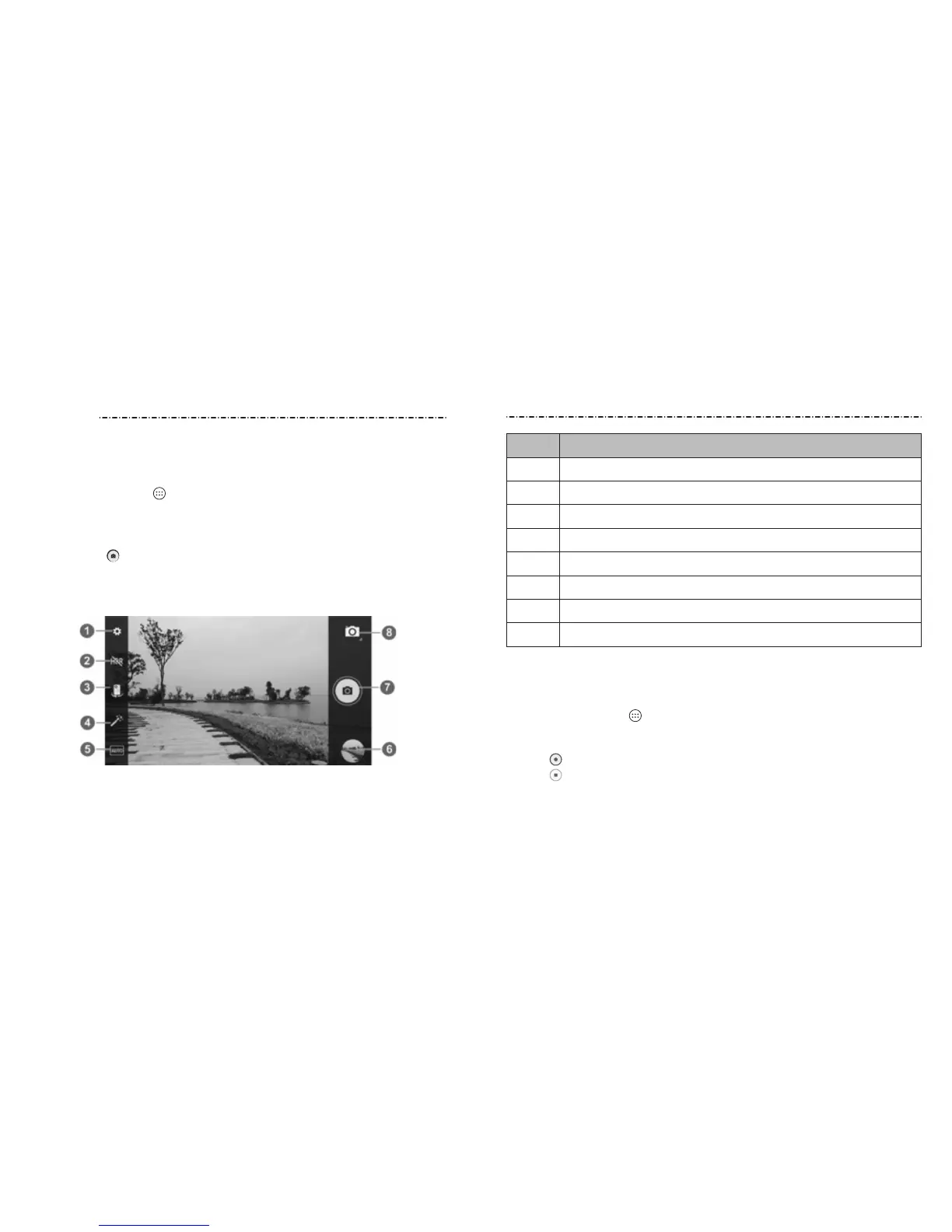
Number Function
1 Change the camera settings.
2 Turn on or o HDR function.
3 Switch between the front and back cameras.
4 Select color eect, only available for the back camera.
5 Change the camera modes.
6
View pictures and videos you have taken
7 Capture a picture.
8 Switch to camcorder or panorama mode.
WARNING! Keep a safe distance when using the ash. Do not point the ash toward the
eyes of people or animals.
Recording a Video
1. Touch the Home Key > >
Snapdragon Camera and switch to the camcorder mode.
2. Aim the camera at the subject. You can touch any area on the screen that you want the
camcorder to focus on before and during recording.
3. Touch to start recording.
4. Touch to stop recording.
Camera
Camera



 To Next Page