Need help?
Do you have a question about the Zte ZXHN H196A and is the answer not in the manual?
Read all safety cautions carefully before using the device.
Ensure proper ventilation and keep the device ventilated and dry.
Clean the device using a soft dry cloth after powering off.
Do not dispose of the device or battery improperly.
Information on product's natural resources and end-of-life recycling.
Details technical specifications like dimension and power adapter.
Lists items included in the product package.
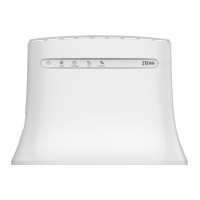
Details the front panel of the ZXHN H196A.
Describes the interfaces and buttons on the rear panel of the device.
Shows how to connect devices to the ZXHN H196A interfaces.
Details compliance with FCC RF Rules and radiation exposure limits.
The ZXHN H196A is an advanced dual-band concurrent 11ac Wi-Fi router designed to provide high-speed internet and IPTV services. It leverages a Gigabit Ethernet WAN connection, offering flexible broadband access choices to suit various network environments. This makes it a versatile solution for both home and office use, enabling users to build a robust network without extensive cabling.
One of the primary functions of the ZXHN H196A is to act as a central gateway for your home network. It delivers internet and IPTV services to various devices such as PCs, set-top boxes (STBs), and gaming consoles through its integrated interfaces, including Ethernet and Wi-Fi. The device is equipped with two Gigabit Ethernet LAN interfaces, which provide higher bandwidth and speed, making the network more future-proof and capable of handling demanding applications.
A key usage feature of this router is its dual-band concurrent Wi-Fi capability. It supports speeds up to 300 Mbps (802.11n 2x2 @ 2.4 GHz) and 1.16 Gbps (802.11ac 2x2 @ 5 GHz). This dual-band functionality allows for greater flexibility and performance, as devices can connect to either the 2.4 GHz band for wider coverage or the 5 GHz band for faster speeds and less interference. The Wi-Fi feature is particularly beneficial for end-users looking to establish a home network without the need for extensive physical cabling.
The ZXHN H196A also supports IPv4/IPv6 dual stack mechanisms, which is crucial for seamless network migration to IPv6. This ensures the device remains compatible with evolving internet protocols and future network requirements. For enhanced network management, the router supports TR-069, including the TR-098 data model. This feature is highly convenient for operators, enabling large-scale deployment and maintenance through zero-touch provisioning, which simplifies the setup and ongoing management of the device.
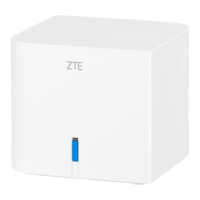
The device's front panel features an indicator light that provides visual cues about its status. A red solid light indicates that the device is starting or is abnormal. A flashing red light signifies a failed uplink connection or a failure to configure synchronization in Extender mode. A solid green light means the uplink connection is normal, while a flashing green light indicates that WPS negotiation is in progress. In Extender mode, a solid blue light shows a strong wireless uplink signal or successful connection and configuration synchronization. A flashing blue light in Extender mode suggests a weak wireless uplink signal. If the device is upgrading software, the indicator will flash red, green, and blue simultaneously.
The rear panel of the ZXHN H196A includes several important interfaces and buttons. The POWER port connects to the power adapter, supplying power to the device. The WAN port, an RJ-45 interface, is used to connect to the uplink access network, such as a modem or optical fiber modem. There are also two RJ-45 LAN ports (LAN1/LAN2) for connecting devices like computers, STBs, or other network equipment. A RESET button is available for restoring the device to its factory default settings; holding it for more than 5 seconds during power-on will trigger a system restart. Additionally, a WPS Push Button (located on the front but without a specific mark) allows users to enable or disable the WPS function for easy and secure Wi-Fi connections.
For optimal performance, particularly concerning wireless network coverage, the placement of the ZXHN H196A is critical. It is recommended to place the product away from objects that can affect wireless signal propagation, such as metallic objects or mirrors, which have high reflectivity. The device should also be kept away from electrical appliances that emit strong magnetic or electric fields, including microwave ovens, refrigerators, other wireless routers, cordless phones, or Bluetooth products, as these can cause interference. The router should ideally be installed on the same floor as the area where it will be used. To maximize signal strength, avoid placing other objects on top of the router and try to minimize the number of obstacles between the router and wireless terminals. Horizontally placing the product in the middle of the applied area, rather than in a corner, is advised. Furthermore, when placed horizontally, the recommended height for the device is between 1.2 to 1.5 meters.
Maintenance features include simple troubleshooting steps. If the green indicator is off after power-on, users should check if the wireless network is enabled, if the indicator function is disabled, or if the uplink signal is weak in Extender mode. If the red indicator is flashing, it suggests the WAN link is not established, the Ethernet cable is not correctly connected to the WAN interface, or professional help is needed from the service provider. If unable to connect to the network, users should verify the Ethernet cable connections to both WAN and LAN interfaces and check the front panel indicator for solid or flashing red. For more severe issues, the device can be restored to factory default settings by pressing the RESET button with a needle for over 5 seconds after power-on.
Cleaning the device requires powering it off and unplugging all connected cables, including the power cable, optical fiber, and Ethernet cable. Only a soft dry cloth should be used for cleaning; liquids or sprays are not recommended. Proper environmental protection is also emphasized, advising users not to dispose of the device or battery improperly but to observe local regulations for equipment disposal and treatment. The product is designed for reuse and recycling, encouraging users to utilize accredited electronics take-back systems to reduce environmental impact.
 General
| Wi-Fi Standard | 802.11ac |
|---|---|
| Frequency Bands | 2.4 GHz, 5 GHz |
| LAN Ports | 4 x 10/100/1000 Mbps |
| WAN Port | 1 x 10/100/1000 Mbps |
| USB Ports | 1 x USB 2.0 |
| Weight | 300 g |
| Security Features | WPA, WPA2, WPS |
| Power Supply | 12 V, 1 A |
| Wireless Speed | Up to 1200 Mbps |

 To Next Page