15
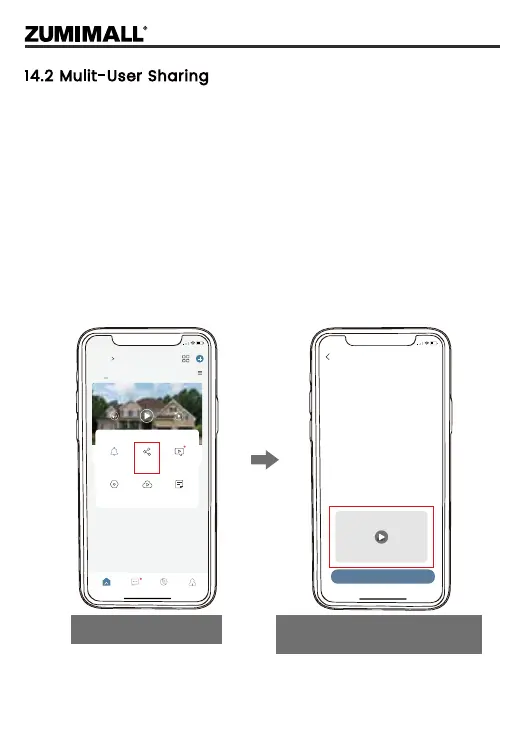
NOTE: One App account can’t log in on multiple devices at the
same time. One camera can’t be connected to multiple devices
either. But camera can be shared from A to B.
Step 1: B download ZUMIMALL App to his/her phone and create a
new account in the App.
Step 2: Click 'Add' in App on A’s phone.
Step 3: A scan B’s QR Code or input B’s account ID.
Step 4: B accept share and refresh the device page.
14.2 Mulit-User Sharing
5:48
The device has not been shared with anyone.
Select Device
How do you
share your camera with others?
Add
5:51
+
Home
Homepage Messages Search
All Devices
Me
Living room Bedroom
02-16-2022 01:56:08 PM
064958492
064958492
Notification Device
Share
Cloud
storage ex...
Settings
Alarm
Messages
Help &
Feedback
Click Device Share
Watch the instructional video
and click Add


 To Next Page