G3 series Description of menu
Description of menu
5-23
000015,046,05-2010, jmu
5
1-6-1-4 X park pos
Position after the cutter start s and stand-by p osition.
Definition of the X coordinates of the park position
2500
1-6-1-5 Y park pos
Position after the cutter start s and stand-by p osition.
Definition of the Y coordinates of the park position
2470
1-6-2 Light barrier options
No help text is available fo r this menu.
Warning!
Risk of injury caused by non-activation of safety devices
The light barriers are part of the safety device!
• only deactivate the light barriers for installation purposes at Zünd
• before delivery, activate the light barriers and check that they function
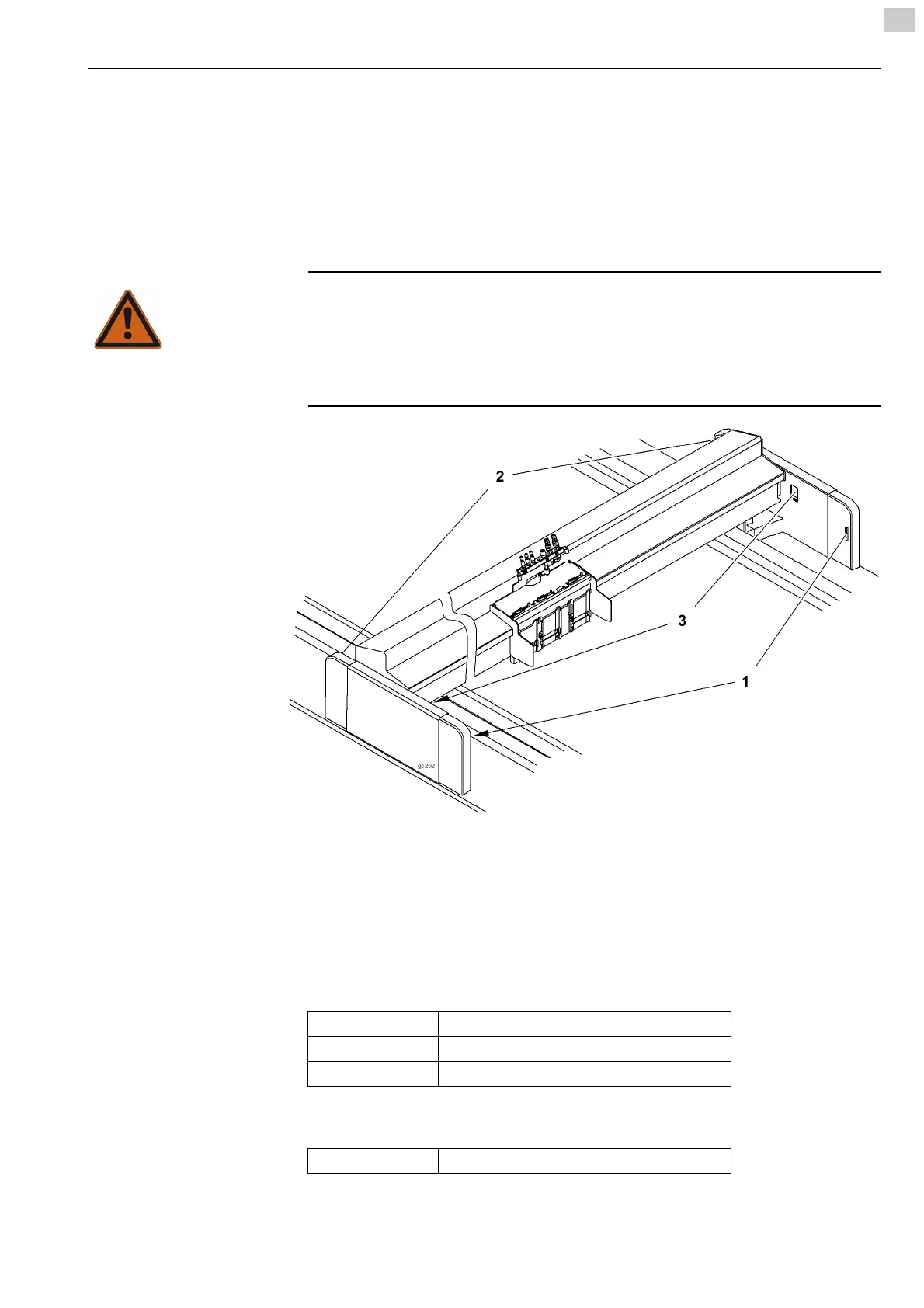
Fig. 5-13 Light barrier options
Menu for activating/deactivating the light barriers
3188
1-6-2-5-1 Front light barrier
No help text is available fo r this paramet er.FreeInterruptedError
Testing the front light barrier.
1-6-2-5-2 Back light barrier
No help text is available fo r this paramet er.FreeInterruptedError
Testing the front light barrier.
1 Front light barrier
2 Back light barrier
3 Reflex light barrier
Error Light barrier defective
Free The light barrier is not interrupted
Interrupted The light barrier is interrupted
Error Light barrier defective


 To Next Page