8 Calibrating the Hihat
When you connect the Hihat for the first time you must perform a calibration. Usually a message appears
asking you to calibrate the hihat. At this point, the hihat machine should of course already be installed or
set up correctly. Now take the barrel shaped receiver and slide it – green rubber side facing upwards –
down the hihat rod until it sits on the seat for the bottom cymbal. Now, mount the pad on the hihat
machine like a regular top cymbal and plug it into the module using the supplied stereo cable.
Then press the UNIT button and go to the page HPED using the PAGE buttons.
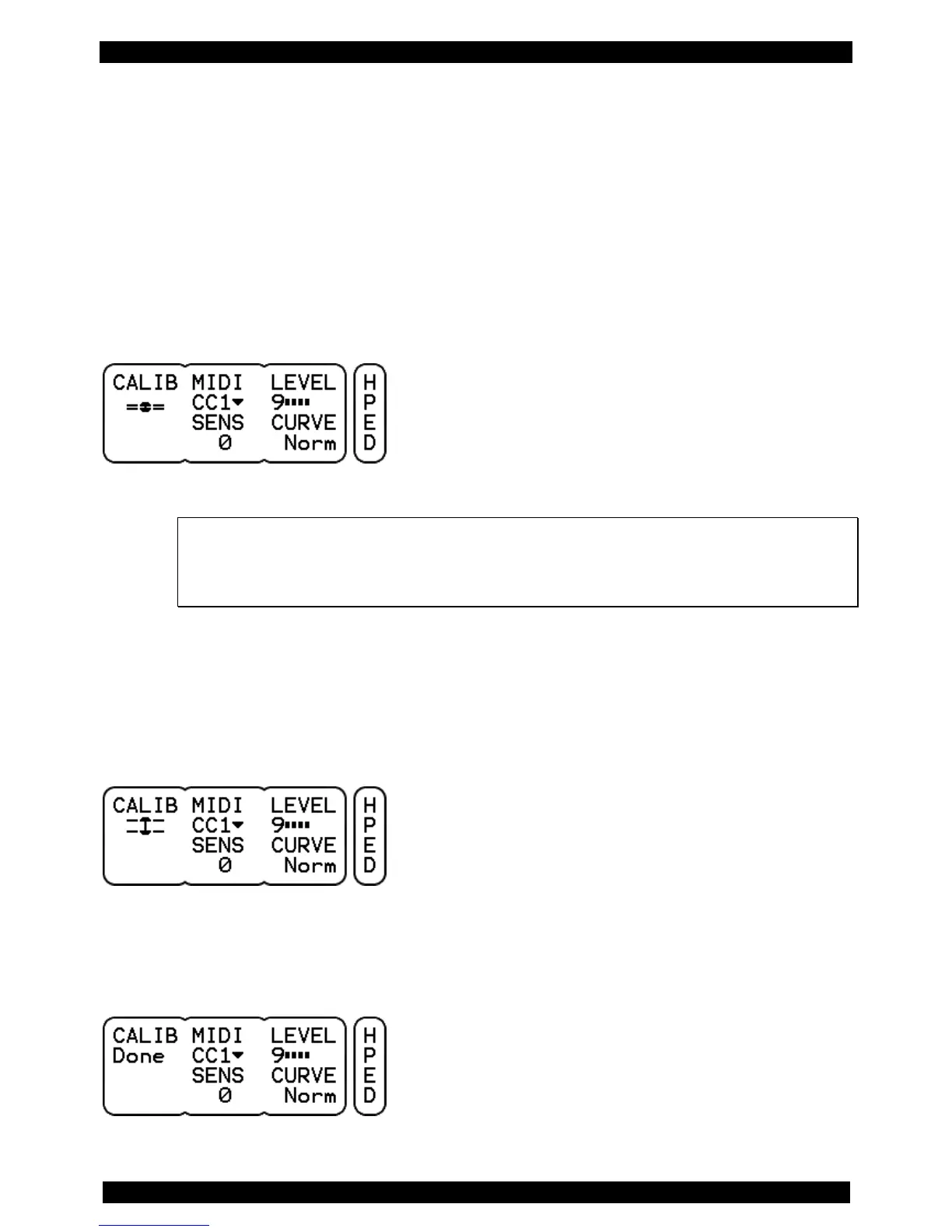
As soon as you have accessed the page HPED, the calibration process will start automatically. The
display shows a flashing icon that looks like a closed hi-hat.
If you have already performed a calibration of your module previously, the process will not
start automatically. The hihat symbol will not flash! To start the calibration, you need to press
the DATA button to the left. Now you see the flashing icon of a closed hi-hat and can
proceed.
“Close” the hihat, by stepping on the pedal, or releasing the clutch, so that the pad rests on the bottom.
Press the left DATA button again and the flashing icon will change once more. It now looks like an open
hi-hat.
Now mount the pad just like an acoustic hihat-cymbal at the desired height. Finish the calibration
procedure by pressing the DATA button a third time. If the calibration was successful, you will see
„Done“ in the display.



 To Next Page