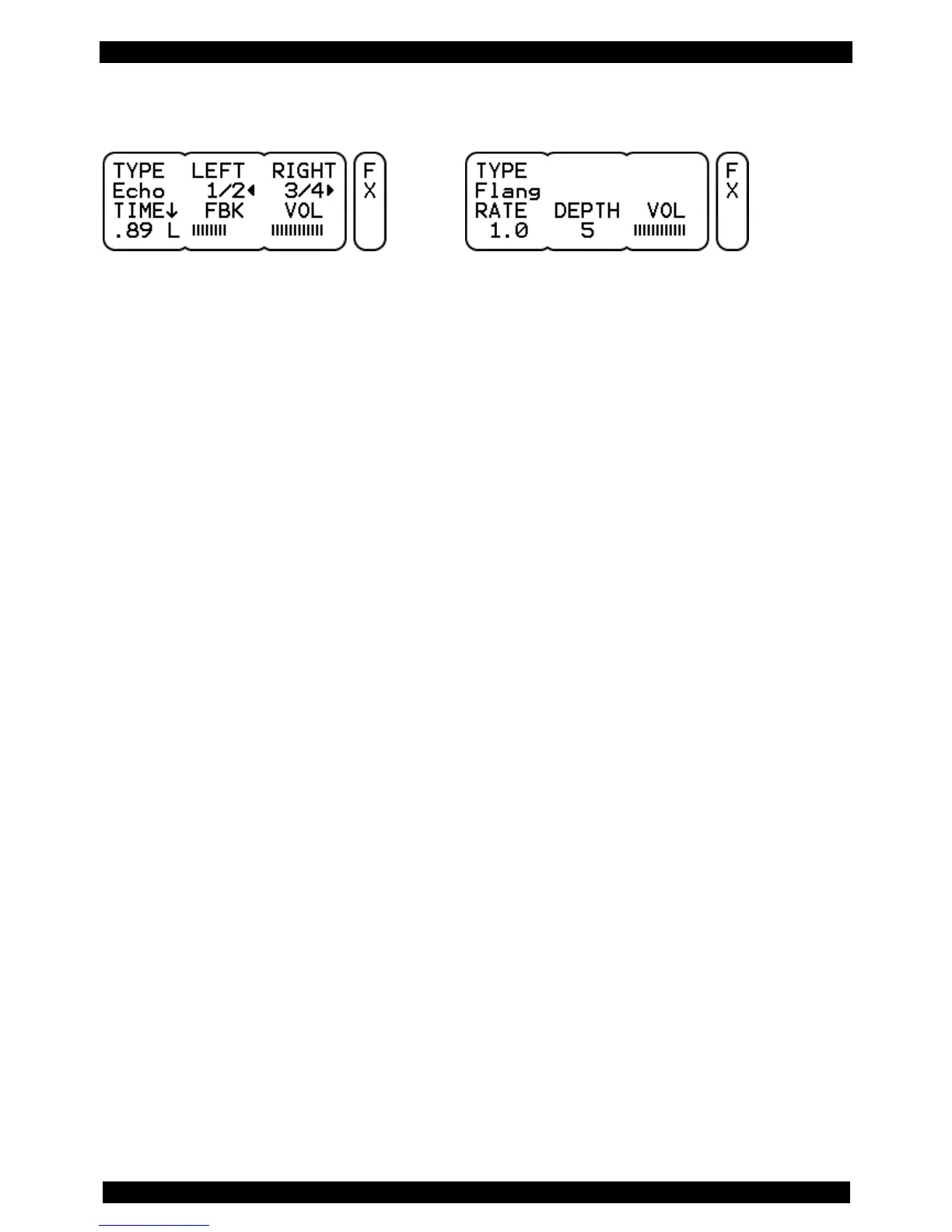
9.6 KIT – FX
Display view: TYPE Echo Display view: TYPE Flange
You have one internal effects section per KIT. This can be used by every single drum channel (see also
page 37).
TYPE Select here the type of effect you want. Delay and flanger are available.
VOL Adjust the level of the output volume of the entire effects section with the rotary control.
Please note that this signal is sent to the internal mixer and can be processed there,
too (see also page 45).
Functions for TYPE “Echo”:
LEFT Set here the delay time for an additional left channel delay signal. The setting is done
in fractions (like 1/2, 1/4, 3/4, etc.) of the overall delay time (TIME).
RIGHT Set here the delay time for an additional right channel delay signal. The setting is done
in fractions of the overall delay time (TIME).
Note:
If you set LEFT and RIGHT to the same value, the delay signal will sound in the center of the stereo
image.
TIME With TIME you set the overall delay time, between .01 (10 ms) and 1.0 (1 sec.). In
addition, it is possible to synchronize the delay reflections with the metronome tempo of
the KIT. To do this, set the value to Syn.
You can also specify where the delay signal will sound in the stereo image. Press the
left rotary control and choose from the following options: .80 C = signal in the center
.80 L = signal only on the left .80 R = signal only on the right side.
FBK With this parameter (feedback) you can set how often the delay signal is repeated.
With very short delay times, you can create in this way interesting sound effects.



 To Next Page