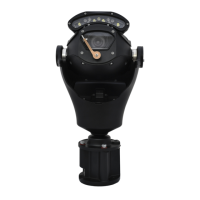
The document describes the 360 Vision Predator camera, a robust and versatile surveillance device designed for various outdoor applications. It covers installation, configuration, technical specifications, and maintenance.
Function Description:
The Predator is a pan-tilt-zoom (PTZ) camera system capable of being controlled via Coax Telemetry or Twisted Pair Telemetry (RS485). It offers advanced surveillance features including programmable tours, mimic patrols, privacy zones, and special presets for various lighting and operational conditions. The system can be equipped with different lamp configurations (No Lamps, Single Lamps, Dual Lamps, Thermal with Lamps, Thermal No Lamps) and can integrate with a washer function for lens cleaning. Alarm inputs allow the camera to react to external triggers by seeking specific presets or activating alarm outputs.
Important Technical Specifications:
- Imaging:
- Imager: 1/4" type Super-HAD CCD II
- Pixels: 976(H) x 582(V)
- Lines Resolution: 670
- Min Sensitivity:
- Colour: 0.4 Lux (18x, 28x), 0.6 Lux (44x)
- Mono Int: 0.01 Lux (all versions)
- Signal Noise Ratio: >50dB
- Zoom:
- Optical/Digital: Available in 18x, 28x, and 44x optical zoom versions, each with 12x digital zoom.
- View Angle (Horizontal):
- 18x: 2.8°(T) ~ 48°(W)
- 28x: 2.1°(T) ~ 55.8°(W)
- 44x: 1.6°(T) ~ 68.8°(W)
- Lens Size:
- 18x: 4.1 ~ 73.8mm
- 28x: 3.5 ~ 98mm
- 44x: 3.06 ~ 134mm
- Pan/Tilt Performance:
- Variable Pan Speed/Coverage: 0.1 ~ 120°/sec, 360° continuous rotation, absolute positioning.
- Variable Tilt Speed/Coverage: 0.1 ~ 120°/sec, 180° rotation, absolute positioning.
- Power: 24Vac/dc (with optional heater)
- Operating Temperature: -40°C ~ 60°C
- Certification: CE approval: IP68
- Dimensions (PSU Enclosure): 255 x 180 x 100mm
- Weight:
- Predator No Lamps: 7.5kg
- Predator Single Lamps: 8kg
- Predator Dual Lamps: 8.5kg
- Predator Single Lamps (Straight Arm): 8kg
- Predator Thermal with Lamps: 9kg
- Predator Thermal No Lamps: 9kg
- HMA Predator No Lamps: 9.5kg
- Wall Bracket: 1.2kg
- Corner Bracket: 2.2kg
- PMB Bracket: 2.5kg
- PMA Bracket: 1kg
Usage Features:
- Installation: Installation should be carried out by qualified personnel following local codes. Safety chains or lanyards are recommended to prevent detachment. Connections for data and power should use pre-made Predator Composite cables and 360 Vision Predator power supplies.
- Mounting Options: Various brackets are available, including Wall Bracket, Corner Bracket, PMB Bracket, and PMA Bracket, with detailed dimensional drawings provided for each. The Hinged Mount Adapter (HMA) is an integral option fitted during manufacturing, allowing for easier access to connectors.
- Connectivity:
- Composite Cable: Pre-made cables (3m, 10m, 25m, 40m) contain video coax, power, and data cables, connecting directly to the Predator's IP68 12-way connector.
- HMA Connections: For Predators with HMA, conventional cables are used for power, video (BNC Video 1 for camera, BNC Video 2 for thermal camera), and RS485 data.
- RS485 Data Wiring: Supports Star Wired configurations. Daisy Chain configuration is not supported as the RS485 circuit is terminated/end of line.
- Configuration (OSD):
- Accessed by defining/programming preset 6 or 95.
- Navigation via joystick (up, down, left, right, zoom in/out).
- PIN Numbers: Operators (360, 426, 180), Controllers (1379, 9731), Engineers (5498).
- Protocol/Address Setup: Configured using the 360 Predator utility software, a USB/RS485 cable (PRED-USB-485), and a laptop. Supported protocols include 360 Vision, Pelco P/D (various baud rates), Pelco Coaxitron, VCL, Ultrak, Forward Vision, and Molynx. RS485 address (1-128) is set via Dilswitches on the alarm card or washer control PCB.
- Tours: Up to four tours, each with 2 to 360 points. Each point defines a preset number, dwell time (1-100 seconds), and speed (1-100°/sec, 0 for max speed).
- Mimics: Up to four mimic tours can be programmed by recording manual movements, preset seeks, or delays.
- Presets: 360 presets available. Special presets (e.g., 64-112, 150-152, 240-249) control specific functions like illumination, wiper operation, de-fog, privacy zones, thermal camera settings, power on park, white light exclusion, and bright control.
- Home Function: Defines an action (goto preset, start preset, or mimic tour) after a period of inactivity.
- General Settings: Digital zoom, white balance, line lock, line phase, video gain/lift, WDR, sunshield, auto flip, proportional pan/tilt speed, freeze presets, OSD preset six, upright mount, aperture, attack detect, wiper rest/on time/permanent, FV text control, AF AI when PTZ, noise reduction, define preset, Pelco D response, Ultrak Cmd T/out, arms (canted/straight).
- Night Settings: Col/Mono level, mono on/off range, brightness, bright control, illumination type (IR, White Light), lamp intensity, camera (mono/colour), external lighting, aperture, noise reduction, low light focus, night presets.
- Lamps Settings: White lamps (on/off, when alarm, timeout), auto dimming, FV white lights, power on park, white exclusion.
- Shutter Settings: Fast shutter (speed), slow shutter (speed).
- Thermal Settings: Gain mode, gain control mode, intensity transform, dual addressing (for thermal cameras).
- Text Field Menu: Allows for custom text display on screen.
- Privacy Zone Menu: Define, seek, or remove privacy zones.
- Preset Mapping: Re-map functions (e.g., auto focus, wiper on, white light, lamp intensity) to presets.
- Washer Control: If equipped, the washer control unit is pre-programmed at manufacture. Address must be set via Dilswitch.
Maintenance Features:
- Care of Painted Surfaces: Regular cleaning (maximum three-month intervals) with warm, mild detergent is essential to preserve the powder coating. Abrasive cleaners or strong solvents must not be used. More frequent cleaning (e.g., monthly) is recommended in areas with concentrated atmospheric pollutants (marine, chemical, bird droppings). Any damage to the coating must be repaired immediately.
- Servicing: All servicing and repairs must be handled by 360 Vision Technology. The OSD includes "Power Reset" (reboots camera, no settings lost) and "Factory Reset" (reboots camera, all settings lost) options.
- Storage and Handling: Predators should be handled with care and not dropped. When in transit packaging, they should not be stacked more than two high. Storage should be in a dry, dust-free indoor environment between 1°C and 35°C, with non-condensing humidity. Short periods (max 24 hours) outside this range are acceptable for transport, but never outside the normal operating temperature range (-40°C to +60°C) during storage. The Predator should be clean and dry before installation.
- Warranty: The provided information and technical advice are given in good faith without warranty. The user is responsible for checking validity and suitability of products. All designs and specifications are subject to change without notice.

 Need help?
 General

 To Next Page