30 C
HAPTER
2: I
NSTALLING
THE
S
WITCH
If there is evidence of a problem, see “Solving Problems Indicated by
LEDs” on page 31.
Choosing the
Correct Cables
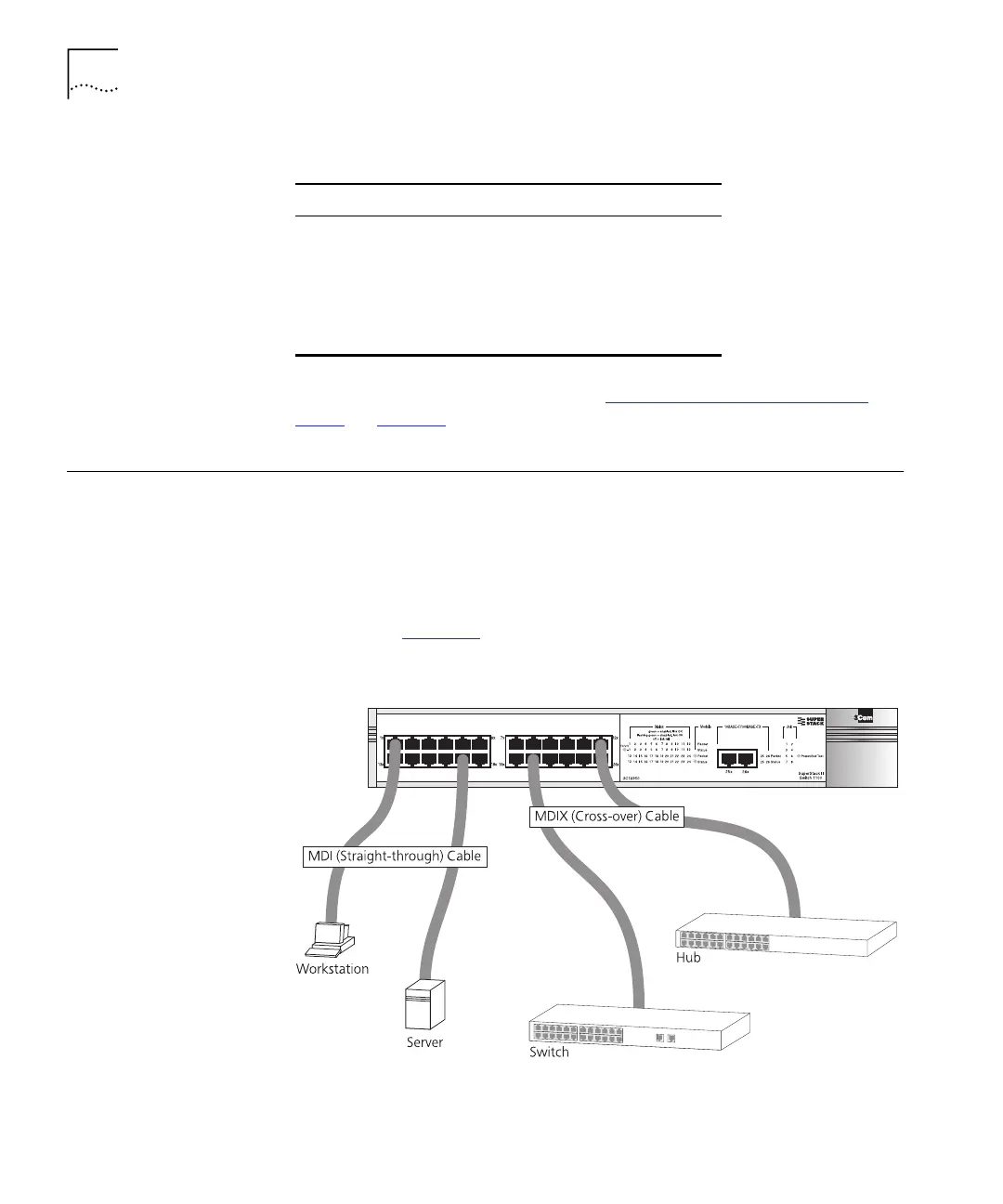
All of the ports on the front of the Switch 1100 are configured as MDIX
(cross-over). If you want to make a connection to another MDIX port, you
need a
cross-over
cable. Most of the 10BASE-T and 100BASE-TX ports on
3Com devices are MDIX-only. Many ports on workstations and servers are
configured as MDI (straight-through). If you want to make a connection
to an MDI port, you need to use a standard
straight-through
cable. This is
illustrated in Figure 10
.
Figure 10
Connecting other devices to the Switch 1100
Ta b le 4
LED colors
Color State
Green The Switch is powered-up and
operating normally
Yellow The Switch has failed its Power On Self
Test. This occurs if any of the ports fail
during power-up.
Off The Switch is not receiving power.
16950ua.bk Page 30 Thursday, April 29, 1999 1:28 PM






 To Next Page