60 CHAPTER 6: TROUBLESHOOTING AND DIAGNOSTICS
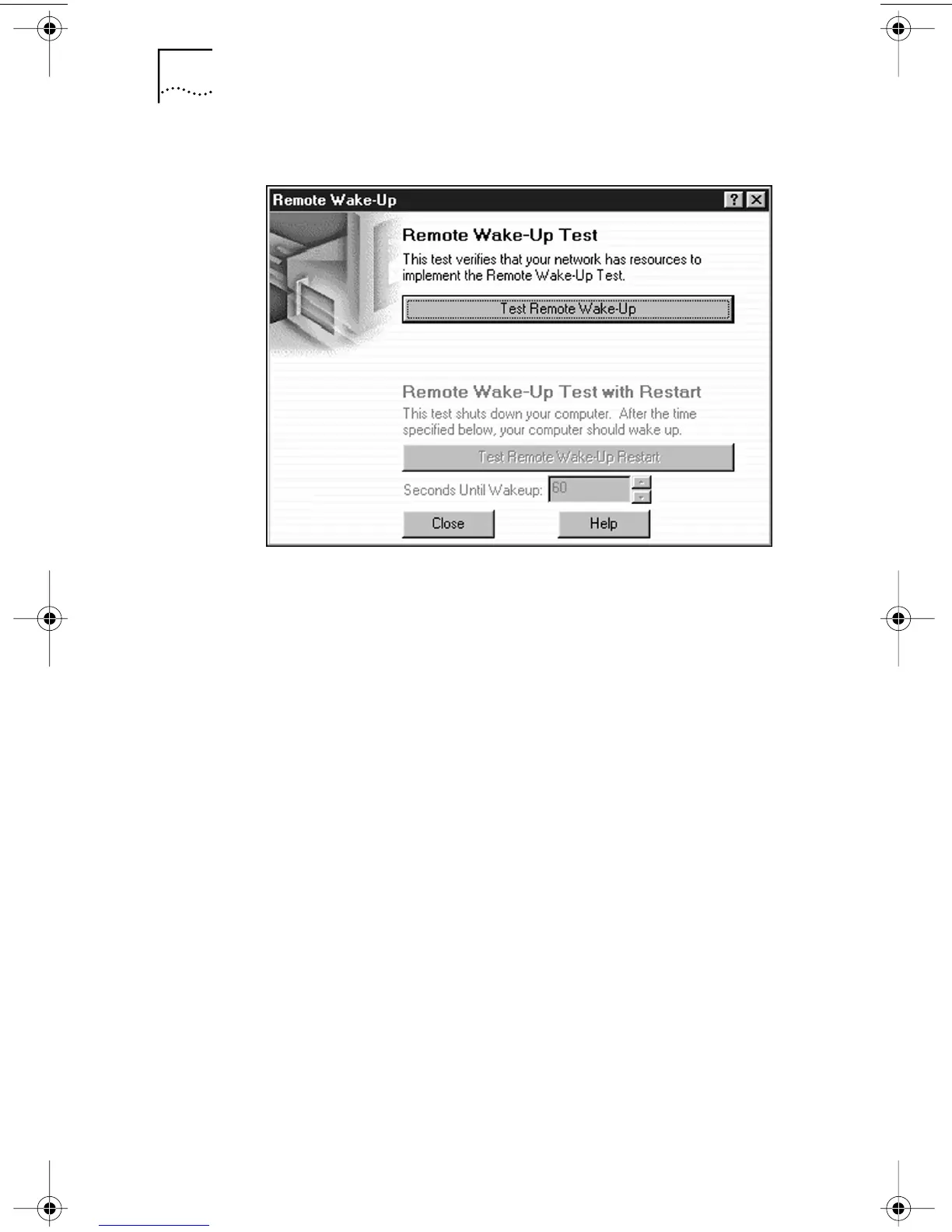
Figure 12 Remote Wake-Up Test Screen
b Click Test Remote Wake-Up to verify that another PC
exists on the network that has the EtherDisk 4.x or later
software Auto Echo feature enabled.
■ If the test passes, another PC with the Auto Echo
feature enabled was detected on the network.
■ If the test fails, another PC with the Auto Echo
feature enabled was not detected on the network.
You will not be able to run the Remote Wake-Up
Test (the Test Remote Wake-Up Restart button will
appear dimmed).
c Enter the number of seconds in the Seconds Until
Wakeup entry box that the PC remains shut down
until it receives a Wake-Up packet from the first PC.
d Click Test Remote Wake-Up Restart.
The PC shuts down.
■ If the PC automatically powers on after the number
of seconds specified in the Seconds Until Wakeup
entry box, Remote Wake-Up is functioning correctly.
■ If the PC does not power on, Remote Wake-Up is
not functioning. See the next section,
“Troubleshooting Remote Wake-Up,” for more help.
book Page 60 Monday, March 15, 1999 1:31 PM


 To Next Page