3DPlatform.com
16
Operating the 3DP Workbench
LCD Control Unit Operation
The 3DP Workbench printer can be operated
independently using the LCD Control Unit, located on the
front of the machine. There are three main functions of
the LCD Control Unit:
1. Prepare the printer for printing.
2. Manual control—both prior-to and during printing.
3. Starting a print from the SD card.
Use the button/knob combination to select and scroll
through the screen options.
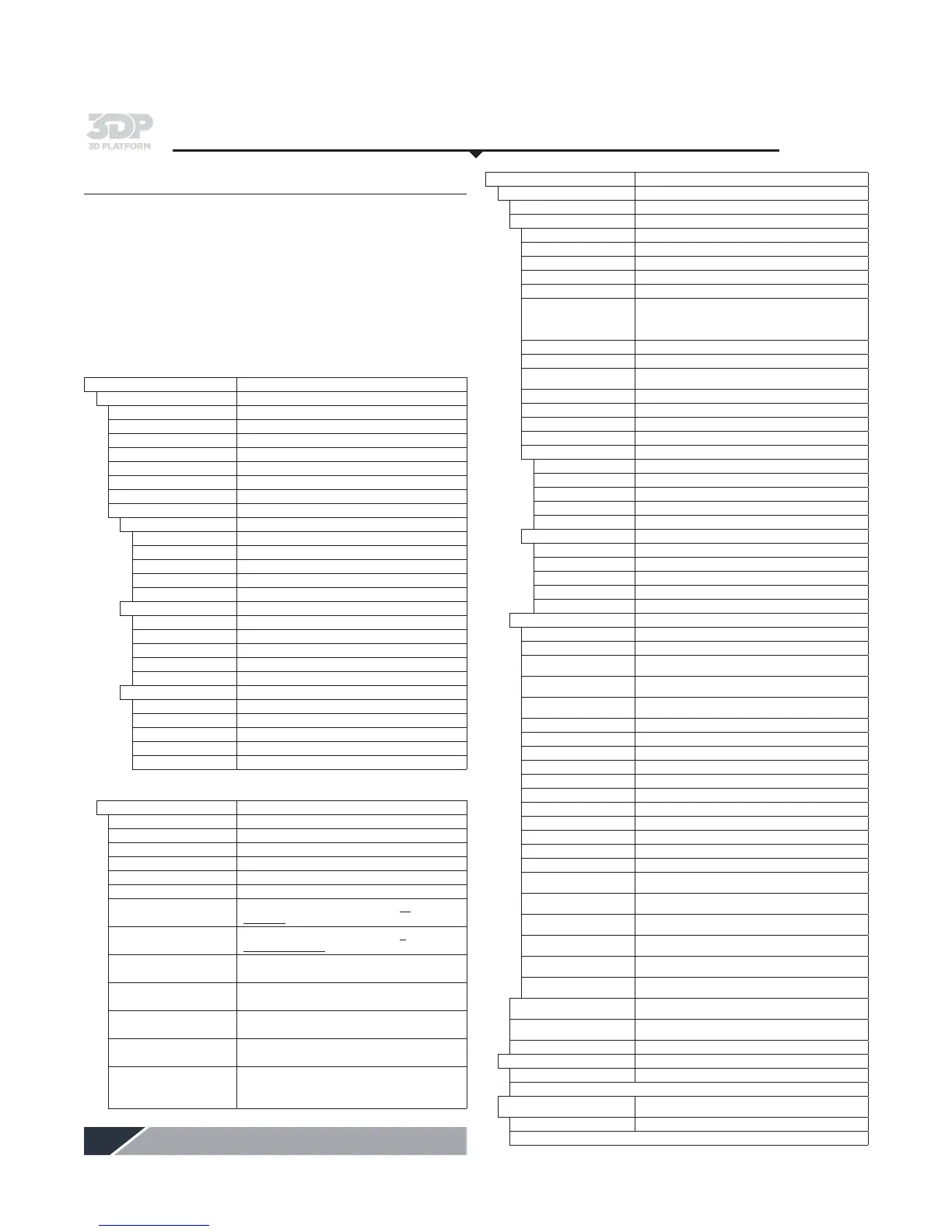
Info Screen
Displays printer information
Prepare
Opens Prepare menu
Main Returns to Main menu
Auto home Homes the machine to x0, y0, z0
Preheat PLA Preheats the extruder for PLA
Preheat ABS Preheats the extruder for ABS
Cooldown Turns off the extruder
Version Displays version of firmware on machine
Clear Babystep Clears babystep settings from memory
Move Axis Opens Move Axis menu
Move 10 mm Opens Move Axis 10 mm menu
Move Axis Returns to Move Axis
Move x Moves x axis in increments of 10 mm
Move y Moves y axis in increments of 10 mm
Move z Moves z axis in increments of 10 mm
Move extruder (2) Moves extruder in increments of 10 mm
Move 1 mm Opens Move Axis 1 mm menu
Move Axis Returns to Move Axis
Move x Moves x axis in increments of 1 mm
Move y Moves y axis in increments of 1 mm
Move z Moves z axis in increments of 1 mm
Move extruder (2) Moves extruder in increments of 1 mm
Move 0.1 mm Opens Move Axis 0.1 mm menu
Move Axis Returns to Move Axis
Move x Moves x axis in increments of 0.1 mm
Move y Moves y axis in increments of 0.1 mm
Move z Moves z axis in increments of 0.1 mm
Move extruder (2) Moves extruder in increments of 0.1 mm
Note: When printing, the Prepare menu is replaced with the Tune menu below.
Tune
Main Returns to Main menu
Speed: Speed of print—expressed in percentage
Nozzle 0 Temp Temperature of front extruder nozzle in °C
Nozzle 1 Temp Temperature of back extruder nozzle in °C
Bed Temp Temperature of the print bed in °C
Fan Speed Speed of fan range from 0-255
Flow
Sets extruder factor/multiplier for all
extruders—expressed in percentage
Flow 0/1
Sets extruder factor/multiplier for a
specified extruder—
expressed in percentage
Babystep X CW+
Jogs machine on the x axis .005 mm
per encoder click
Babystep Y CW+
Jogs machine on the y axis .005 mm
per encoder click
Babystep Z CW+
Jogs machine on the z axis .005 mm
per encoder click
Change Filament
Pauses printing. Moves extruder to X and Y
Home position so filament can be changed
Use Backup Ext On/Off
Toggle control for utilizing the secondary
extruder when filament runs out on the primary
extruder
Info Screen (continued)
Control
Opens Control menu
Main Returns to Main menu
Temperature Opens Temperature menu
Control Returns to Main menu
Nozzle 0 Temp Temperature of front extruder nozzle in °C
Nozzle 1 Temp Temperature of back extruder nozzle in °C
Bed Temp Temperature of the print bed in °C
Fan speed Sets of tunes speed of cooling fan
Autotemp
If enabled, the set temperature will vary between max
and min auto temp values based on the given factor
and the computed target temperature = autotemp_min +
factor
*
maximal extruder rate
extruder Min Minimum value in Autotemp
extruder Max Maximum value in Autotemp
extruder fact
Factor multiplied by maximal feedrate. Used to compute
dynamic temperature.
PID-P Extruder Potential Coefficient
PID-I Extruder Integral Coefficient
PID-D Extruder Derivative Coefficient
PID-C Heating power = Kc
*
e_speed, default = 1
Preheat PLA conf Opens Preheat PLA config menu
Temperature Returns to Temperature menu
Fan speed Sets the fan speed when preheating PLA
Nozzle Sets the nozzle temp when preheating PLA
Bed Temp Sets the bed temp when preheating PLA
Store memory Stores the Preheat PLA setting changes
Preheat ABS conf Opens Preheat ABS config menu
Temperature Returns to Temperature menu
Fan speed Sets the fan speed for preheating ABS
Nozzle Sets the nozzle temp when preheating ABS
Bed Temp Sets the bed temp when preheating ABS
Store memory Stores the Preheat ABS setting changes
Motion Opens Motion menu
Control Returns to Motion menu
Accel Absolute ceiling acceleration for all axes
Vxy-jerk
Limits the change in acceleration over time for the x and
y axis motors
Vz-jerk
Limits the change in acceleration over time for the z
axis motor
Ve-jerk
Limits the change in acceleration over time for the
extruder motor
Vmax x Maximum x axis velocity
Vmax y Maximum y axis velocity
Vmax z Maximum z axis velocity
Vmax e Maximum extruder velocity
Vmin Minimum velocity
VTrav min Minimum travel velocity
Amax x Maximum x acceleration
Amax y Maximum y acceleration
Amax z Maximum z acceleration
Amax e Maximum extruder acceleration
A-retract Maximum retract acceleration
Xsteps/mm
Number of steps required for the stepper motor to move
1 mm in the x direction
Ysteps/mm
Number of steps required for the stepper motor to move
1 mm in the y direction
Zsteps/mm
Number of steps required for the stepper motor to move
1 mm in the z direction
Esteps/mm
Number of steps required for the extruder stepper motor
to move filament 1 mm
T1X Offset
Sets the rear extruder's x axis offset
from the first one
T1Y Offset
Sets the rear extruder's y axis offset
from the first one
Store memory
Stores all changes to the non-volatile EEPROM memory
Load memory
Reads and uses all settings stored in the EEPROM
memory
Restore failsafe Restores all the default EEPROM data
Print from SD
Opens the .gcode files from SD card
Main Returns to the Main menu
(List of .gcode files from SD card)
Resume SD from Z
Opens the .gcode files from SD card and sets the current
Z height as the layer to resume printing
Main Returns to the Main menu
(List of .gcode files from SD card)


 To Next Page