Product Handbook
Product HandbookProduct Handbook
Product Handbook
EAP760 Enterprise Access Point ENGLISH
Copyright © 4IPNET, INC. All rights reserved.
11
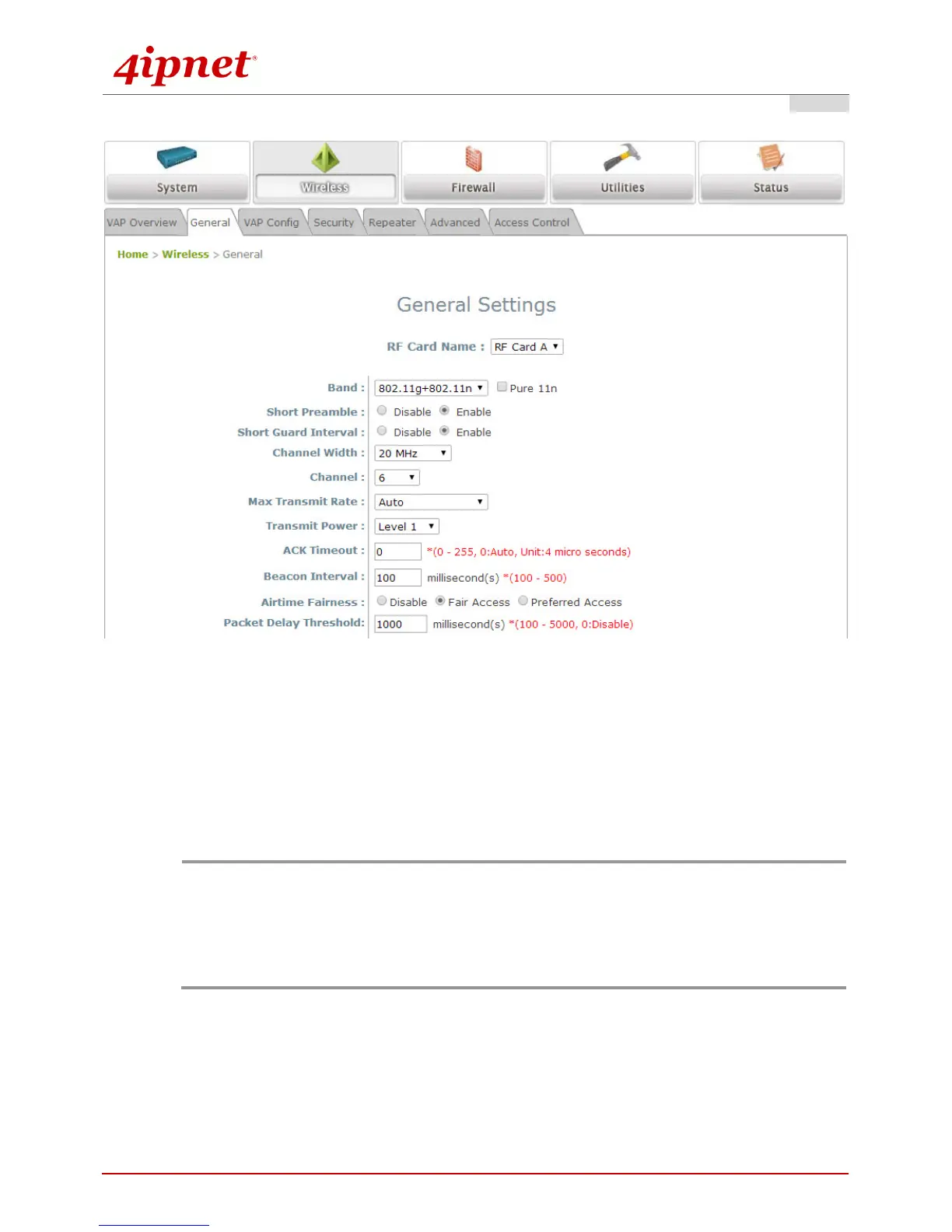
Step 2. Configure General AP (Access Point) Settings
Wireless General Settings Page
Click on the Wireless icon on the main menu, and then select the General tab.
Determine the Band and Channel settings:
Select your preferred Band and Channel for you wireless connection. For example, select
802.11g+802.11n for the band and 6 for the channel. For a detailed guide to configuration, please
refer to the EAP760 User Manual.
Note:
Admin should be aware of Dynamic Frequency Selection (DFS) mandated on some channels of the
5GHz band. When an EAP760 detects interference, this mechanism will limit the ability to broadcast
the SSID on one of the channels listed below:
1) Country Code: 840 (US)
DFS Channels: 52 56 60 64 100 104 108 112 116 120 124 128 132 136 140
2) Country Code: 250 (EU)
DFS Channels: 52 56 60 64



 To Next Page