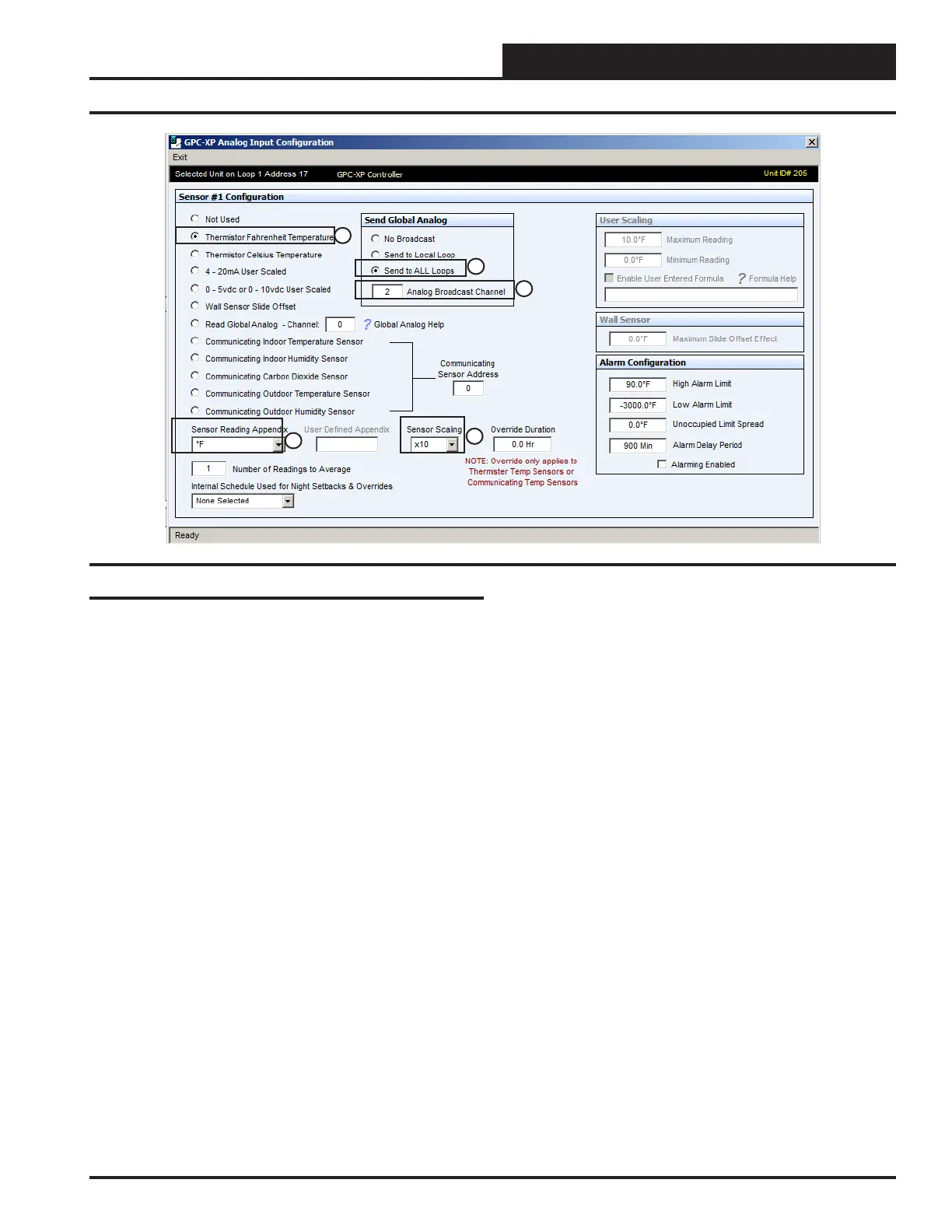
Analog Input #1
This is the input conguration screen that would be congured for the
Outdoor Air Temperature sensor (“OSA Temp”) on Analog Input #1
(AIN1).
This is a required sensor in all Central Plant Controller applications.
Also either a Supply Water or Return Water Temperature Sensor is al-
ways required as well as either a Differential Pressure Transducer or a
Differential Pressure Switch. All other inputs may or may not be needed
for your specic application.
Item #1 in Figure 10 indicates the Outdoor Air Temperature sensor is
congured for a thermistor type sensor with a Fahrenheit output. This
could also be congured for a thermistor type sensor with a Celsius
output if you desire by selecting that option instead. In addition you may
have a sensor that uses one of the other options listed. No matter what
type of signal your sensor has, be sure to set the jumper on the GPC-XP
controller board‘s Analog Input being congured for the correct sensor
signal you are using.
In this example Item #2 indicates that the sensor reading will be shown
in degrees Fahrenheit on the status screen. You may also set this to
Celsius if desired.
Figure 10: AIN1 Sensor Screen
1
2
3
4
5
Item #3 indicates the Sensor Scaling has been congured to “10” which
will show tenths of a degree on the screen. So at a 74.51 degrees actual
temperature signal from the sensor the screen would show 74.5 degrees.
If the scaling factor is set to “1” the screen would show 74 degrees
from the same sensor signal. If it is set to “100” for the same signal
it would show 74.51. Congure this typically as either “1” or “10” as
one hundredth of a degree is beyond the accuracy of most thermistor
sensors anyway.
Item #4 is the “Send Global Analog” setting. In this case if you are us-
ing the Auto-Zone 2 controllers for the WSHP units on your controls
system and you have a single loop communications system you would
broadcast the Outdoor Air Temperature to the other units on the local
loop by selecting “Send to Local Loop” as shown. If you have a multiple
loop communications system you would set this to “Send to ALL Loops”
as shown in the example.
Item #5 is the Analog Broadcast Channel selection box. In this case it
should be set to “2”.
Conguring the Controller
Conguration
15
WSHP Loop Controller GPC-XP Guide



 To Next Page