Conguring the Controller
Conguration
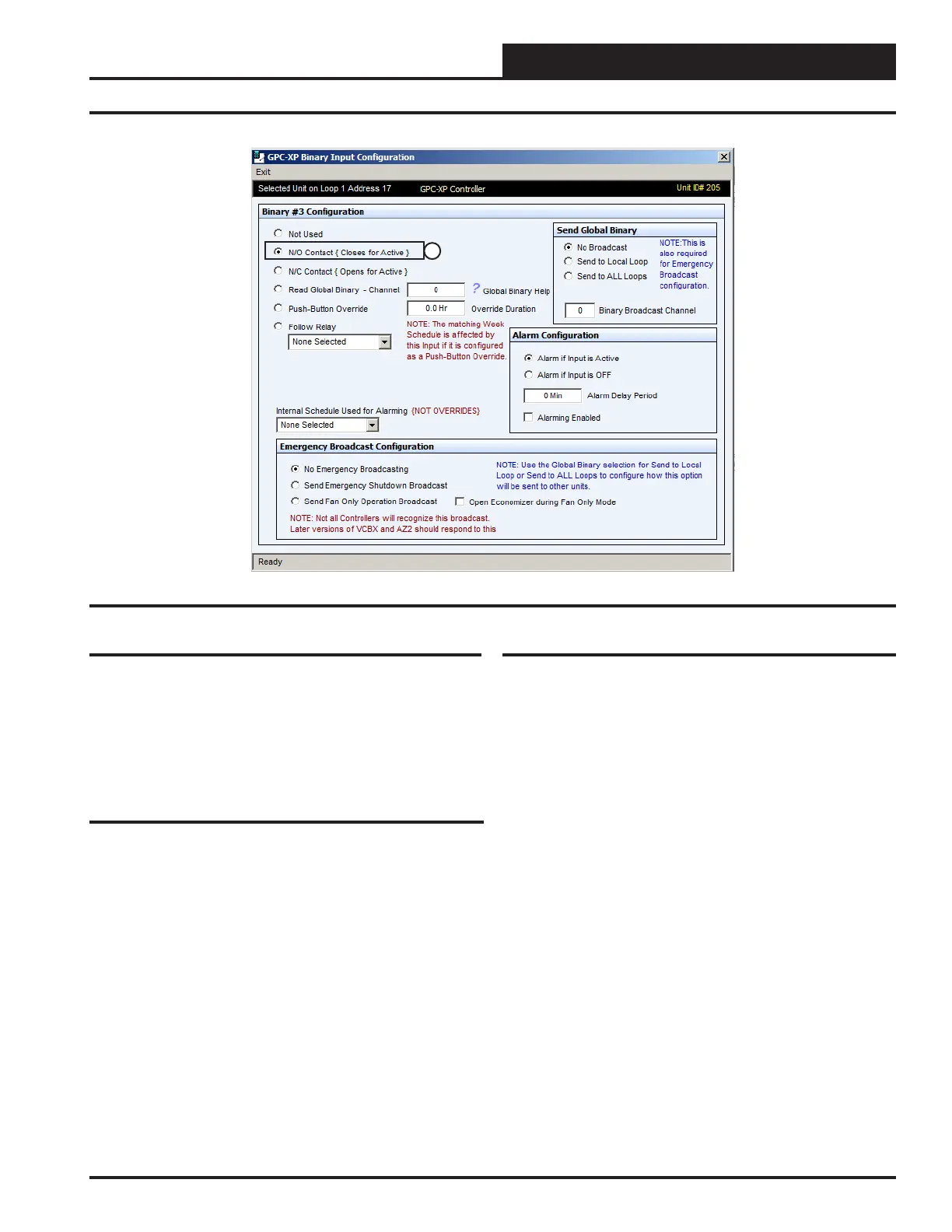
Figure 19: BIN3 Input Screen
1
Binary Input #1
In this example this is the input conguration screen for “Request To
Run” on Binary Input #1 (BIN1). Item #1 in Figure 17 indicates the
“Request To Run” input is congured for a normally open contact.
In this conguration the water loop would be enabled and allowed to
operate based on its other inputs, schedules and temperature setpoints.
This could be a signal from the heat pump controller (by others) or could
be congured to be a Global Binary Input from the AZ 2 Controllers
(when used).
Binary Input #2
In this example this is the input conguration screen for “System POF”
on Binary Input #2 (BIN2). Item #1 in Figure 18 indicates the “System
Proof Of Flow” input is congured for a normally open contact. In this
conguration it indicates the system pump is running and producing
water ow when this contact is activated. This could be from a water
ow switch or a current switch on the system pump motor.
Binary Input #3
IIn this example this is the input conguration screen for “Spray Pump
POF” on Binary Input #3 (BIN3). Item #1 in Figure 19 indicates the
“Spray Pump Proof Of Flow” input is congured for a normally open
contact. In this conguration indicates the tower pump is running and
producing water ow when this contact is activated. This could be from
a water ow switch or a current switch on the tower fan pump motor.
21
WSHP Loop Controller GPC-XP Guide



 To Next Page