VETSCAN SA USER’S MANUAL v 1.1 SOFTWARE |
39
Appendix C: UA Installation
A VETSCAN UA analyzer may be connected to the VETSCAN SA to produce a full urinalysis
report. The SA analyzer becomes the urinalysis workstation where all data entry will take place
and sample runs initiated.
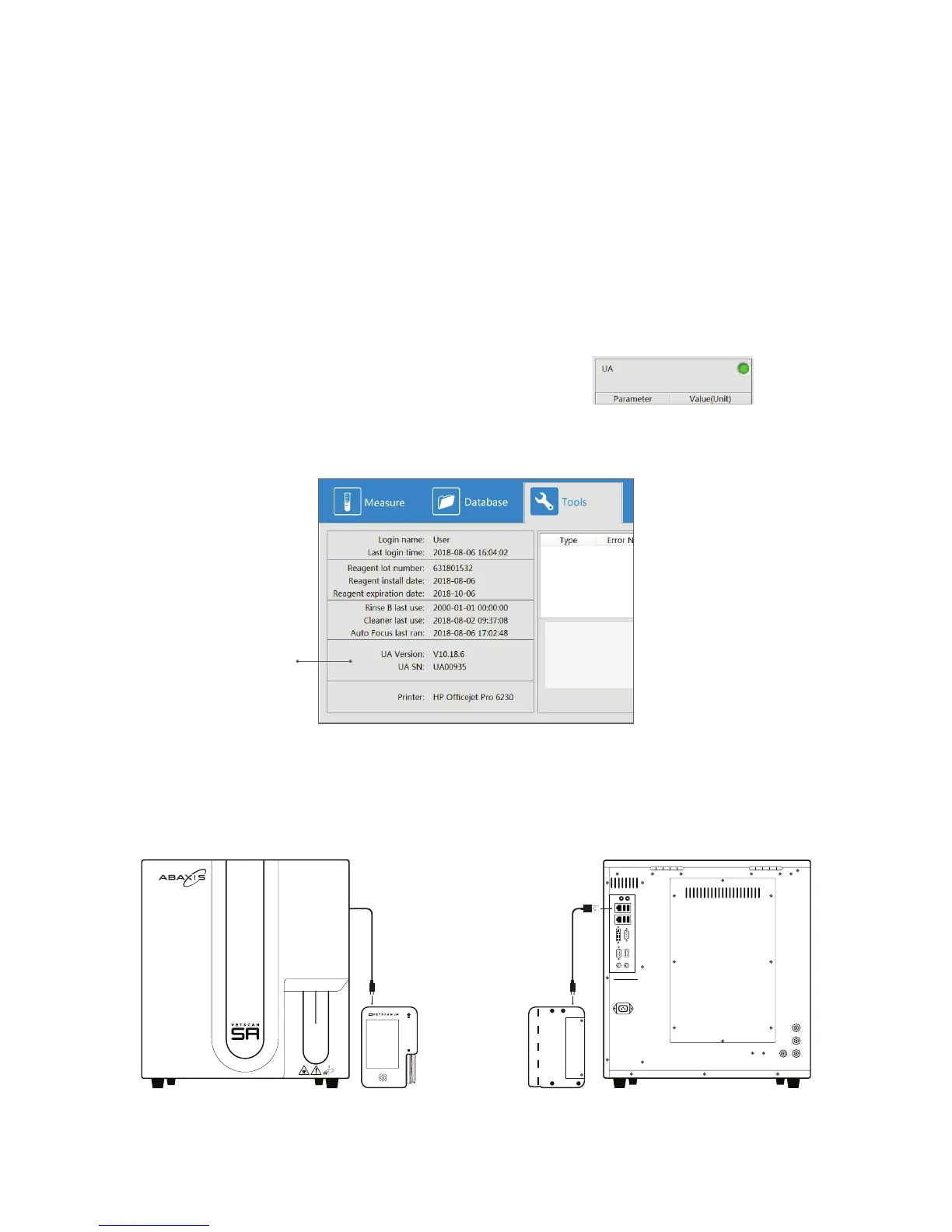
To connect the UA to the SA, use the UA Y Cable provided with the UA analyzer:
1. Power on the SA analyzer.
2. Plug the USB Standard A end of Y Cable into a USB port on the back of the SA. Do not
connect the USB power charger to the third leg of the Y-cable. UA power is provided from
the SA.
3. Plug the micro USB end of Y Cable into the UA.
4. Power on the UA analyzer.
On the SA screen, the UA status indicator light (top right of the
UA Results Panel) will turn green if connection is successful.
Also, by clicking on the Tools selection from the top menu, you can verify software and SN of
connected UA.
While the UA is connected to the SA, it will no longer be able to print results on the portable UA
printer.
SN of connected UA
DETERGENT - A
DETERGENT - B
WASTESENSOR
Urine Anal yzer
micro USB micro USB
USB



 To Next Page