Installation
26
Mounting the HMI The HMI can be mounted separately from the Arc Monitor or an extra HMI
can be added to the Arc Monitor and mounted sparately.
Mounting the HMI
on door
Follow this procedure to mount the HMI module, separately on the door.
Warning!
Make sure that supply voltage is switched off!
Before mounting:
1. drill a 25 mm (1 inch) hole through the door.
Note!
It is important to use the cable which is included in the package!
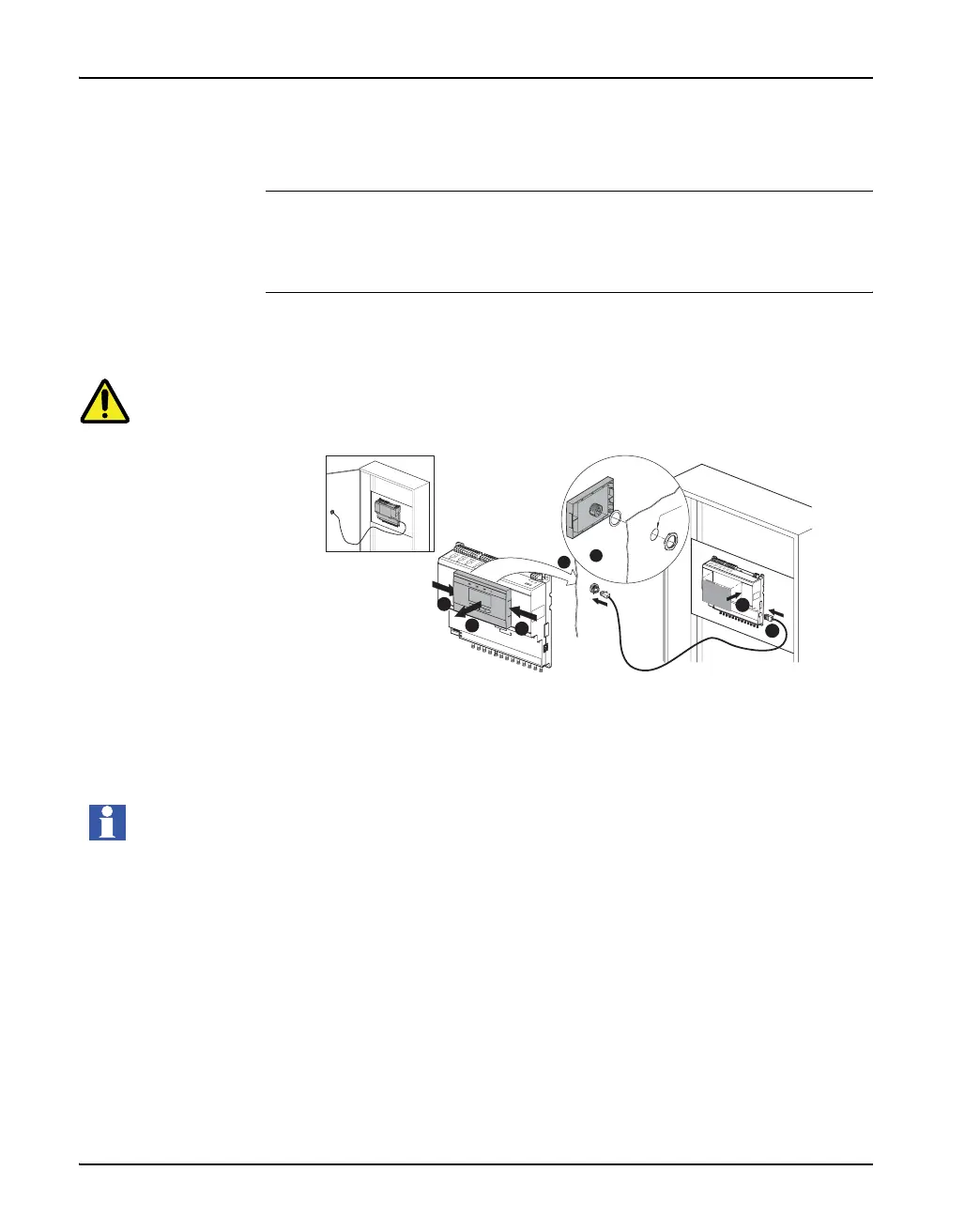
To mount the HMI on a door do the following steps:
2. Remove the HMI module from the Arc Monitor by pressing on both sides on
HMI and at the same time,
3. Pull straight out from the Arc Monitor.
4. Add the sealing on the HMI.
• Mount the HMI on front door.
• Insert the back side of module into the door hole.
• Tighten the plastic nut by hand. Make sure the HMI is fixed to the door.
5. Connect the communication cable between the HMI module back side and
Arc Monitor right hand side.
6. Attach the label to cover HMI module hole on the Arc Monitor front if needed.
1
1
2
6
5
4
3
Ø25,5


 To Next Page