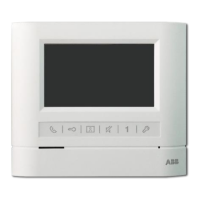
Inside structure
On the following condition, we can choose to cancel all the original message:
(l)The
quantity
ofthe
ID cards are too
many
for a system(full enough).
(2)Some original ID cards were loss or damaged, which can't be logout.
(3)When you like to cancel all the original ID cards.
CM-06DNRL
::~:m
m
:
m
m~~~
:::
@
CM-06DNRV
T Video
Indoor
Phone(hand-free)
D
NO
DEL
c:::::J:'5J
Short circuiton NO
Pin
Short
circuit
NO
DEL
[g::::]
Short circuit on
DEL
4.Se
tti
ng
the
unlock
time(!
second
or
5 second): Open the
back
cover and inner cover(see the
attached picture). On the JB1, there are 1 second and 5 second for selection. Turn the pin cap
to different size can select the unlock time.
Inside structure
18 58
c:::::J:'5J
1 second
for selection
Pin short circuit
18 58
[g::::]
5 second
for selection
~CD
Di
s
p
l
a
y
IDisplays visitor's image
~
@Loudspeaker
Indoor phone voice comes out
fromhere
~
®Monitor
Button
IPress this button to survey entranceI
~
@UnlockButton
During conversation press
it
to
unlock
~
®Talk
Indicator
IPress "Talk" button,light on or
off
l
~
@)Brightness
Adjust
IAdjust brightness
~
@ContrastAdjust
IAdjust contrast
~
@Ring
Volume
Adjuster
IAdjust the ring volume
5.Volume
adjust:
Open the
back
cover and the inner cover( see the attached picture) ;
~
®Call
Button
Press this button for internal
broadcasting call
~
@Talk
Volume
Adjuster
IAdjust the conversation volume
M-----
~
I
G G
MIC
SPK
~
®SiIence
Button
While there is noisy at the door
station, press it to keep visitor's
voice only.
~
(1)Ring Beils
Adjuster
Three melody are optional
(not for ding-dong ring)
I[
~]I
Inside structure
MIC: Adjust the volume
ofMIC
SPK: Adjust the volume
of
SPK
~
CVTaik
Button
Press the button can talk with the
calling side
~
@Power
Indicator
IPower works while it is on
~
@Movable
Cover
IMovable, usage inside
~
@Microphone
ITalk to door station


 To Next Page
 Loading...