ESP630 Product Manual
1KHW02104 /Ed01a page 15 of 29 ABB
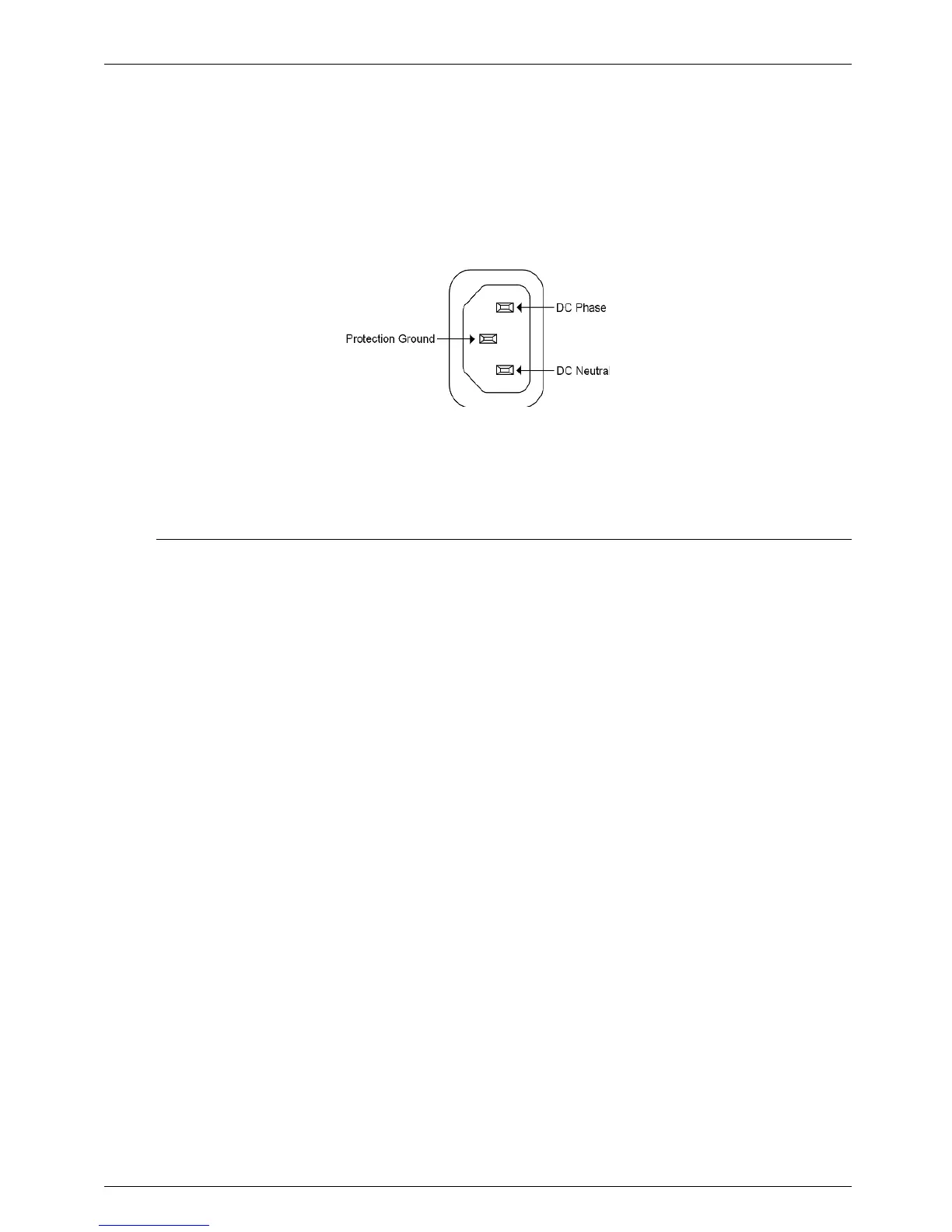
If DC power is used, the power cable should be cut close to the AC sockets connection plug and con
nected in a way that the socket central pin corresponds to ground protection and the other 2 pins supply
the power, as seen in the next Figure. The equipment shelf is connected directly to protection ground.
Fig. 2-3. AC/DC Power Supply Connector
2.6 Installing/Removing a A2/A3 version Hot-Swap
Power Unit
The ESP630 A2/A3 versions are able to work with one or two Hot-Swap Power Units. Follow the next
instructions to install or remove a Power Unit:
Installing a Power Unit:
1. Use a Phillips screwdriver to remove the screws that attach the protection panel of the Power Unit’s
site (if present).
2. Insert the RPU into the slot and slide it through the track. Press it firmly to ensure it is properly placed.
3. Use your hand to attach the two silver plated screws placed on the Power Unit’s panel to secure it on
its slot.
Removing a Power Unit:
1. Use your hand to detach the two silver plated screws placed on the Power Unit’s panel.
2. Pull the RPU, using the screws as knobs, and remove it outside the slot.
3. If no other Power Unit is to be put into the same slot, attach the protection panel (if you have one)
using a Phillips screwdriver.



 To Next Page