ESP630 Product Manual
1KHW02104 /Ed01a page 16 of 29 ABB
3 Making Connections
3.1 Connecting Devices through RJ-45 Ports
The ESP630 can be connected to 10, 100 or 1000 Mbps devices. Its ports accept automatic
MDI/MDI-X configuration, so either crosses or straight cables can be used.
Use Unshielded Twisted-Pair (UTP) or Shielded Twisted-Pair (STP) cables with RJ-45 connectors. Con-
nect one end of the cable directly into the switch port and the other end into the networking device.
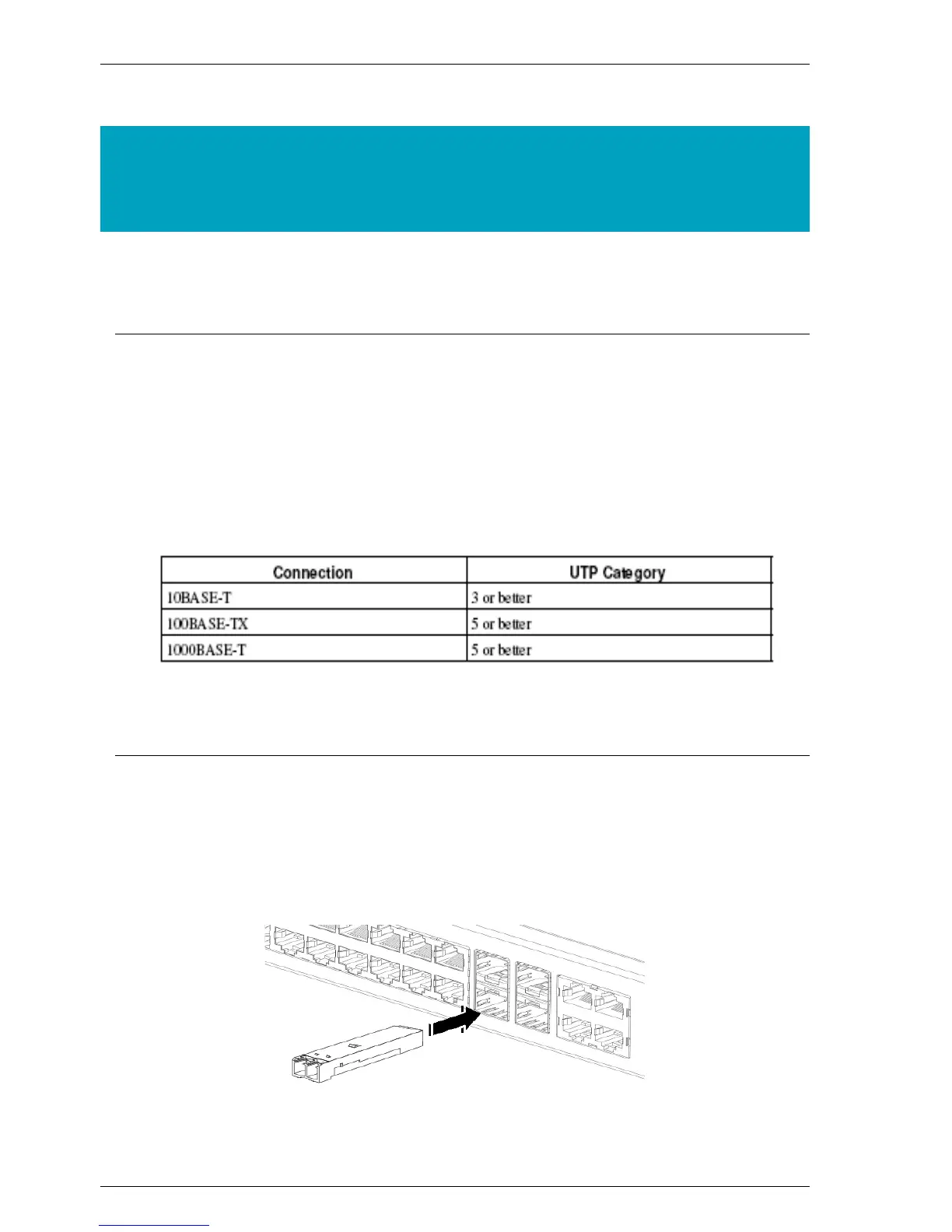
Check the table bellows to make sure the cables you are using in your network are the correct ones.
Table 3-1. Cable Category:
3.2 Connecting a SFP Module
The use of a SFP transceiver is optional. It is not included in the package. Follow the next instructions to
install a SFP module properly:
Fig. 3-1. SFP Module Installation



 To Next Page