ESP630 Product Manual
1KHW002104 / Ed01a page 14 of 29 ABB
2.4 Installing the Switch in a Rack
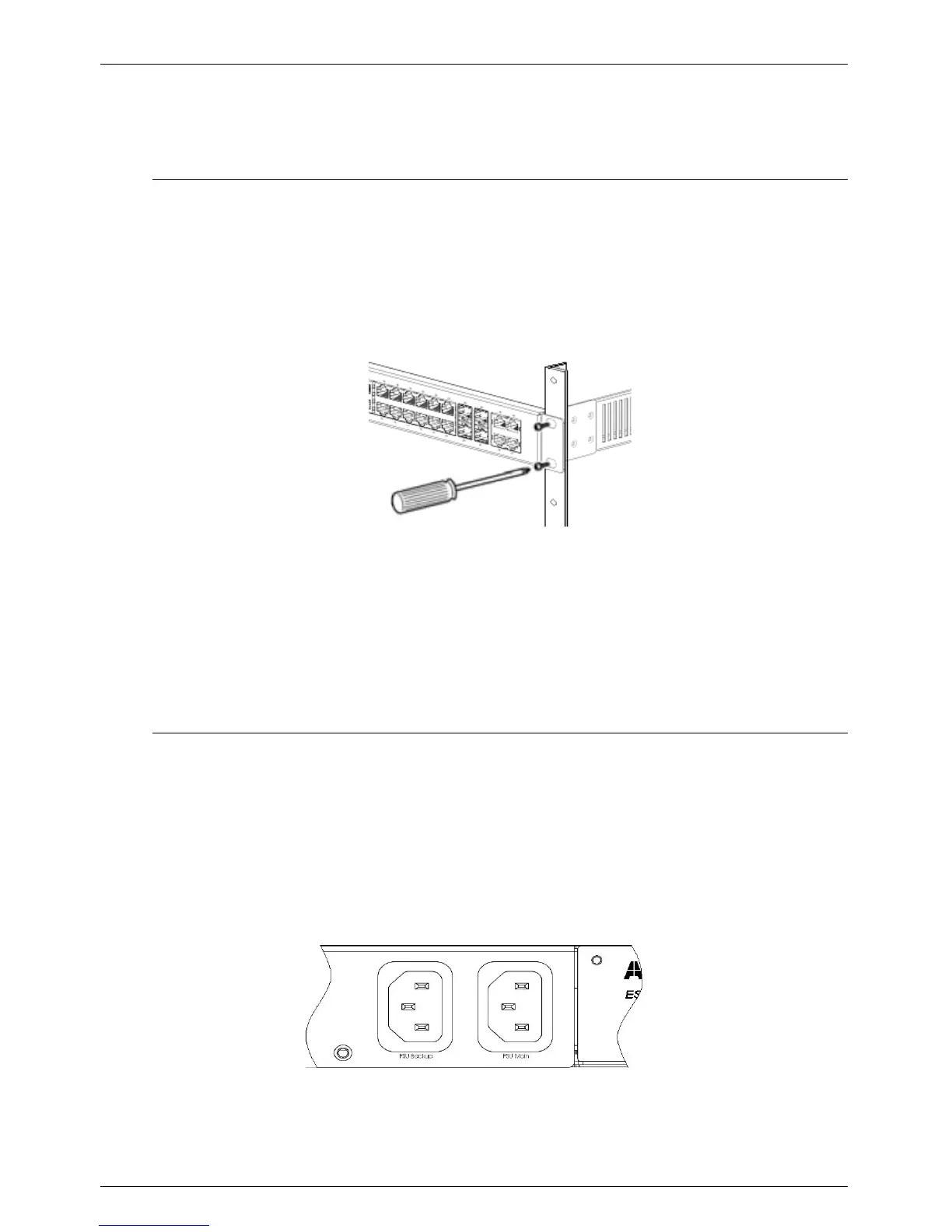
The switch can be installed in a 19" rack. The brackets used to fix the device already come attached to the
switch. To install the switch in a rack, use the following procedure and refer to the figure below:
Fig. 2-1. Rack Mounting
1. Place the switch in the rack.
2. Insert two screws (not provided) on each bracket to secure the switch in the rack.
2.5 Powering the Switch
After installing the switch, plug one end of an IEC-320 standard power cable into the AC receptacle lo-
cated at the rear panel of the switch and the other end into the local power source outlet. The Power LED
should light, indicating the switch is correctly powered.
The ESP630 A2 has two AC/DC power connectors at the rear panel, one for each power source. If you
are using both redundant power units, use two power cables to connect them.
Fig. 2-2. ESP630 A2 Power Connectors



 To Next Page