Operation Manual / 4 Product description / A130-H.. - A140-H
8 Dismantling and fitting / 8.6 Removing the compressor casing
© Copyright 2017 ABB. All rights reserved. HZTL4030_EN Revision D May 2017
8.6 Removing the compressor casing
Removing the compressor casing
u Mark the casing position for assembly.
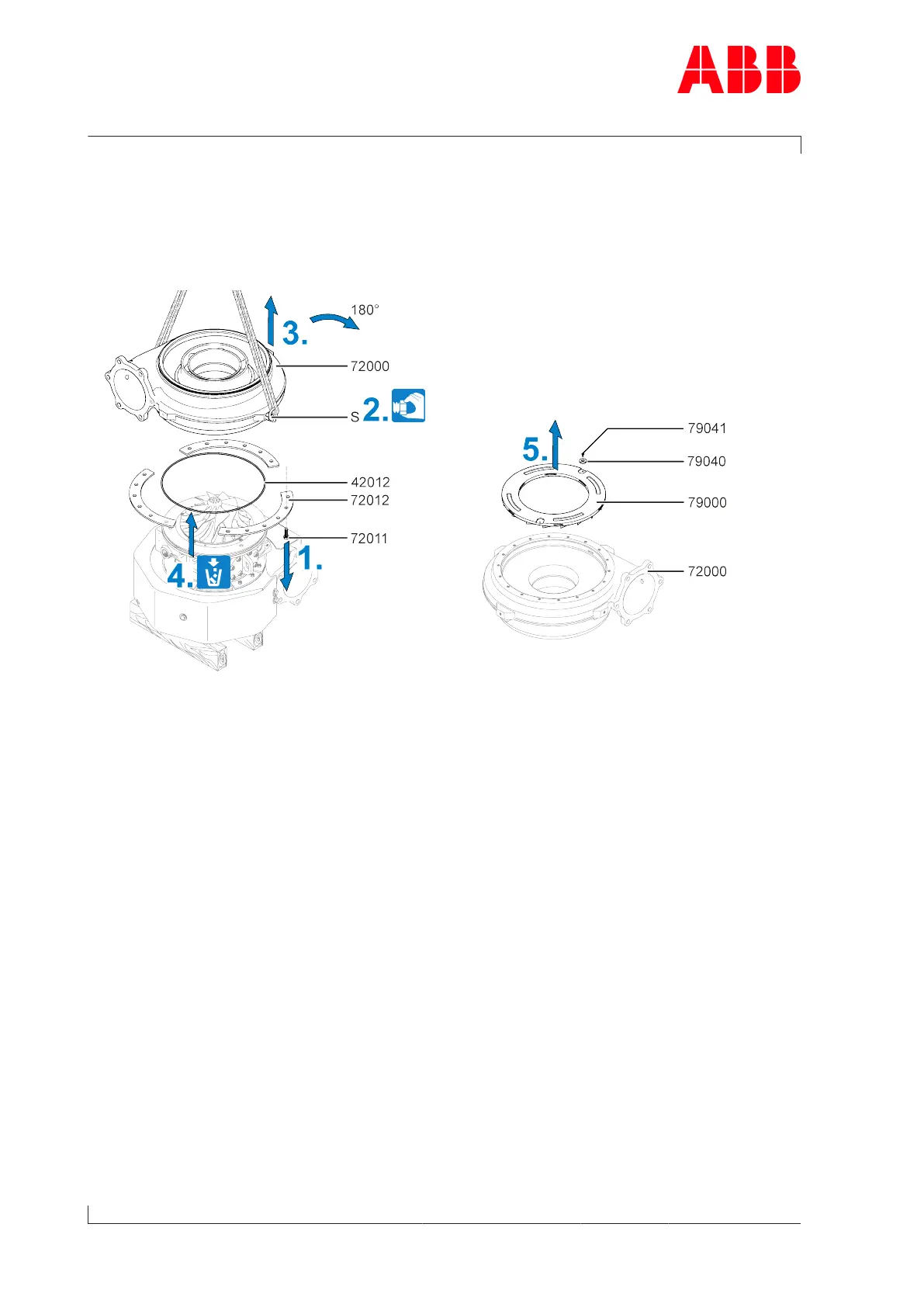
Fig.30: Removing the compressor casing
1. Loosen screws(72011) and remove together with fastening strips(72012).
2. Attach swivel lifting eye (S) to the compressor casing and the lifting gear.
3. Remove the compressor casing (72000) and turn it 180°.
4. Remove and dispose of the O-ring (42012).
5. Loosen screws (79041) and remove from the compressor casing (72000) with fixing discs
(79040) and diffuser (79000).
If the compressor casing cannot be loosened, it can be pressed off against the turbine cas-
ing using the press-off tool (90042) (see chapter Pressing off the casing →66).
Page 64 / 91



 To Next Page